Showing posts with label in. Show all posts
Showing posts with label in. Show all posts
Friday, November 4, 2016
Tecno R7 Specs and Price in Nigeria
Tecno R7 Specs and Price in Nigeria
Tecno R7 Review, Specs and Price in Nigeria
Great specs for fast performance and affordable prices of Tecno devices like the Tecno R7 makes them trend in Africa, especially in countries like Ghana, Kenya, as well as Nigeria. The Tecno R7 with its loaded features is an upgrade from Tecno D7 and is better than the later in terms of design, build and features. Known as the first Tecno hexa-core (6 processors) and android smartphone with HD display, the Tecno R7 is a high performance smartphone with great sound and display.
Where to Buy Tecno M5
JUMIA FROM ?32,000 BUY NOW
 |
| Tecno R7 |
Also Read: Tecno M5 Specs and Price in Nigeria
Tecno Phantom Z Specs and Price - Nigeria
Samsung Galaxy Note 4 Specs and Price
Overview Features
Display and Build
For its display, the Tecno R7 sports a 5.5 inch HD Gorilla Glass which is 1280 by 720 pixels resolution and this resolution is equal to the sharpness on the Samsung Galaxy Note 2. The Gorilla Glass makes the screen tougher and protects it against scratches hence, using a screen guard on this device is not necessary. This display almost puts the Tecno R7 in the league of major high end devices like the Samsung Galaxy S5 and places it on the larger end of smartphone screens.This android phablet has a slim body of 158mm tall, 78.5mm wide and, 8.4 mm thick. With its stylish and sleek design, it is probably the slimmest phone released by the Chinese company, Tecno. The Tecno R7 is a dual sim smartphone and the dual sim works on standby mode, meaning that when none of the SIMs are in use, then both SIMs will be active, but when a particular SIM is in use, the other SIM becomes inactive.
Although it might be difficult to operate the Tecno R7 with one hand due to its large display screen, Its light weight makes it easy to hold, easily slide into a pocket and carry around. It also has a plastic back cover and comes with a flip case cover.
Processor and OS
Tecno R7 features a 1.5GHz 6-Core Processor which tends to load apps and games faster with support for multi-tasking. This processor ensures maximum performance and power efficiency in the Tecno R7.It runs on Android 4.2 (JellyBean) OS, has a RAM size of 2GB capable of eliminating frequent lagging or hanging of running apps/games and gives it a significant performance boost over most mid-range phones. A 16GB in-built memory storage which can be expanded up to 32GB with a microSD card is included on this device.
Camera
It sports a 5.0MP BSI Front- facing camera for taking selfies with great quality and a 13MP BSI rear camera that offers up to 4128x3096 pixels resolution pictures. The BSI (Backside Illumination) on both cameras improves their performance in low light. With the inclusion of features like geo-tagging, auto focus, face detection, ability to capture 1080p high definition video, LED flash and at a megapixel of 13, one should expect pictures and videos of high quality from its rear camera.Battery and Connectivity
The battery capacity on the Tecno R7 is 2430mAH and this is above the average battery capacity for a smartphone. The battery is capable of supporting up to 500 hours of standby time and 6 hours of talk time. Theres also a free 5200mAh power bank to support this device. Now you can chat all day and play sophisticated android games without worrying about draining your battery. The long lasting battery, power bank and power saving mode feature on the R7 helps you preserve the battery. Connectivity features on the Tecno R7 also include support for bluetooth, WIFI and, GPRS.Tecno R7 Specifications
Body | |
Dimensions | 158 x 78.5 x 8.4mm |
| Keyboard | Touchscreen |
| Colors | White, Black, Yellow |
| Cover | Plastic |
Display | |
| Type | Capacitive touchscreen with 16,000,000 colors |
| Size | 5.5 inches, 720 x 1280 pixels, 267 pixels per inch (PPI) |
Memory And OS | |
| Card slot | MicroSD, up to 32GB |
| Internal | 16GB |
| OS | Android 4.2.2 Jelly Bean |
| Processors | 1.5GHz hexa-core CPU, MediaTek MT6589 chipset |
| RAM | 2GB |
Camera | |
| Primary | 13MP, up to 4128×3096-pixel pictures, Geo-tagging, auto focus, face detection camera with LED flash |
| Video | 1080p@60fps |
| Secondary | 5MP up to 2592×1944 pixel pictures |
Connectivity | |
| 2G | GPRS – up to 85.6 kbps; EDGE – up to 236.8 kbps |
| 3G | Up to 22.2 mbps downlink; Up to 5.76 mbps uplink |
| 4G | No |
| WIFI | Wi-Fi 802.11 b/g/n, WIFI hotspot, WIFI direct, dual-band |
| Bluetooth | Version 3.0 |
| GPS | A-GPS |
| NFC | No |
| USB | MicroUSB v2.0 |
| 2G Network | GSM 900 / 1800 |
| 3G Network | HSDPA 850 / 1900 |
| 4G Network | No |
| SIM | Dual mini SIM |
| Status | Available April 2014 |
Battery | |
| Capacity | 2430mAh Li-Ion battery |
| Stand-by | N/a |
| Talk time | N/a |
| Music play | N/a |
Others | |
| Sensors | Accelerometer, Compass, Ambient light sensor |
| Messaging | SMS, MMS, Email, Push Mail, IM |
| Browser | HTML5 |
| Java | No |
Google Talk, Facebook, Whatsapp |
Also Read: Samsung Galaxy J5 Specs and Price
HTC Desire 626s US Edition Specs & Price
Pricing and Availability
The Tecno R7 is currently available in Nigeria and other countries like Uganda, Kenya and Ghana. At the time of this post, the price of Tecno R7 in Nigeria ranges from ?32,000 to ?48,000 depending on your location in the country.
Where to Buy Tecno M5
JUMIA FROM ?32,000 BUY NOW
Go to link download

Thursday, November 3, 2016
Resolve CommentLuv Could Not Find A Feed of the Blog In Blogger
Resolve CommentLuv Could Not Find A Feed of the Blog In Blogger
For blogger blogs encountering the error message "RSS Error: A feed could not be found at (put your RSS feed URL here). A feed with an invalid mime type may fall victim to this error, or SimplePie was unable to auto-discover it.. Use force_feed() if you are certain this URL is a real feed" while commenting of commentluv enabled blogs, in this post youll get to know how to rectify this problem. After inserting your URL in the required field and ticking the commentluv option, if theres no RSS feed URL in your template, youll encounter this error. If you changed your template recently, this might be the case. Commenting on commentluv enabled blogs is one of the ways of building backlinks to a site and also drive traffic it, hence an error like the one above can make that impossible.
Also Read: How to Add CommentLuv Plugin On Blogger Blogs
Top Commentators Widget Enabled Blogs
10+ Best Blogger Tips and Tricks
<link rel="alternate" type="application/rss+xml" title="Posts Feed" href="http://mysite.blogspot.com/feeds/posts/default" />
In the code above, replace mysite.blogspot.com with your URL and optionally Posts Feed with your anchor text/keyword.
High PR Dofollow Commentluv Enabled Blogs
Following the steps above to rectify RSS feed not working properly with commentluv, on retrying to post a comment on one of these commentluv enabled blogs, your blog should be successfully crawled with the most current posts displayed.
Also Read: How to Add CommentLuv Plugin On Blogger Blogs
Top Commentators Widget Enabled Blogs
10+ Best Blogger Tips and Tricks
How to Resolve CommentLuv RSS Error
- From your blogger dashboard,
- Goto Template
- Click on Edit HTML
- In your template, use CTRL+F keys to search for the tag < head>
- Copy the line of code below and paste below <head>
<link rel="alternate" type="application/rss+xml" title="Posts Feed" href="http://mysite.blogspot.com/feeds/posts/default" />
In the code above, replace mysite.blogspot.com with your URL and optionally Posts Feed with your anchor text/keyword.
- Save your template.
High PR Dofollow Commentluv Enabled Blogs
Following the steps above to rectify RSS feed not working properly with commentluv, on retrying to post a comment on one of these commentluv enabled blogs, your blog should be successfully crawled with the most current posts displayed.
Go to link download
Monday, October 31, 2016
How to Add Related Post Widget in Blogger Mobile Version
How to Add Related Post Widget in Blogger Mobile Version
A post on how to add related post widget in blogger mobile version. The related post widget in the mobile version of your blogger blog can increase your blogs pageviews especially if a higher number of visitor/readers access your blog from their phone. Since this blogger widget displays related posts without the images, it does not affect page load time of your blog. It can also reduce your blogs bounce rate beacause there is interlinking of one post to other and your visitors dont leave immediately without checking out any other post on your blog. If your blog posts have been categorized using labels, then you can follow the guidelines below on how to add related post widget without thumbnails in blogger mobile version.
Also Read: How to Add IP Widget In Blogger Blogs
Numbered Page Navigation Widget For Blogger Blogs
Most Commented Posts Widget For Blogger With Thumbnails
Step 1
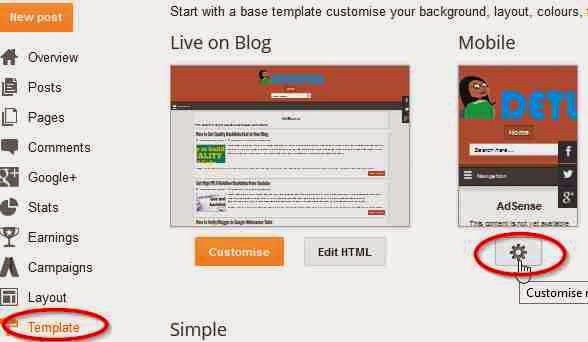
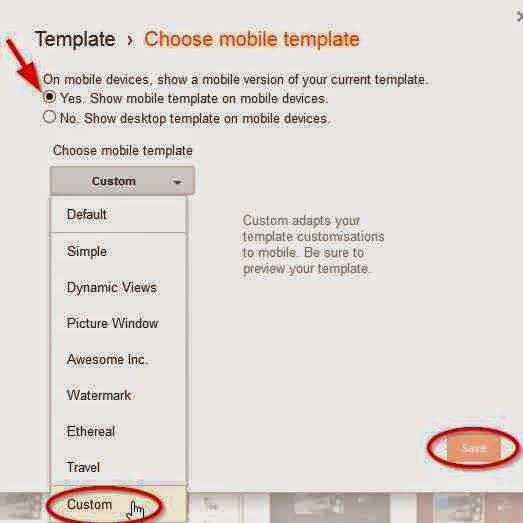
Step 2
Step 3
Update:06/09/2015 Save your template without including this last step step 4.
Step 4
<b:if cond=data:top.showMobileShare>
Add Stylish Custom Search Box To Blogger
Following the steps above, the related post widget without thumbnails should show up in the mobile and desktop version of your blog. If it doesnt, its probably because youve not added labels in your blog posts.
Also Read: How to Add IP Widget In Blogger Blogs
Numbered Page Navigation Widget For Blogger Blogs
Most Commented Posts Widget For Blogger With Thumbnails
How to Add Related Post Widget Without Thumnails In Blogger
Step 1
- From your blogger dashboard,
- Goto Template.
- Click on the gear mobile settings icon
- Select the button option, Yes show mobile template on mobile devices
- From the drop down menu, choose the option custom
- Click on Save to enable your changes.
Step 2
- Next, Still in your template
- Click on Edit HTML
- Using Ctrl+F keys, search for the tag </head>
- Copy the code below and paste above </head>
<!--Related Posts Scripts and Styles Start-->
<style>
#related-posts {
float : left;
width : 350px;
margin-top:20px;
margin-left : 5px;
margin-bottom:20px;
font : 11px Verdana;
margin-bottom:10px;
}
#related-posts .widget {
list-style-type : none;
margin : 5px 0 5px 0;
padding : 0;
}
#related-posts .widget h2, #related-posts h2 {
font-size : 20px;
font-weight : normal;
margin : 5px 7px 0;
padding : 0 0 5px;
}
#related-posts a {
text-decoration : none;
}
#related-posts a:hover {
text-decoration : none;
}
#related-posts ul {
border : medium none;
margin : 10px;
padding : 0;
}
#related-posts ul li {
display : block;
background : url("https://blogger.googleusercontent.com/img/b/R29vZ2xl/AVvXsEg_rJsGTn3oSMisqJfpwoKyKwMUQJuFyBKNrNiHB69R38HrlwyR_ZAgwbRSF4yq_YSyII4Rp25f0ny3x1EPF5eS4x2iLWHcScqOoUN1A-hoHyFKehHnA0OkznIrlHexIOKtjTPiZBMS8T0/s200/greentickbullet.png") no-repeat 0 0;
margin : 0;
padding-top : 0;
padding-right : 0;
padding-bottom : 1px;
padding-left : 21px;
margin-bottom : 5px;
line-height : 2em;
border-bottom:1px dotted #cccccc;
}
</style>
<script type=text/javascript>
//<![CDATA[
var relatedTitles = new Array();
var relatedTitlesNum = 0;
var relatedUrls = new Array();
function related_results_labels(json) {
for (var i = 0; i < json.feed.entry.length; i++) {
var entry = json.feed.entry[i];
relatedTitles[relatedTitlesNum] = entry.title.$t;
for (var k = 0; k < entry.link.length; k++) {
if (entry.link[k].rel == alternate) {
relatedUrls[relatedTitlesNum] = entry.link[k].href;
relatedTitlesNum++;
break;
}
}
}
}
function removeRelatedDuplicates() {
var tmp = new Array(0);
var tmp2 = new Array(0);
for(var i = 0; i < relatedUrls.length; i++) {
if(!contains(tmp, relatedUrls[i])) {
tmp.length += 1;
tmp[tmp.length - 1] = relatedUrls[i];
tmp2.length += 1;
tmp2[tmp2.length - 1] = relatedTitles[i];
}
}
relatedTitles = tmp2;
relatedUrls = tmp;
}
function contains(a, e) {
for(var j = 0; j < a.length; j++) if (a[j]==e) return true;
return false;
}
function printRelatedLabels() {
var r = Math.floor((relatedTitles.length - 1) * Math.random());
var i = 0;
document.write(<ul>);
while (i < relatedTitles.length && i < 20) {
document.write(<li><a href=" + relatedUrls[r] + "> + relatedTitles[r] + </a></li>);
if (r < relatedTitles.length - 1) {
r++;
} else {
r = 0;
}
i++;
}
document.write(</ul>);
document.write(<a href="http://www.techlass.com/2015/04/add-related-post-widget-in-blogger-mobile-version.html " target="_blank" rel="dofollow"><font size="1" color="black">[Get Related Posts Widget]</font></a>);
}
//]]>
</script>
<!--Related Posts Scripts and Styles End-->
Step 3
- In your template, Search for
<div class=post-footer-line post-footer-line-1>
OR SEARCH FOR
<p class=post-footer-line post-footer-line-1>
- Copy the code below and paste below any of the lines of code above which you could find in your template.
<!-- Related Posts with Thumbnails Code Start-->
<b:if cond=data:blog.pageType == "item">
<div id=related-posts>
<font face=Arial size=3><b>Related Posts: </b></font><font color=#FFFFFF><b:loop values=data:post.labels var=label><data:label.name/><b:if cond=data:label.isLast != "true">,</b:if><b:if cond=data:blog.pageType == "item">
<script expr:src="/feeds/posts/default/-/" + data:label.name + "?alt=json-in-script&callback=related_results_labels&max-results=5" type=text/javascript/></b:if></b:loop> </font>
<script type=text/javascript> removeRelatedDuplicates(); printRelatedLabels();
</script>
</div>
</b:if>
<!-- Related Posts with Thumbnails Code End-->
Update:06/09/2015 Save your template without including this last step step 4.
Step 4
- Still in your template, use CTRL+ F keys to search for this line of code below
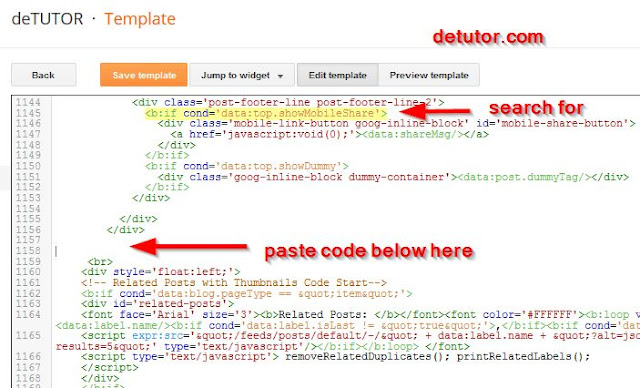
<b:if cond=data:top.showMobileShare>
- Below the line of code above, scroll down and search for the fourth </div>
- Copy the code below and paste below the fourth </div> as shown in the image below
<br>
<div style=float:left;>
<!-- Related Posts with Thumbnails Code Start-->
<b:if cond=data:blog.pageType == "item">
<div id=related-posts>
<font face=Arial size=3><b>Related Posts: </b></font><font color=#FFFFFF><b:loop values=data:post.labels var=label><data:label.name/><b:if cond=data:label.isLast != "true">,</b:if><b:if cond=data:blog.pageType == "item">
<script expr:src="/feeds/posts/default/-/" + data:label.name + "?alt=json-in-script&callback=related_results_labels&max-results=5" type=text/javascript/></b:if></b:loop> </font>
<script type=text/javascript> removeRelatedDuplicates(); printRelatedLabels();
</script>
</div>
</b:if>
<!-- Related Posts with Thumbnails Code End-->
</div></br>
- Save your template.
Add Stylish Custom Search Box To Blogger
Following the steps above, the related post widget without thumbnails should show up in the mobile and desktop version of your blog. If it doesnt, its probably because youve not added labels in your blog posts.
Go to link download
Tecno M5 Specs and Price in Nigeria
Tecno M5 Specs and Price in Nigeria
Tecno M5 Specs and Price: Tecno M5 is an mid-range smartphone from the Chinese company, Tecno. As an upgrade from the Tecno M3, it includes features/specs of the Tenco M3 and an improvement in these specifications. Some of which include, a larger RAM size, a larger screen display screen and higher camera megapixels.
The Tecno M5 is also a successor to the Tecno M7. When compared with the later in terms of specs and price, the Tecno M5 is a lower version. Both devices look similar in build since they have the same dimension. In this post, youll find the Tecno M5 Specifications, Its features, review and price.
The Tecno M5 is also a successor to the Tecno M7. When compared with the later in terms of specs and price, the Tecno M5 is a lower version. Both devices look similar in build since they have the same dimension. In this post, youll find the Tecno M5 Specifications, Its features, review and price.
Where to Buy Tecno M5
KONGAFROM ?20,000 BUY NOW
JUMIA FROM ?20,000 BUY NOW
Also Read: Tecno Phantom Z Specs and Price - Nigeria
Samsung Galaxy Note 4 Specs and Price
Samsung Galaxy J5 Specs and Price
For improved performance, It features a RAM size of 1GB. This is a step-up from the 512MB which has been the typical RAM size found in most mid-range Tecno phones like the Tecno M3, P5 and H5. With more RAM, you can be sure of storing lots of multimedia, apps, games and run more than one app at a time without the phone lagging or hanging.
Other than its RAM for storage, it has a 4GB internal memory storage which can be expanded up to 32 GB via a microSD card. An 8GB free memory card has also been included in the Tecno M5. With these storage spaces, you can save music, videos, pictures, apps and games without worrying about each of their sizes or exhausting the memory capacity.
For connectivity, the Tecno M5 features, WIFI, USB, bluetooth, fast 2G/3G internet with GPS Navigation. Other Tecno M5 Specs and features are given below.
Also Read: Samsung Galaxy S6 Edge Specs and Price
Samsung Galaxy A5 Specs and Price
KONGAFROM ?20,000 BUY NOW
JUMIA FROM ?20,000 BUY NOW
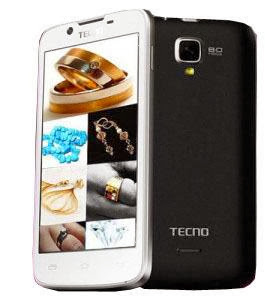 |
| Tecno M5 |
Also Read: Tecno Phantom Z Specs and Price - Nigeria
Samsung Galaxy Note 4 Specs and Price
Samsung Galaxy J5 Specs and Price
Overview Features
Display and Build
The Tecno M5 is a dual-SIM smartphone and features a 4.5-inch TFT capacitive display screen with a resolution of 480 by 854 pixels. It weighs 130g, is made from plastic and has a dimension which is 35.60 mm high, 68.30 mm wide, and a depth of 10.50 mm. This makes the device small and portable, enabling users to easily hold, carry about and perform one-handed operations.Processor and OS
Tecno M5 is powered by 1.3GHz dual-core processor and runs on Android 4.2.2 (Jelly Bean) OS. At this CPU speed, apps and games can launch very fast with support for multitasking and switching between running apps. The phone performs fast operations and high quality games can be ran without hanging or slowing down.For improved performance, It features a RAM size of 1GB. This is a step-up from the 512MB which has been the typical RAM size found in most mid-range Tecno phones like the Tecno M3, P5 and H5. With more RAM, you can be sure of storing lots of multimedia, apps, games and run more than one app at a time without the phone lagging or hanging.
Other than its RAM for storage, it has a 4GB internal memory storage which can be expanded up to 32 GB via a microSD card. An 8GB free memory card has also been included in the Tecno M5. With these storage spaces, you can save music, videos, pictures, apps and games without worrying about each of their sizes or exhausting the memory capacity.
Camera
The Tecno M5 has an 8MP rear camera with features like LED flash, geo-tagging, auto focus, and face detection camera . At 8MP, you should expect clear images whose quality are high from this device. Theres also a 1.3MP front-facing camera for video chats and taking selfies.Battery and Connectivity
The battery capacity of the Tecno M5 is 1800mAh and can support up to 6 hours of talk time, 180 hours of standby time, about 12 hours on 2G and 10 hours on 3G. The device also comes with a power bank to support the battery.For connectivity, the Tecno M5 features, WIFI, USB, bluetooth, fast 2G/3G internet with GPS Navigation. Other Tecno M5 Specs and features are given below.
Body | |
| Dimensions | 135.6 x 68.3 x 10.5mm, 130 grams |
| Keyboard | Touchscreen |
| Colors | White, Black, Yellow, Gray, Pink |
| Cover | Plastic |
Display | |
| Type | TFT capacitive touchscreen with 256,000 colors |
| Size | 480 x 854 pixels, 4.5 inches, 218 pixels per inch (PPI) |
Memory And OS | |
| Card slot | MicroSD, up to 32GB |
| Internal | 4GB |
| OS | Android 4.2.2 Jelly Bean |
| Processors | 1.3GHz dual-core CPU, MediaTek MT6572 chipset |
| RAM | 1GB |
Camera | |
| Primary | 8MP, up to 3264×2448-pixel , HDR, face and smile detection, LED flash |
| Video | 720p@30fps |
| Secondary | 1.3MP, up to 1200×1024-pixel pictures |
Battery | |
| Capacity | 1800mAh Li-Ion battery |
| Stand-by | N/a |
| Talk time | N/a |
| Music play | N/a |
Connectivity | |
| 2G | GSM 900 / 1800 |
| 3G | HSDPA 2100 |
| 4G | No |
| SIM | Dual mini SIM |
| Status | Available 2013, November |
| 2G | GPRS – up to 85.6 kbps; EDGE – up to 236.8 kbps |
| 3G | Up to 22.2 mbps uplink; Up to 5.76 mbps downlink |
| 4G | No |
| WIFI | Wi-Fi 802.11 b/g/n, WIFI hotspot |
| Bluetooth | Version 3.0 |
| GPS | A-GPS |
| NFC | No |
| USB | MicroUSB v2.0 |
Others | |
| Sensors | Accelerometer, Proximity, Compass, Ambient light sensor |
| Messaging | SMS, MMS, Email, Push Mail, IM |
| Browser | HTML5 |
| Java | No |
|
Also Read: Samsung Galaxy S6 Edge Specs and Price
Samsung Galaxy A5 Specs and Price
Pricing and Availability
Tecno M5 is currently available in Nigeria. The price of Tecno M5 in Nigeria ranges from N20,000 to N30,000.Where to Buy Tecno M5
JUMIA FROM ?20,000 BUY NOW
Go to link download
Saturday, October 29, 2016
How To Embed PDF DOC XLS And PPT Files In Blogger
How To Embed PDF DOC XLS And PPT Files In Blogger
Steps on how to embed PDF, DOC, XLS, PPT documents/files in blogger blogs are outlined in this post. With the use of Google drive, files/documents like PDFs, HTML, Microsoft Word, Spreadsheets, PowerPoint Slides, Excel Spreadsheets etc can be added easily in blogger posts and can be made accessible to the public. Heres how to Embed PDFs files/documents in blogger posts.
Also Read: 10+ Best Blogger Tips and Tricks
Optimize H1,H2 and H3 Heading Tags In Blogger
Auto Read More With Thumbnail For Blogger Blogs
<iframe src="https://docs.google.com/document/d/19mgrO77F_nvSmPk14ZVujb0EL_NbDLkBD7M/pub?embedded=true"></iframe>
To increase or reduce the size of the document by specify the width and height, as in
<iframe src="https://docs.google.com/document/d/19mgrO77F_nvSmPk14ZVujb0EL_NbDLkBD7M/pub?embedded=true" width="600 " height="550 "></iframe>
How to Hide Specific Posts from Blogger Homepage
Also Read: 10+ Best Blogger Tips and Tricks
Optimize H1,H2 and H3 Heading Tags In Blogger
Auto Read More With Thumbnail For Blogger Blogs
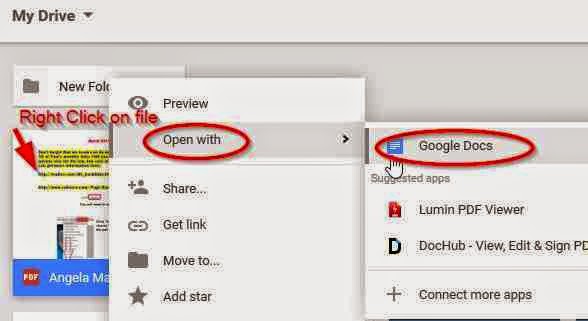
- Visit Google Drive
- Click on New
- Click on File Upload
- Select the file, then click on Open.
- Right click on the file/document
- Select Open with
- Click on Google Docs
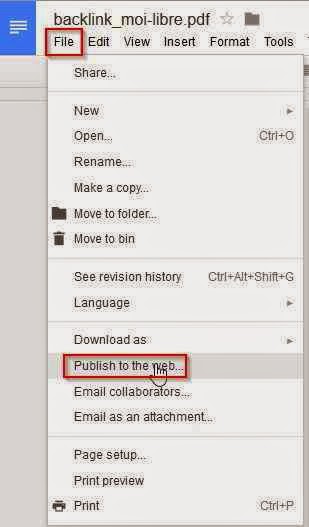
- On Google Docs page, Click on the File menu
- Select Publish to the web.
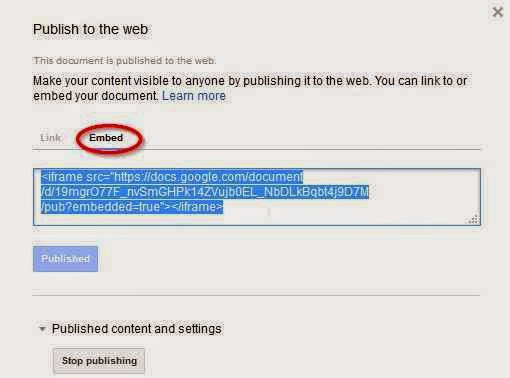
- Click on Embed
- Select Publish
- Copy the code provided.
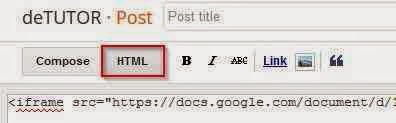
- Goto your Blogger blog
- Create a new post or open an existing post.
- Select the HTML mode.
- Paste the code where you want it to be displayed in the post.
<iframe src="https://docs.google.com/document/d/19mgrO77F_nvSmPk14ZVujb0EL_NbDLkBD7M/pub?embedded=true"></iframe>
To increase or reduce the size of the document by specify the width and height, as in
<iframe src="https://docs.google.com/document/d/19mgrO77F_nvSmPk14ZVujb0EL_NbDLkBD7M/pub?embedded=true" width="600 " height="550 "></iframe>
- Preview or publish your post.
How to Hide Specific Posts from Blogger Homepage
Go to link download
Thursday, October 27, 2016
How To Unlock Pattern In Micromax Phones
How To Unlock Pattern In Micromax Phones
How To Unlock Pattern In Micromax Phones.
Best method to unlock all micromax phones.
Method 1:
Step 1: Switch off your phone.
Step 2: Press and Hold Power + Volume up together for several seconds
Step 3: You will see recovery mode in your phone, use volume keys to navigate up and down and power key to choose.

Step 4: Choose wipe data factory reset.
Step 5: Choose Yes- Delete all user data
Step 6: Reboot device.
Method 2:
Step 1: Switch off your phone.
Step 2: Press and Hold Power + Volume down together for several seconds
Step 3: You will see recovery mode in your phone, use volume keys to navigate up and down and power key to choose.
Step 4: Choose wipe data factory reset.
Step 5: Choose Yes- Delete all user data
Step 6: Reboot device.
Best method to unlock all micromax phones.
Method 1:
Step 1: Switch off your phone.
Step 2: Press and Hold Power + Volume up together for several seconds
Step 3: You will see recovery mode in your phone, use volume keys to navigate up and down and power key to choose.
Step 5: Choose Yes- Delete all user data
Step 6: Reboot device.
Method 2:
Step 1: Switch off your phone.
Step 2: Press and Hold Power + Volume down together for several seconds
Step 3: You will see recovery mode in your phone, use volume keys to navigate up and down and power key to choose.
Step 5: Choose Yes- Delete all user data
Step 6: Reboot device.
Go to link download
Thursday, October 20, 2016
Health Care System in Canada The Future and History of Canadian Health care
Health Care System in Canada The Future and History of Canadian Health care
Health Care System in Canada,
 network of providers, institutions, and insurers that care for the health of Canadians. In Canada health care is delivered by private institutions—hospitals and physicians—that are not controlled directly by the government. This private delivery system is combined with a publicly financed health insurance system that is paid for by the provincial and federal governments. (In this article, the use of the term “provincial” refers to both provinces and territories, since territories and provinces play the same role in the health care system.) This health insurance system is known as Medicare. Each province has a separate health insurance system funded by provincial government revenues and contributions from the federal government. The federal government provides funding in a lump sum based on the province’s population. Of the total spending on health care in Canada in 1998, provincial expenditures made up 45 percent and federal transfers to the provinces made up 18 percent. Private spending made up 31 percent and accounted for most of the rest. The largest outlays were in these sectors: hospitals, 32 percent; physicians, 14 percent; and drugs, 16 percent.
II PROVINCIAL SYSTEMS AND THE FEDERAL GOVERNMENT
The Constitution Act of 1867 made the provinces responsible for matters of health policy (see Constitution of Canada). As a result, instead of national health insurance, Canada has ten provincial and three territorial health insurance systems. Although the federal government has a strong presence in the health sector, the provinces are primarily responsible for health care. Each province and territory has its own statute that regulates its health care system. The provincial governments administer health insurance programs and make decisions about funding hospitals and reimbursing physicians. Most provinces fund their health insurance out of general revenues and do not impose a specific health tax on individuals or businesses. Only Alberta and British Columbia levy health care insurance premiums for their public insurance. Health insurance is an expensive operation, and provinces spend from 30 to 35 percent of their total budget on health care.
The federal government contributes to the provincial systems as part of the Canada Health and Social Transfer (CHST), a block grant that includes the federal contributions to health care, higher education, social assistance, and other social services. The federal government also links the provincial health care systems together with a set of principles, commonly referred to as national standards. These standards were articulated in the Canada Health Act, which the Canadian Parliament passed in 1984.
Under that law, provinces must ensure that their health care systems respect five criteria: (1) public administration—the health insurance plans must be administered by a public authority accountable to the provincial government; (2) comprehensive benefits—the plan must cover all medically necessary services prescribed by physicians and provided by hospitals; (3) universality—all legal residents of the province must be covered; (4) portability—residents continue to be covered if they move or travel from one province to another; and (5) accessibility—services must be made available to all residents on equal terms, regardless of income, age, or ability to pay. In the 1980s and 1990s the federal government began to contribute a lower percentage of provincial health insurance funding. In response some critics questioned the extent to which the federal government could continue to expect the provinces to uphold the national standards of the Canada Health Act with less funding.
In addition to setting standards and providing funds for the provincial health systems, the federal government is required by the constitution of Canada to provide health care to military personnel and veterans, members of the Royal Canadian Mounted Police, and inmates of federal prisons. The federal government is also directly responsible for the health needs of aboriginal Canadians living on reserves. The federal government promotes public health through activities such as prenatal nutrition programs and youth antismoking campaigns. It also maintains laboratories for disease control and product safety.
III HOW THE PUBLIC SYSTEM WORKS
A Patients
When a legal resident of Canada needs medical care, he or she presents a provincial health card, usually a plastic identification card similar to a credit card, to a physician or hospital. Patients choose their physicians, although a general practitioner may refer them to a specialist. If patients require immediate care without an appointment, they can seek admittance to any hospital emergency room or community health clinic. There, the severity of their medical need determines how long they will wait to see a nurse or doctor. Health care provision in Canada is based on medical need rather than the ability to pay; consequently, there are often waiting lists for some elective procedures, such as cataract surgery; nonemergency surgery, such as hip replacement; and diagnostic services, such as the use of magnetic resonance imaging (MRI). In addition, medical specialists are often less available in rural and remote areas.
B Physicians
The majority of Canadian doctors provide care in private practice and apply for admitting privileges at one or more nearby hospitals. Most doctors provide care on a fee-for-service basis. In that arrangement the doctor is paid for each service provided to the patient, rather than earning a set salary or a set amount for each person under his or her care. The fee-for-service format is especially common among specialists and doctors who see patients outside of the hospital. The fee-for-service arrangement allows the physician to decide what care to provide independent of the influence of administrators or insurers. The licensed physician is reimbursed for his or her services through a provincial agency that negotiates a fee schedule with the provincial medical association.
Not all doctors are paid by the fee-for-service format; some are paid a fixed wage, either an hourly wage or a salary. Emergency room doctors, for example, are often paid on an hourly basis. Doctors in their residency (early years of specialty training) in teaching hospitals are generally paid on a salaried basis. In Québec, a small number of general practitioners choose salaried positions in community health and social clinics. In most provinces, specialist salaries are capped at a certain level of income.
C Hospitals
Hospitals in Canada are nonprofit institutions with independent administrative boards; they are not directly operated by the government. However, all hospitals depend on public funds for their operating costs. These funds are provided through the provincial government and are allocated by means of a yearly global budget. The yearly global budget is a set amount of money that the hospital uses to meet the needs of its patients. Each hospital and each province as a whole has a yearly global budget, which is determined by a provincial agency or a regional board. Provinces and individual hospitals must use the global budget to cover all their costs for personnel, equipment, and supplies. Limited global budgets have at times forced provinces to recommend the reduction of available beds, laboratories, or operating rooms and, in some cases, the closure of certain hospitals.
IV SUPPLEMENTARY HEALTH CARE
With a few exceptions, provincial health plans cover all medically necessary services, so that patients need not pay directly for anything except so-called incidental costs. These incidental costs include items such as a patient’s private hospital room, unless it is specified by a physician, and transportation to the hospital. Provincial health plans also do not cover some nonessential procedures, such as laser surgery for the eye, cosmetic surgery, procedures to reverse sterilization, and, in most provinces, in vitro fertilization. In addition, provinces do not pay for dental services and long-term or special care facilities, such as nursing homes and addiction-recovery centers, with exceptions. Also provinces generally do not cover prescription drugs for patients outside the hospital. Some benefits vary by province: For example, limited chiropractic and optometrist services are covered in Ontario and British Columbia but not in Québec. Although health benefits are portable across provincial boundaries, there is only limited coverage (mainly for emergency care at provincial rates) for Canadians when they travel outside the country.
Canadians have two choices when it comes to paying for these additional services: They can either pay directly for whatever services they use, or they can join a private supplementary insurance plan, usually offered by their employer. Private insurers are not permitted to offer insurance coverage for any service that provincial insurance covers. That restriction is designed to prevent a two-tier system in which people who could afford more expensive private insurance would have greater access to necessary medical services and procedures.
Many provinces subsidize these additional services for the elderly and those who receive social assistance. Several provinces also have government plans that provide insurance coverage for drug costs and that are available to the entire population, but those plans require substantial contributions from the insured. Private spending on health care in Canada (mainly on dental care and prescription drugs) has been increasing steadily, and in 1998 it accounted for 31 percent of total health care spending.
The practice of extra-billing, in which physicians charge patients a higher fee than that covered by provincial insurance, was common in some provinces. The patients then had to pay the difference between the cost of the service and the amount covered by provincial insurance. The federal government effectively abolished this practice in the Canada Health Act, a law that specifically prohibits extra-billing and penalizes any province that allows it. If a province allows extra-billing, the federal government reduces funding to the province by the amount charged in extra-billing.
V CANADIAN SYSTEM IN COMPARISON
Although health care in Canada is expensive, the country’s expenditures on health care resemble those in other industrialized countries and are considerably less than in the United States. In 1998 Canada spent C$81.8 billion dollars or C$2,700 per person on health care, representing 9.1 percent of Canada’s gross domestic product (GDP). In contrast, health care expenditures in the United States in the same year totaled 13.5 percent of the U.S. GDP, representing approximately C$5,700 per person. In Canada, about 69 percent of total health expenditures are publicly funded, whereas in the United States 45 percent of health expenditures are funded by the government.
Despite these differences in spending, the number of hospital beds per person in Canada is comparable to the United States (1 for every 244 people in Canada, and 1 for every 826 people in the United States). There is 1 physician for every 476 Canadians (compared to 1 for every 253 people in the United States). Canadian physicians are fairly evenly split between general practitioners and specialists. Hospitals in Canada are as well-equipped to deliver technologically advanced medical procedures as hospitals in other industrialized countries. However, the cost constraints of the Canadian system have made the use of certain expensive diagnostic equipment, such as MRIs, considerably less widespread than in the United States.
There is some debate among economists about the role of national health insurance in controlling health care costs, but it is evident that the Canadian health care sector, because of the government’s involvement, spends considerably less on health care than the United States. There are numerous reasons for the cost difference, but the major factors include the lower administrative costs associated with single-payer insurance, the yearly spending caps set by global hospital budgets, and the negotiation of uniform billing fees with provincial physician associations.
VI HISTORY
Canada’s system was created through two major innovations. The first innovation was government-funded insurance to cover hospital costs. The second initiative was government-funded insurance to pay for medical services outside of hospitals.
A Provincial and Federal Initiatives
T. C. Douglas From 1944 to 1961, T. C. Douglas was premier of Saskatchewan, in a government led by the socialist Co-operative Commonwealth Federation. During his tenure, the province introduced a public hospital insurance plan that became the foundation for Canada’s national health insurance system.Archive Photos/Express Newspapers
Until the 1940s, the government was not very involved in health care. It mostly focused on efforts to improve public health, such as disease control and food and drug regulation. In addition, local governments provided charitable hospitals and medical care for indigent people. Canadians paid for health care either directly out of their pockets or through private insurance.
The first real initiatives for developing public health insurance on a wide scale originated in the provinces. In 1947 the Saskatchewan government, led by the Co-operative Commonwealth Federation, a social democratic party, inaugurated the first hospital insurance plan in North America. The plan used public funds to cover the costs of hospital services. The success of this plan and similar plans in other provinces convinced the federal government to pass the Hospital Insurance and Diagnostic Services Act in 1957. This legislation allowed the federal government to share in the cost of provincial hospital insurance plans. By 1961 every province in Canada had set up a hospital insurance plan.
In 1962 the Saskatchewan government introduced a further innovation: a medical insurance program that used public funds to reimburse doctors for the services they provided to patients outside of hospitals. This again proved to be a successful model. In the Medical Care Insurance Act of 1966, the federal government agreed to share provincial health costs for medical care outside of hospitals. By 1971 every province had a medical insurance plan in operation, and Canada’s health insurance system was fully in place.
In 1984 the federal government combined the 1957 and 1966 laws into the Canada Health Act. This legislation reinforced the underlying principles of the previous health insurance programs, including public administration, comprehensive benefits, universality, and portability. In addition the new law emphasized a fifth principle, equal access, which was designed to prohibit practices such as extra-billing that presented potential financial hardship for some patients.
Federal financial support for health care has varied over time. Prior to 1977 the federal government paid an agreed-upon percentage of provincial medical costs. In 1977 the Established Programs Financing Act replaced this system with a single payment for health care, known as a federal block transfer payment; this new payment was based on provincial population. At various times in the 1980s and early 1990s the federal government froze or reduced those payments as part of a movement to contain health care costs and reduce federal spending in general. Beginning in 1996 federal funding for provincial health systems was combined into a super-grant, the Canada Health and Social Transfer (CHST). The CHST combined federal contributions to health care, higher education, social assistance, and other social services into one lump sum. In the CHST, the federal government provided fewer funds for health care. However, in the 1999 budget the federal government renewed its commitment to health funding and injected new money into the health care sector.
As federal health care contributions declined in the 1980s and 1990s, provincial governments came under pressure to control health care costs. Many provinces attempted to make health care services more efficient by combining or closing hospitals. Some, like Québec, attempted to shift the emphasis of health care delivery to preventative and community care. Most provinces also implemented controls on physicians, such as salary caps for specialists. Governments have also attempted to control demand by extending the waiting lists for certain surgical procedures or discontinuing coverage of some services that are not medically necessary.
B Attitudes Toward the System
Physicians have displayed an ambivalent attitude toward public health insurance in Canada. On the one hand, government involvement guaranteed universal coverage and did away with the problem of collecting payments from patients and insurers. On the other hand, government involvement necessarily meant some regulation of the profession, including the fees that doctors charge for their services. Some provincial medical associations resisted the introduction of public medical insurance because of this regulation. In Saskatchewan in 1962 and Québec in 1970, physicians went on strike to protest the introduction of government-funded medical insurance.
A consensus eventually emerged. Doctors agreed to respect the fees negotiated with provincial governments in return for the freedom to practice medicine on a fee-for-service basis. This consensus was threatened when some physicians began to charge higher fees than those covered by provincial insurance by extra-billing. The federal ban on extra-billing in the Canada Health Act in 1984 led most provinces to prohibit the practice. In Ontario, where extra-billing was most widespread, the ban prevailed only after a bitter strike by doctors in 1986.
Public opinion polls commissioned by the National Forum on Health in 1994 found that Canadians were profoundly attached to equity and universality in health care. Other polls in the late 1990s showed negative reactions to expenditure cuts and efficiency measures in hospitals. The public saw these cuts as compromising the quality of and access to health care. This perception, along with examples of overcrowding at certain emergency rooms, led to a public backlash against the cuts. In many provinces, as well as at the federal level, politicians became sensitive to public discontent and injected more funds into the health care sector.
Whether demand for expensive health services can be controlled by deterrents such as waiting lists, or whether such controls will lead to greater desire for private medicine remains to be resolved. Canada is one of the very few public health care systems that does not allow some measure of partial payment by patients, such as co-payments, deductibles, or user fees, for services primarily paid for by insurance. Canada is also one of a dwindling number of countries that has not experimented with two-tier medical delivery, in which private health insurance is allowed to cover the same services as public insurance.
The Canadian health care system is at an important and potentially controversial crossroads. On the cautionary side, there seems to be a growing unease about whether the system can be sustained. Can a system that essentially shuts out the private market for health services in an era in which demand for health care is increasing at a remarkable pace survive? On a more positive note, the Canadian health care system is regarded as among the most effective—and popular—of any industrialized country. The Canadian system continues to combine the best features of any successful health care system and offers high-quality, comprehensive care for all citizens at reasonable cost.
Go to link download
Wednesday, October 19, 2016
Whats Next Nokia in 2016
Whats Next Nokia in 2016
After the acquisition is completed. around mid-2016, Nokia plans to re-enter the mobile market. Although this time may not produce a Nokia smartphone until the specified time limit. but Nokia could just released smartphones today through third parties such as foxconn factory that has made Nokia N1, the first of Nokias tablet based on Android.

The latest rumors are quoted from Recode, sourced from Nokia Technologies. one of the three divisions of Nokia which has more than 10,000 licenses, Nokia will enter the mobile phone consumer market. but it also will enter the virtual reality market. and will face competitors Samsung and HTC.
Nokia N1 is the result of the division. Grant a license to foxconn but still using the Nokia brand. With a design made by Nokia. Well reportedly latest products precisely two new products namely mobile and virtual reality will be a new round of rise of Nokia. well wait. Whats Next? #NOKIA
Nokia N1 is the result of the division. Grant a license to foxconn but still using the Nokia brand. With a design made by Nokia. Well reportedly latest products precisely two new products namely mobile and virtual reality will be a new round of rise of Nokia. well wait. Whats Next? #NOKIA
Go to link download
Saturday, October 1, 2016
How to Qmobile A4 Pattern lock done in fast mod working 100
How to Qmobile A4 Pattern lock done in fast mod working 100
How to Q mobile A4 Pattern Lock Remove
power and volume down press in fast mode this is fast boot mode


Go to link download
Thursday, September 29, 2016
Top Free Classified Submission Sites in India Free Ad Posting Sites List 2016
Top Free Classified Submission Sites in India Free Ad Posting Sites List 2016
Free Online Classifieds Websites List for Ad Posting
A list of high PR classified submission sites for India, USA, Uk Canada is given below for posting free ads in order to acquire backlinks to your blog. These sites allow you to place links to your site and since they have high PR, youll be getting a high PR backlink to your blog. With the backlinks gotten from these high Pr online classified sites, you can improve your blogs traffic and rank in search engine results.Also Read: Top Free High PR PPT, PDF Submission Sites List 2016
20+ High PR DoFollow Edu And Gov Backlinks 2016
How to Get Quality Backlinks Fast to Your Blog
Free Classifieds Websites list with High Google PR
|
| ||
|
| ||
|
| ||
|
| ||
|
| ||
|
| ||
|
| ||
|
| ||
|
| ||
|
| ||
|
| ||
|
| ||
|
| ||
|
| ||
|
| ||
|
| ||
|
| ||
|
| ||
|
| ||
|
| ||
|
| ||
|
| ||
|
| ||
|
| ||
|
| ||
|
| ||
|
| ||
|
| ||
|
| ||
|
| ||
|
| ||
|
| ||
|
| ||
|
| ||
|
| ||
|
| ||
|
| ||
|
| ||
|
| ||
|
| ||
|
| ||
|
| ||
|
| ||
|
| ||
|
| ||
|
| ||
|
| ||
|
| ||
|
| ||
|
| ||
|
| ||
|
| ||
|
| ||
|
| ||
|
| ||
|
| ||
|
| ||
|
| ||
|
| ||
|
|
Go to link download
Subscribe to:
Posts (Atom)