Showing posts with label commentluv. Show all posts
Showing posts with label commentluv. Show all posts
Thursday, November 3, 2016
Resolve CommentLuv Could Not Find A Feed of the Blog In Blogger
Resolve CommentLuv Could Not Find A Feed of the Blog In Blogger
For blogger blogs encountering the error message "RSS Error: A feed could not be found at (put your RSS feed URL here). A feed with an invalid mime type may fall victim to this error, or SimplePie was unable to auto-discover it.. Use force_feed() if you are certain this URL is a real feed" while commenting of commentluv enabled blogs, in this post youll get to know how to rectify this problem. After inserting your URL in the required field and ticking the commentluv option, if theres no RSS feed URL in your template, youll encounter this error. If you changed your template recently, this might be the case. Commenting on commentluv enabled blogs is one of the ways of building backlinks to a site and also drive traffic it, hence an error like the one above can make that impossible.
Also Read: How to Add CommentLuv Plugin On Blogger Blogs
Top Commentators Widget Enabled Blogs
10+ Best Blogger Tips and Tricks
<link rel="alternate" type="application/rss+xml" title="Posts Feed" href="http://mysite.blogspot.com/feeds/posts/default" />
In the code above, replace mysite.blogspot.com with your URL and optionally Posts Feed with your anchor text/keyword.
High PR Dofollow Commentluv Enabled Blogs
Following the steps above to rectify RSS feed not working properly with commentluv, on retrying to post a comment on one of these commentluv enabled blogs, your blog should be successfully crawled with the most current posts displayed.
Also Read: How to Add CommentLuv Plugin On Blogger Blogs
Top Commentators Widget Enabled Blogs
10+ Best Blogger Tips and Tricks
How to Resolve CommentLuv RSS Error
- From your blogger dashboard,
- Goto Template
- Click on Edit HTML
- In your template, use CTRL+F keys to search for the tag < head>
- Copy the line of code below and paste below <head>
<link rel="alternate" type="application/rss+xml" title="Posts Feed" href="http://mysite.blogspot.com/feeds/posts/default" />
In the code above, replace mysite.blogspot.com with your URL and optionally Posts Feed with your anchor text/keyword.
- Save your template.
High PR Dofollow Commentluv Enabled Blogs
Following the steps above to rectify RSS feed not working properly with commentluv, on retrying to post a comment on one of these commentluv enabled blogs, your blog should be successfully crawled with the most current posts displayed.
Go to link download

Friday, September 9, 2016
How to Add CommentLuv Plugin On Blogger Blogs
How to Add CommentLuv Plugin On Blogger Blogs
With this tip below on How to Add CommentLuv Plugin On Blogger Blogs, you can also implement the commentluv plugin as seen in WordPress blogs on blogger. Commentluv is a plugin that allows commentators to leave a link of their most recent post or any blog post on blogs they comment on which have installed the plugin.
Some also have the feature of retaining the twitter username of the commentators. The commentluv plugin to site owners and commentators has lots of advantages. To the former, it can bring about an increase in the blog/sites traffic and comments. Since the commentators get rewarded with a backlink to their blogs and others visiting their site from the link, this encourages them to drop comments, which in turn increases user engagement on that site/blog. Installing the commentluv plugin in blogger would mean replacing the default commenting system on blogger, to do this, heres how to add commentLuv plugin for blogger blogs.
Also Read: How to Disable Right Click On Blogger - Stop Copy Paste
How to Make Blogger Widgets/Gadgets Sticky(Float)
How to Show Post Title Before Blog Title In Search Results

Also Read : How to Add HTML Parse Tool in Blogger
How To Centralise Blogger Title And Description
Some also have the feature of retaining the twitter username of the commentators. The commentluv plugin to site owners and commentators has lots of advantages. To the former, it can bring about an increase in the blog/sites traffic and comments. Since the commentators get rewarded with a backlink to their blogs and others visiting their site from the link, this encourages them to drop comments, which in turn increases user engagement on that site/blog. Installing the commentluv plugin in blogger would mean replacing the default commenting system on blogger, to do this, heres how to add commentLuv plugin for blogger blogs.
Also Read: How to Disable Right Click On Blogger - Stop Copy Paste
How to Make Blogger Widgets/Gadgets Sticky(Float)
How to Show Post Title Before Blog Title In Search Results
How to Integrate CommentLuv With Blogger Blogs
- Visit IntenseDebate with this link
- Signup for an account.
- Ensure you tick the radio button "i want to install intenseDebate on my blog or website" before clicking the sign up button.
- Verify your email address by clicking on the link that will be sent to the email which you signed up with.
- Log into your account on IntenseDebate.
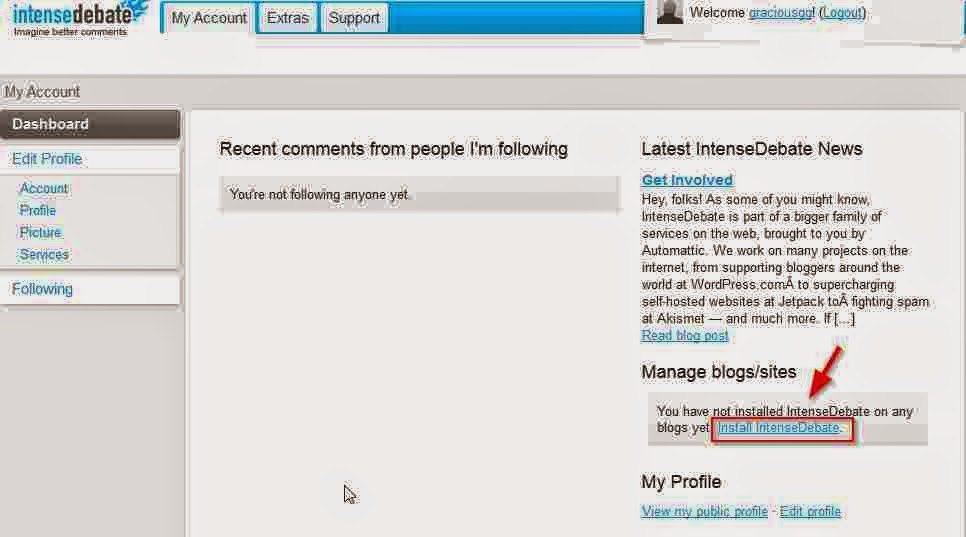
- On the site, Select install intenseDebate.
- Select your blogging platform as blogger
- You can also choose if the commentluv plugin should be shown on all existing posts or on new posts.
- Next, From your blogger dashboard, navigate to template
- Download a copy on your template.
- Return to IntenseDebate site, upload your template where its specified.
- In the code that is generated, it contains your template codes and the commentluv plugin code. Copy the entire code to a notepad or any other text editor.
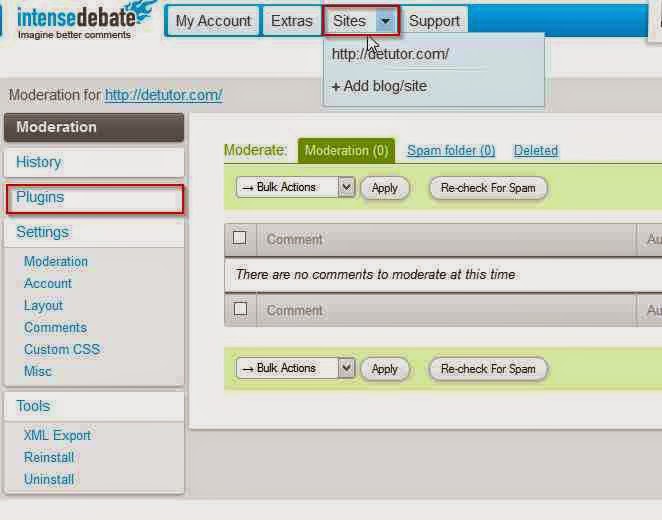
- Click on the Sites tab
- Select plugins
- In the list of plugins that displayed, activate commentluv.
Also Read : How to Add HTML Parse Tool in Blogger
How To Centralise Blogger Title And Description
- Return to your blogger template,
- Click on edit html,
- Replace the entire code in your template, with the code you copied from IntenseDebate site.
- Save your template, then view your blog to note the changes
Go to link download
Subscribe to:
Posts (Atom)