Showing posts with label google. Show all posts
Showing posts with label google. Show all posts
Tuesday, October 25, 2016
Bypass Verify Your Google Account On Huawei All Models Android 6 1 5 1 1
Bypass Verify Your Google Account On Huawei All Models Android 6 1 5 1 1
Published on May 30, 2016
Bypass Verify Your Google Account On Huawei All Models Android 6.1 , 5.1.1
With this Bypass Method Will Bypass Verify Your Google Account On Huawei All Models Android 6 1 , 5 1 1 by using Apk file without requiring the PC OR any Other Hardware.
Use it if you forget your Google Account
it will NOT UNLOCK the network lock. This method does not reset the PIN code of the SIM card.
Bypass Google verify Your Account.
1. follow the Videos Steps
2. Subscribe FlashRepair1
Warning!
Take your sim card and memory card from the phone before the reset.
All personal data from the phone (contacts, pictures, messages, apps, games, files) will be deleted!
if you can, make a backup before!
Link:
Shortcut application apk link:
https://goo.gl/lJPCqH
Follow Me:
https://www.facebook.com/GsmMarhaba
https://www.youtube.com/FlashRepair1
Go to link download

Monday, October 17, 2016
Huawei Y6 SCL U31 Hard Reset And Bypass Google Verify Your Account
Huawei Y6 SCL U31 Hard Reset And Bypass Google Verify Your Account
Huawei Y6 SCL U31 Hard Reset and remove pattern lock And Bypass Google Verify Your Account
With this HARD RESET Method Will Huawei Y6 SCL U31 to factory settings by using a keys combination without requiring the phone to be power on.
And also Bypass Google verify your account Without pc or other hardware
Use it if you forget your security code or if you have various problems with the phone software.
it will NOT UNLOCK the network lock. This method does not reset the PIN code of the SIM card.
How To Hard Reset:
1.Power Off
2. Press Volume Up + Power Key
3. left the keys when you see reset options
4. Move to wipe data/factory rest With Volume down.
5. Conform with Power key
6. Conform Again with Power key
7. Reboot now Conform with Power key
8. its done
Bypass Google verify Your Account.
1. follow the Videos Steps
2. Subscribe FlashRepair1
Warning!
Take your sim card and memory card from the phone before the reset.
All personal data from the phone (contacts, pictures, messages, apps, games, files) will be deleted!
if you can, make a backup before!
Link:
Shortcut application apk link:
https://goo.gl/lJPCqH
Follow Me:
https://www.facebook.com/GsmMarhaba
https://www.youtube.com/FlashRepair1
Go to link download
Wednesday, October 12, 2016
Google SEO Ranking Factors
Google SEO Ranking Factors
Knowing Google SEO ranking factors can help in search engine optimization of any blog/website. There are several Google ranking tips listed in this post which Google uses as their ranking algorithm. Following each can help you optimize your website for the worlds largest search engine and improve Google ranking for your site. Usually, Google uses about 200 various factors to rank a site, in this post, youll find 40.
Also Read: How to Use Google Webmaster Tools For SEO
How to Verify Blogger In Google Webmaster Tools
High PR Dofollow Backlink Sources
19. Number of external Links: Too many dofollow external links on a page could hurt that page’s rankings.
Source
Also Read: How to Use Google Webmaster Tools For SEO
How to Verify Blogger In Google Webmaster Tools
High PR Dofollow Backlink Sources
1. Keywords in domain name: Keywords in domain name can have an influence on a blogs rank. or URL can help your website rank higher in search engines. On searching for a keyword e.g blogging tips, most likely, the results on the first page are the ones that have that keyword in their domain name.
2. Keywords In URL: Just like keywords in domain names, including keywords in post/page URLs can help it rank higher in search results.
3. Length of URL: Post URLs that are too long may hurt search visibility. By removing stop words like to and irrelevant keywords, this can be eliminated.
2. Keywords In URL: Just like keywords in domain names, including keywords in post/page URLs can help it rank higher in search results.
3. Length of URL: Post URLs that are too long may hurt search visibility. By removing stop words like to and irrelevant keywords, this can be eliminated.
4. Keywords in title: A post which has relevant keywords in its title has better chances of ranking higher.
5. Post title starts with keyword: Post titles which begin with keywords tend to perform better when compared with post titles with keyword towards the end.
6. Post begins with keywords: Keywords at the beginning of posts between the first 100 words, starting of paragraphs can have a positive effect on its placement in Google search results.
7. Recency of Post update: A recently published or updated post can also rank high on Google.
8. Page Age: Even though Google prefers fresh content, an older page that’s regularly updated may outperform a newer page.
6. Post begins with keywords: Keywords at the beginning of posts between the first 100 words, starting of paragraphs can have a positive effect on its placement in Google search results.
7. Recency of Post update: A recently published or updated post can also rank high on Google.
8. Page Age: Even though Google prefers fresh content, an older page that’s regularly updated may outperform a newer page.
9. Frequency of update: Fresh content regularly on a site can elp in boosting its rank on Google search engine.
10. Number of Comments: A Pages with lots of comments shwos its popularity and can influence its ranking in search engines.
10. Number of Comments: A Pages with lots of comments shwos its popularity and can influence its ranking in search engines.
11. Keywords in search description: For blogger blogs that allows search description for individual posts, a post with a search description containing keywords can have a better rank.
12. Keyword Order: A post title or portion of the content with an exact match of a searcher’s keyword can rank better than the same keyword phrase in a different order.
12. Keyword Order: A post title or portion of the content with an exact match of a searcher’s keyword can rank better than the same keyword phrase in a different order.
13. Keyword density: Repeating relevant keywords throughout the post but at the same time avoiding keyword stuffing.
14. Meta Tag Spamming: Keyword stuffing in meta description and keywords can have a negative effect on your sites ranking
14. Meta Tag Spamming: Keyword stuffing in meta description and keywords can have a negative effect on your sites ranking
15. Length of Content: A longer post with detailed explanation will likely perform better in search engines.
16. Page Loading Speed: The page loading speed can influence rankings in search results. A page that loads very fast can rank higher on Google.
17. Image Optimization: By adding image alt tags, properties, description in images, there can be an improvement in search raking since Google also displays images in search results.
18. Number of Broken Links: Having too many broken links on a page may be a sign of a neglected or abandoned site.
18. Number of Broken Links: Having too many broken links on a page may be a sign of a neglected or abandoned site.
19. Number of external Links: Too many dofollow external links on a page could hurt that page’s rankings.
20. Number of Internal Links Pointing to Page: The number of internal links pointing to a page shows its relevance and can help the page rank higher.
21. Number of Pages: The number of pages a website denotes its authority.
22. Quality of Internal Links Pointing to Page: Internal links from authoritative pages on domain have a stronger effect than pages with no or low PR.
23. Backlinks from .Edu or .Gov sites: Backlinks from .edu and .gov sites have more relevance and can help in boosting a sites pages in search engine.
24. Number of backlinks : The number of backlinks to a site can help its rank in search engines. This shows the number of sites voting for it.
25. Pagerank of backlink source: The quality of backlinks to a page is an important ranking factor. High PR backlinks have more relevance.
26. Quality of Linking Content: Links from poorly written content don’t pass much value as links from well-written content.
27. Linking Domain Relevancy: A link from related niche is more powerful than a link from an unrelated niche.
28. Anchor text for links: The achor text used for both internal links or backlinks is an important SEO ranking factor.
29. Number of Outbound Links on Page: A link on a page with several of outbound links passes less PR than a page with only a few outbound links.
30. Link Location on Page: Where a link appears on a page is important. Generally, links embedded in a page’s content are more powerful than links in the footer or sidebar area.
31. Google Sandbox: New sites that immediately get a high number of backlinks are sometimes put in the Google Sandbox, which temporarily limits search visibility
32. Sitemap in website: A sitemap helps search engines index your pages faster and can improve a sites search visibility.
23. Backlinks from .Edu or .Gov sites: Backlinks from .edu and .gov sites have more relevance and can help in boosting a sites pages in search engine.
24. Number of backlinks : The number of backlinks to a site can help its rank in search engines. This shows the number of sites voting for it.
25. Pagerank of backlink source: The quality of backlinks to a page is an important ranking factor. High PR backlinks have more relevance.
26. Quality of Linking Content: Links from poorly written content don’t pass much value as links from well-written content.
27. Linking Domain Relevancy: A link from related niche is more powerful than a link from an unrelated niche.
28. Anchor text for links: The achor text used for both internal links or backlinks is an important SEO ranking factor.
29. Number of Outbound Links on Page: A link on a page with several of outbound links passes less PR than a page with only a few outbound links.
30. Link Location on Page: Where a link appears on a page is important. Generally, links embedded in a page’s content are more powerful than links in the footer or sidebar area.
31. Google Sandbox: New sites that immediately get a high number of backlinks are sometimes put in the Google Sandbox, which temporarily limits search visibility
32. Sitemap in website: A sitemap helps search engines index your pages faster and can improve a sites search visibility.
33. Site Uptime: Lots of server issues may hurt your ranking
34. Duplicate Meta Information: Having duplicate meta information across your site may bring down all of your page’s visibility.
35. Mobile Friendly Site: In search results, websites that are mobile friendly mobile can rank higher.
36. DMCA Complaints: Sites with DMCA complaints can have a lower rank on Google.
37. Reciprocal Links: Excessive link exchanging can affect your site;s rank.
38. Forum Profile Links: Google may significantly devalue links from forum profiles.
39. Direct Traffic: Sites with lots of direct traffic are likely higher quality than sites that get very little direct traffic.
40. Dwell Time: How long people spend on on visiting your page from a Google search.
Also Read: White Hat SEO Techniques To Enhance Blog Traffic
7 Best On Page SEO Techniques 2015 For Blog Traffic
The above are some of the SEO ranking factors that Goolge uses for its search algorithm. With the knowledge of all these, you can improve your sites Google ranking
36. DMCA Complaints: Sites with DMCA complaints can have a lower rank on Google.
37. Reciprocal Links: Excessive link exchanging can affect your site;s rank.
38. Forum Profile Links: Google may significantly devalue links from forum profiles.
39. Direct Traffic: Sites with lots of direct traffic are likely higher quality than sites that get very little direct traffic.
40. Dwell Time: How long people spend on on visiting your page from a Google search.
Also Read: White Hat SEO Techniques To Enhance Blog Traffic
7 Best On Page SEO Techniques 2015 For Blog Traffic
The above are some of the SEO ranking factors that Goolge uses for its search algorithm. With the knowledge of all these, you can improve your sites Google ranking
Source
Go to link download
Sunday, September 25, 2016
Google New Calendar For Android Lolipop 5 0 Complete
Google New Calendar For Android Lolipop 5 0 Complete
With Android 5.0 Lollipop practically at our doorsteps, most major Google apps (Play Store, Play Books, Gmail, Newsstand, etc) have been getting their Material Design Updates. Up until now, however, there has been one prominent omission: Google Calendar. Luckily, Google Calendar is finally getting a complete overhaul that not only changes its appearance, but also aims to make it your personal assistant.

DownLoad Calendar Apk
The new Google Calendar app now integrates with Gmail, automagically turning your emails to events. Booked a flight or made a hotel reservation? You probably got an email confirmation about it, and Google Calendar now knows about it. It’ll create an event with all the relevant details for you, and will even update them if you get additional emails.
That’s not all! Calendar will also offer you smart suggestions, allowing you to create events quicker than ever before. You’ll get suggestions as you type for people, places and even titles (it’ll even learn from your preferences, suggesting entire events depending on your habits).
Last but not least, Calendar introduces a new “Schedule View” (reminiscent of the current “Agenda” view), which makes it easy to see upcoming events with beautiful sketches, images and even maps. If you’re using a tablet, you’ll also be able to see a month view along with the new schedule view.
The update should be rolling out starting today if you’re on Lollipop, and will be downloadable for all devices in the coming weeks. To learn more, visit the Official Gmail Blog and the new Google Calendar landing page.
Go to link download
Saturday, September 24, 2016
Samsung Galaxy Nexus I9250 Google Hard Reset Done
Samsung Galaxy Nexus I9250 Google Hard Reset Done
Samsung Galaxy Nexus I9250 (Google) Hard Reset Done
Hard Reset :
Volume Down & Volume Up Together Then Press Power
Now Select Recovery Mode Using Volume Down
Now Press Power Switch (For Recovery Mode)
After Recovery Mode Come
You Need Press Power Then Volume Up
After Comment Enable
Now You Can Wipe
YouTube Gide
Samsung Galaxy Nexus I9250 Security Wipe - Restore - Hard Reset - Firmware 4.2.2 - YouTube

Samsung Galaxy Nexus I9250 Security Wipe - Restore - Hard Reset - Firmware 4.2.2 - YouTube
Hard Reset :
Volume Down & Volume Up Together Then Press Power
Now Select Recovery Mode Using Volume Down
Now Press Power Switch (For Recovery Mode)
After Recovery Mode Come
You Need Press Power Then Volume Up
After Comment Enable
Now You Can Wipe
YouTube Gide
Samsung Galaxy Nexus I9250 Security Wipe - Restore - Hard Reset - Firmware 4.2.2 - YouTube
Samsung Galaxy Nexus I9250 Security Wipe - Restore - Hard Reset - Firmware 4.2.2 - YouTube
Go to link download
Friday, September 23, 2016
How To Solve SPD Android Google Lock Patten Lock Pin Lock ETC Hang On Logo Without Debug Flash
How To Solve SPD Android Google Lock Patten Lock Pin Lock ETC Hang On Logo Without Debug Flash
SPD Android Tutorial
How To Solve Google Lock, Patten Lock, Pin Lock, ETC Lock
&
Hang On Logo
Without Usb Debug Enable & Without Full Flash
How To Solve Google Lock, Patten Lock, Pin Lock, ETC Lock
&
Hang On Logo
Without Usb Debug Enable & Without Full Flash
1st You Need :
- ResearchDownload_R2.9.7006 Or Latest
- You Need Factory Backup (You Can Do With Any Tools Or Script Backup )
- Now You Need FLD1 , FLD2 & UserData This 3 File Only
Q: I need backup From Same phone ?
A: If you have same phone , That Better
Q: I dont have same phone Also dont have same Backup , I can Use any Backup ?
A: Yes You can But Better If you use same Company Phone , If Dont Have You Can Use Any One
Same Company Example - If your lock phone is Qmobile So Use Qmobile Backup , If Lava Use Lava , If Micromax Use Micromax , If Symphony Use Symphony Backup
Note - If You use Same Phone Backup Then You Can Solve 100% without Any Problem
Q: Its Risky ?
A: I Already Do But Not Dead , Not hang On Logo . But Better If You Take Risk
Q : Did You try It With Other Phone Backup ?
A: Yes . I did . See Here : SPD ANDROID Analysis flash internal data fail (Google Lock ) Done By AzimBahar
How to Crate This File (PAC Or RESET File ) :
MostImpotent

Must Be Flow It , On Gide Have Little Mistake
Open ResearchDownload.exe
Now Click To Setting

Now Unmarked All Select File ,Select Your Chip & Select Baud Rate

Now Select FLD1 , FLD2 & UserData File

FLD1 , FLD2 & UserData Select Done . See UserData Marked , Its Must Be Mark

Now Click to Packet & Click Yes

Again Click Yes

Select Product Version (File Name) , Saving Pach & Click Ok

Your PAC File Crate Done

Thanks to AzimBahar
Go to link download
Sunday, September 18, 2016
How to Verify Blogger In Google Webmaster Tools
How to Verify Blogger In Google Webmaster Tools
Guidelines on how to verify blogger In Google Webmaster Tools are given in this post. Google Webmaster Tools enables bloggers to view the performance of their site on google. This inturn helps them in knowing what pages to optimize properly on the website for higher page rankings. Although new blogger blogs are automatically verified in Webmaster Tools, the older or existing ones require manual verification which can be done using the meta tag method. Looking for how how to verify your blogger blog In Google Webmaster Tools? Heres how to do it.
Also Read: Showing Post Title Before Blog Title In Search Results
Automatically Open all External Links in a New Window In Blogger
Automatically Add Nofollow Attribute to All External Links In Blogger
For existing websites on Google Webmaster Tools,

Top 60 High PR DoFollow Directory Submission Sites 2015
On clicking on verify, your blogger account/website has been verified. You can now see how your site performs on Google Webmaster Tools using features like search queries, links to your site, page speed insights etc.
Also Read: Showing Post Title Before Blog Title In Search Results
Automatically Open all External Links in a New Window In Blogger
Automatically Add Nofollow Attribute to All External Links In Blogger
How to Verify Blogger in Google Webmaster Tools
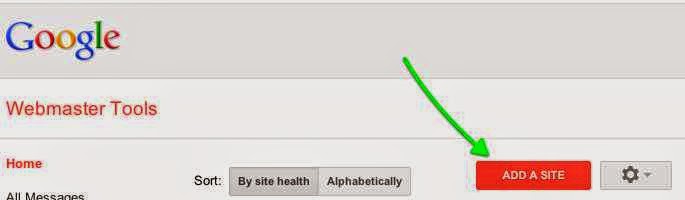
Here, the meta tag method will be used since it is the easiest way to add your Blogger blog to Google’s Webmaster Tools.- Goto Google webmaster tools, Login using your Gmail account details.
- Click on Add site, then enter your websites URL in the space provided
For existing websites on Google Webmaster Tools,
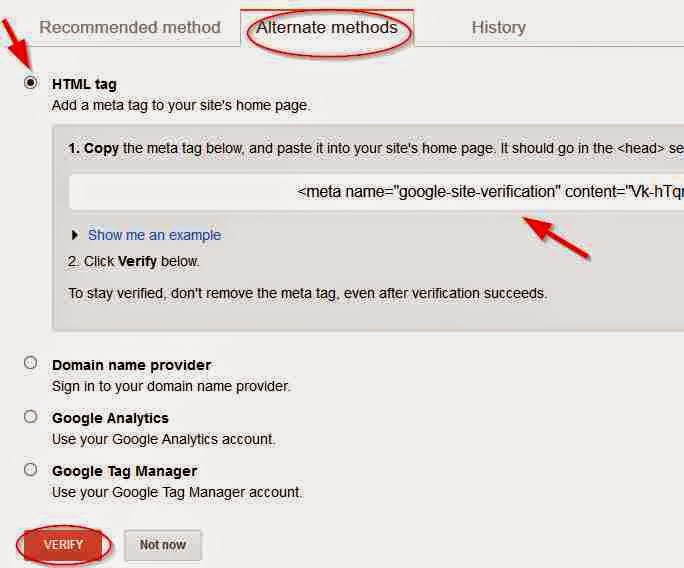
- Click on Verify this site
- On the new page, click on Alternate methods tab
- Select HTML tag button
- A google webmaster verification meta tag code will be generated, youre required to copy this code into your template. Follow the steps below to do this.
How to Add Google Webmaster Verification Code in Blogger Template
- From your Blogger dashboard
- Goto Template
- Click on Edit HTML
- Click inside your template, the use Ctrl + F keys and search for <head>
- Copy the the verification HTML code that was generated in Google Webmaster Tools and paste below <head>
- Save your template.
- Return to Google webmaster tools, then click on verify.
Top 60 High PR DoFollow Directory Submission Sites 2015
On clicking on verify, your blogger account/website has been verified. You can now see how your site performs on Google Webmaster Tools using features like search queries, links to your site, page speed insights etc.
Go to link download
Remove Old or Deleted Information From Google Index
Remove Old or Deleted Information From Google Index
Removing Information From Google Search
Heres how to request Google to remove a page in search results. You can request Google to remove a link to any of your pages which you dont want to come up in Google search engine result pages. You might be wondering why you should do this, but when Google indexes pages on your site that have broken links or are returning 404 error, it can affect your blogs/sites reputation and rank in search engine results. Even if youve manually deleted the pages on your blog, they are still indexed in search engines for some weeks after you’ve altered them. Other reasons why one might do this is if there are pages on the site that they dont want accessible to the public on web or if the URL of the webpage has changed making it an outdated page in SERPs. Deleting things off Google search can be done easily by using the URL removal tool provided in Google Webmaster toolsAlso Read: How to Use Google Webmaster Tools For SEO
How to Verify Blogger In Google Webmaster Tools
Google SEO Ranking Factors
How To Remove URL From Google Index
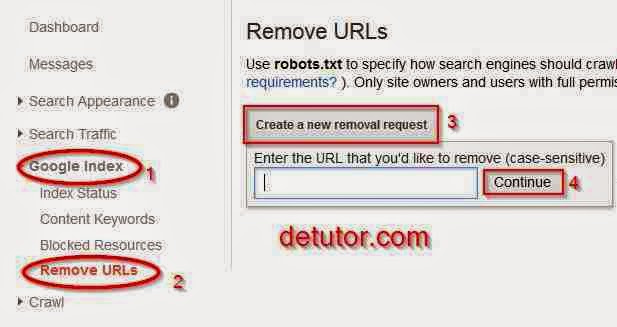
To make a Google URL removal request, follow the steps below
- Goto Google Webmaster Tools,
- If you have more than one site, select the one which is associated with the page you want to remove.
- Click on Google Index
- Select Create a new removal request
- In the space provided, enter the URL youll like to remove from Google Index
- Click on Continue.
On the new page, youre given three options which are Remove page from search results and cache, Remove page from cache, Remove page from directory
- Select the option Remove page from search results and cache
- Finally, click on the submit button Submit Request.
Optimize H1,H2 and H3 Heading Tags In Blogger
After submitting, youll see that the URL/page is pending removal from search results. Within a period of time, the page you entered will be completely removed from Google index. To cancel the process, select cancel.
Go to link download
Sunday, September 11, 2016
6 Best Android App Store Alternatives to Google Playstore
6 Best Android App Store Alternatives to Google Playstore
A list of the best Android app store alternatives to Google play store is given in this post. Best feature of the android device is the sophisticated apps and games that can be run on it, bringing about a better user experience. With the list of Google Play Store alternatives in this post, youll find several android app stores where you can download your favorite android apps and games. Although you can find lots of great apps and games in the Google Play Store, If youre looking for something different or an app that has been banned from the official store, then you can try out these android app store alternatives to Google Play store.
Also Read: Flash Share For BB10
Android Apps and Games For BB10
How to Download YouTube Videos on Android and BB10
Download Amazon App Store For Android Here.
Download 1Mobile for android
Download F-Droid For Android Here
Download GetJar For Android Here
Also Read: Flash Share For BB10
Android Apps and Games For BB10
How to Download YouTube Videos on Android and BB10
How to Install Third-party Android App Store
Before you can install any of the android app stores below, you have to enable installation of apps from unknown sources on your android device. To do this,- On your android device, Navigate to Settings
- Goto Security
- Then enable “Unknown sources”.
Best Google Play Store Alternatives for Android Devices
1. Amazon App Store
The Amazon App Store is a popular Google Play Store alternative for android devices. Apps and games on this app store can also be downloaded on BB10 devices.Download Amazon App Store For Android Here.
2. Opera Mobile Store
Another reliable Google play store alternative is the Opera mobile store. Several great apps and games for android, windows, blackberry devices etc can be found here.
Download Opera Mobile Store For Android Here.
3. Aptoide
Aptoide is an android app store and one of the Google play alternatives. You can easily get great apps and games from this app store.
Download Aptiode For Android Here
4. 1Mobile
1Mobile is another Google play store alternative. Most apps and games that can be found on any other app store can also be found on 1mobile. Certain apps that are absent on the Google play store are available on this app store.Download 1Mobile for android
5. F-Droid
F-Droid is another Google Play alternative for free open-source apps. Here, registration is not required to have access to the app store.Download F-Droid For Android Here
6. GetJar
GetJar is also regarded as one of the best Google Play alternatives. Other than the usual Java apps and games, users can download and install high quality android apps from the GetJar app store. Unlike other apps listed here, you can download GetJar from Google play store
Download GetJar For Android Here
Risk Of Using Android App stores
This risk here is malware or viruses on your android device. While using any of these app stores to download apps, ensure you have installed an antivirus or an android security app on your device.Go to link download
Sunday, September 4, 2016
How to Get Free Google Followers Instantly
How to Get Free Google Followers Instantly
This post centers on how to get free google+(plus) followers instantly. Social networking sites like facebook, twitter, google+, tumblr and the likes can have great impact on our websites depending on the number of fans we have on these social networks. Usually, the problem here is how to increase the number of fans on each of these social accounts. For twitter, ive already written a post on how to get twitter followers fast and free. But among all these social networks, and from my experience, Ill say google+ is the best because of its SEO benefits.
Also Read: How to Hide/Disable Google+ Profile Views Count
Download YouTube Videos On Android And BB10 devices
How to Update Facebook Status via Heaven, Hell, Blueberry, Ipad
Still looking for ways you can make your website appear on the first page of search results on the world’s #1 search engine? Then aside from page load time, keyword placement and backlinks, an increase in your google+ followers can do the trick. Each time any of your google+ followers that is logged in on their google account searches for a related content that is on your website, and which you have already shared on your google+ profile or page, it will also appear to them as one of the top search results on google. Also, when your blog post gets reshared by your google+ followers, their followers can also see your post when they search on google. Follow they steps below to increase your google+ followers for free and get a better search ranking.

Also Read: How to Hide/Disable Google+ Profile Views Count
Download YouTube Videos On Android And BB10 devices
How to Update Facebook Status via Heaven, Hell, Blueberry, Ipad
Still looking for ways you can make your website appear on the first page of search results on the world’s #1 search engine? Then aside from page load time, keyword placement and backlinks, an increase in your google+ followers can do the trick. Each time any of your google+ followers that is logged in on their google account searches for a related content that is on your website, and which you have already shared on your google+ profile or page, it will also appear to them as one of the top search results on google. Also, when your blog post gets reshared by your google+ followers, their followers can also see your post when they search on google. Follow they steps below to increase your google+ followers for free and get a better search ranking.
Also Read: Check Username Availability For Over 100 Social Networks
How to Get More Social Shares on Your Blog
Get Google+ Followers Fast and Free
Below are some websites you can use in getting free google+ followers and also increase your facebook and twitter followers. These sites operate based on social exchanges. You gain credits either by liking, sharing, or following other peoples social account. And with the credits gained, you pay others to also follow you.
- Likesasap
- Like4like
- Addmefast
- Social-Exchange
- Socialhitsexchange
Go to link download
Fix Duplicate Meta Description Error In Google Webmaster Tools
Fix Duplicate Meta Description Error In Google Webmaster Tools
How to Remove Duplicate Meta Description Error in Google Webmaster tool
Google Webmaster tools gives webmaster knowledge about their sites performance in search engines. Here, you can note the progress of your site and how to improve its SEO. Duplicate meta description error in Google webmaster tool exist when each posts on your blog does not have a meta search description. By telling search engines what the post is about using a search description, they can rank your pages in their result pages. Therefore, it is required that the search description is unique for each of the pages on your blog. Also, Duplicate meta description error can be brought about when you do not set your archive and labels pages as noindex.
Also Read: Remove Old or Deleted Information From Google Index
How to Use Google Webmaster Tools For SEO
How to Verify Blogger In Google Webmaster Tools
To identify duplicate meta description error in your blogger blog,
How to Use Google Webmaster Tools For SEO
How to Verify Blogger In Google Webmaster Tools
To identify duplicate meta description error in your blogger blog,
- Goto Google webmaster tools
- Select the site which you want to chect for the errors.
- Click on the section Search Appearance
- Select HTML Improvements
Here, youll see the number of duplicate descriptions and title tags on your blog.
Remove Duplicate Meta Descriptions Blogger
Some ways in which you can remove duplicate meta description error from Google webmaster tool are:- Editing Blogger Template
- Custom Robot.txt file in Blogger
- Custom Robot Header Tags
Editing Blogger Template
To remove duplicate meta description error using your blogger template, follow the steps below
- From your Blogger dashboard,
- Go to Template
- Click on Edit HTML
- Using CTRL+F keys, search for the entire code below
<b:if cond=data:blog.metaDescription != "">
<meta expr_content=data:blog.metaDescription name=description/>
</b:if>
- Replace the code with the one below
<b:if cond=data:blog.url != data:blog.homepageUrl>
<b:if cond=data:blog.pageType != "item">
<b:if cond=data:blog.metaDescription != "">
<meta expr_content=data:blog.metaDescription name=description/>
</b:if>
</b:if>
</b:if>

User-agent: Mediapartners-Google*
Allow: /
User-agent: Googlebot-Image
Allow: /
User-agent: Adsbot-Google
Allow: /
User-agent: Googlebot-Mobile
Allow: /
User-agent: Twitterbot
Allow: /
User-agent: *
Disallow: /search
Disallow: /cgi-bin/
Allow: /
User-agent: *
Disallow: /*.html
Allow: /*.html$
Sitemap: http://www.techlass.com//atom.xml?redirect=false&start-index=1&max-results=500
Also Read: Optimize H1,H2 and H3 Heading Tags In Blogger
- Save the template
Custom Robot Header Tags
- From your blogger dashboard,
- Goto settings
- Click on Search Preferences
- In the section Custom robots header tags, click on Edit
- Select the radio button Yes
- Tick the fields as with the image below
Custom Robot.txt
- From your blogger dashboard,
- Goto Settings
- Click on Search Preferences
- In Customs Robots.txt section
- Click on Edit
- Select Yes
- In the text field, copy the code below and paste
User-agent: Mediapartners-Google*
Allow: /
User-agent: Googlebot-Image
Allow: /
User-agent: Adsbot-Google
Allow: /
User-agent: Googlebot-Mobile
Allow: /
User-agent: Twitterbot
Allow: /
User-agent: *
Disallow: /search
Disallow: /cgi-bin/
Allow: /
User-agent: *
Disallow: /*.html
Allow: /*.html$
Sitemap: http://www.techlass.com//atom.xml?redirect=false&start-index=1&max-results=500
- Replace the higlighted URL with your sites URL.
- Click on Save changes.
Also Read: Optimize H1,H2 and H3 Heading Tags In Blogger
How to Make Blogger Template SEO Friendly
Go to link download
Saturday, August 20, 2016
How to Use Google Webmaster Tools For SEO
How to Use Google Webmaster Tools For SEO
What Is Google Webmaster Tools?
This post centers on how to use Google Webmaster Tools For SEO. This is a set of tools provided for webmasters to optimize their blogs or websites for Google search engine. Since Google is the worlds largest search engine and most of the free traffic webmasters are likely to get comes from it, it makes sense why one should give their website a proper SEO structure. With Google webmaster tools, you get to see your sites performance within a specified period of time, most important pages and indexed pages on your website, list of external and internal links to your site. Also you can adjust the crawl rate at which Google bot indexes your site, and generally ways on how you can improve your website with the site metrics provided.
To use Google Webmaster Tools For SEO, you have to verify your website on it. For blogger blogs, you can see this post on how to verify blogger in Google webmaster tools. For other blogging platforms, you can visit Google webmaster tools, add your site, then verify using either of the following:
- HTML Meta tag
- HTML file upload
- Google Analytics
- Google tag Manager and,
- Domain name Provider.
Verification of your website proves youre the owner and enables you to gain access to all of the features listed above and many more.
Google Webmaster Tools For Seo
Several tools which webmasters can use in analyzing their website for better rankings can be found in Google webmaster tools, In this post, a list of the basic ones are given. These include search queries, links to your site, index status, content keywods, crawl errors, crawl stats, fetch as Google, Sitemaps, robots.txt tester and page speed insights.
Search Queries:
A review of your sites popularity is shown using a graphical representation. You can set the date range which lets you know if your sites performance is improving or declining in Google search results. Things you should watch out for are the impressions, number of clicks for that date range. Also, in the search queries tab the keywords used to find a post on your blog is shown with the impressions it got, number of clicks and its average position in search results.
Keywords- With the keywords, you get to know the search strings that was inputted before a visitor accessed your website. With this, you can edit existing posts on your blog that matches that keyword in order to increase their ranking.
Impressions : This shows the number of times your post came up in search engines and the possibility of a user clicking on it. A post with a higher impression should be optimized properly by giving it a better description, and catchy title etc.
Number of Clicks: This gives the actual number of users who clicked on the post to visit your site. If a post has a high impression but with very low clicks, you need to spend time to make the post SEO friendly. By using header tags to categorise the post, relevant keywords in post title and description, increasing the length of the actual post, this can do the trick.
Average Position: When your post comes up in search engines, it falls into different positions for different users who search for it on Google. If for user A the post was on position 3 and for user B , the post was on position 5, then the average positon for that post will be 4, since 3 plus 5 divided by 2 is 4. If the post has an average position above 9, then its likely on page 2 on Google which means less traffic to your blog. The higher the average position, the lower its rank on Google.
What you can do here is to check the impression for that post, if it is high, then you can try and move the post to page 1 on Google. To do this will require backlinks, keyword density in post, keywords in the post title , at the beginning of the post etc. For backlinks, instead of building them to your homepages URL, you can start building them to internal pages on your blog using high PR social bookmarking sites, high PR Gov and Edu Forums, directory submission sites and commenting on dofollow commetluv blogs.
Links to your Site
This shows the number of websites that are linking to pages on your site and the number of internal links on your site. For links to your site, you get to see your most linked content, the URL of the website that is linking to it, an the anchor text used for each link.You can use this as an online backlink checker tool.
Index Status
The index status shows the number of pages on your site that have been indexed by Google, meaning theyre accessible by users on searching for it. To allow Google index the pages on your website, you need to add/submit a sitemap in Google webmaster tools, to do this:- On Google webmaster tools,
- Click on Crawl
- Select Sitemap
- On the top right corner, click on Add/Test Sitemap
- Type Sitemap.xml or type system/feeds/sitemap in the space provided, then click on submit.

You can also create an HTML sitemap page in your blogger blog which can help index the pages on your blog faster and help users navigate easily through your blog.
Fetch as Google
As the name implies, you can use this tool to fetch the content of your homepage or individual pages on your site. An advantage is that the content gets indexed faster instead of waiting for hours or days for Google to crawl and index your blog posts after youve published them.Content Keywords
The primary keywords used on your blog are shown with the level of significance they have. It shows you how how Google sees your site.Crawl Errors
The Crawl errors section shows the errors encountered by Google bot while crawling your site to index its pages. This is usually shown in form of messages on visiting Google Webmaster tools. These errors can arise when theres inability to communicate with the DNS server, robot.txt is not accessible and theres a slow response in server connectivity .
Page Speed Insight
Here, the speed of your website is given out of a possible result of 100. If your page speed is low, it can affect your blogs position in search engines since it takes too much time to load. Another effect itll have is an increase in its bounce rate. Most users on visiting your blog will leave immediately if it takes too much data or is slow. You should keep in mind that the information theyre looking for is also on several blogs who are your competitors. You have to remove unnecessary Ads, gadgets and widgets on your blog. Compressing images, reducing their sizes and minimizing the number of images on pages can help improve you blogs page speed. On Google webmasters tools, youll get other sugestions on how to increase your sites page speed on mobile and desktop devices.
Also Read: Get High PR 9 Dofollow Backlinks From YouTube
With these tools listed above and many others as provided in Google Webmaster tools you can get detailed information about your sites performance and the areas that need modification in order to improve its SEO.
Go to link download
Subscribe to:
Posts (Atom)