Showing posts with label index. Show all posts
Showing posts with label index. Show all posts
Monday, September 19, 2016
Allow Search Engines to Index Your Blog Fast
Allow Search Engines to Index Your Blog Fast
Search Engines Indexing
Steps on how to allow search engines to index your blog posts fast is given in this post. The process of crawling a website by search engine bots is to find new and updated content in order to bring about its indexing. Indexing involves the addition of the sites content to the search engines index. The time taken to index an updated content or new content varies from site to site. For some websites, their posts are indexed within a matter of minutes after the content was published, and for others it might take hours or some days. Until a website or post from the site is indexed by search engines,it cannot be found by users on searching for it on the net.Also Read: How to Submit Blog to Bing Webmaster Tools
Remove Old or Deleted Information From Google Index
Optimize H1,H2 and H3 Heading Tags In Blogger
Benefits Of Indexing a Blog Post Fast
Waiting for Google bots to crawl and index new posts on your blog can take hours, days or even weeks. The reason for this diversity in indexing speed/time is unknown and for many bloggers, this can have many disadvantages. One of them is the fact that when someone copies from your blog to theirs and Google indexes their posts first before yours, it can have a negative impact on your blog. For one, theyll be seen as the original creator of the content since theirs was indexed before yours and since Google dislikes duplicate content, your site could get penalized.Also a blog post that is indexed fast and on time will start showing up in Google search result pages. If it is well optimized, Itll start getting pageviews and thereby influence the amount of traffic to the site positively. Below are some of the ways you can ensure your new blog post gets indexed fast by Google and other search engines, follow them to improve the time at which posts and pages on your website are indexed.
How to Index a New Blog Post Fast On Search Engines
Link Building:
Building backlinks from reputable sites that gets crawled regularly can help in indexing your site and its content fast. By sharing the URL of the post to these sites, you can help search engines find, crawl and index your content on time. These backlinks can be acquired from sites with high Page rank. They can be social bookmarking sites, commentluv blogs, and forums. Other than getting your blog posts indexed fast, these backlinks can improve your rank in search engine result pages.Pinging Of Post
Another effective way of alerting search engines that you have recently updated your website or made changes to its pages is to ping the URL of the post to several search engines.This will help in indexing the post fast. There are several sites that offer pinging services and some of these are pingdom and pingomatic. Also, you can create an RSS feed URL and submit it to RSS aggregators. To generate an RSS feed URL,- Visit RSS feed Creator
- Enter your keywords, post URLs and description. Then create the feed.
On this site, you also can submit the RSS feed you created to different directories. To do this,
- Click on the tab RSS submit Online
- Enter the Feed name, its description, and URL of the feed you created in step one above
- Finally, submit the URL
Fetch as Google Tool
In Google Webmaster tools, you can use the fetch as google tool that can enable Google index your blog posts faster. To use this tool,
- Goto Google Webmaster tools,
- If you have more than one site, select the one youll like to use for this process
- Click on Crawl
- Select Fetch as Google

- You can enter individual URLs or your homepages URL in the space provided.
Sitemap
An HTML sitemap in your blog does not only enable users navigate easily through your blog but it can also help search engines crawl pages on your website. Add an HTML sitemap to your blog by following this link.Also Read: 7 Best On Page SEO Techniques 2016 For Blog Traffic
How to Use Google Webmaster Tools For SEO
With the methods outlined above, Google bots and other search engine bots can easily to crawl and fetch your sites content for indexing at a faster pace.
Go to link download

Sunday, September 18, 2016
Remove Old or Deleted Information From Google Index
Remove Old or Deleted Information From Google Index
Removing Information From Google Search
Heres how to request Google to remove a page in search results. You can request Google to remove a link to any of your pages which you dont want to come up in Google search engine result pages. You might be wondering why you should do this, but when Google indexes pages on your site that have broken links or are returning 404 error, it can affect your blogs/sites reputation and rank in search engine results. Even if youve manually deleted the pages on your blog, they are still indexed in search engines for some weeks after you’ve altered them. Other reasons why one might do this is if there are pages on the site that they dont want accessible to the public on web or if the URL of the webpage has changed making it an outdated page in SERPs. Deleting things off Google search can be done easily by using the URL removal tool provided in Google Webmaster toolsAlso Read: How to Use Google Webmaster Tools For SEO
How to Verify Blogger In Google Webmaster Tools
Google SEO Ranking Factors
How To Remove URL From Google Index
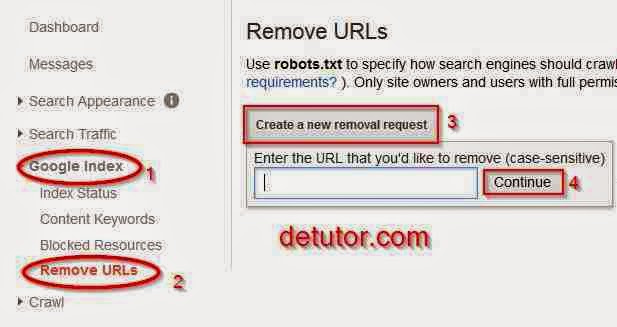
To make a Google URL removal request, follow the steps below
- Goto Google Webmaster Tools,
- If you have more than one site, select the one which is associated with the page you want to remove.
- Click on Google Index
- Select Create a new removal request
- In the space provided, enter the URL youll like to remove from Google Index
- Click on Continue.
On the new page, youre given three options which are Remove page from search results and cache, Remove page from cache, Remove page from directory
- Select the option Remove page from search results and cache
- Finally, click on the submit button Submit Request.
Optimize H1,H2 and H3 Heading Tags In Blogger
After submitting, youll see that the URL/page is pending removal from search results. Within a period of time, the page you entered will be completely removed from Google index. To cancel the process, select cancel.
Go to link download
Saturday, September 17, 2016
How to Index Backlinks Fast
How to Index Backlinks Fast
What Are Backlinks
A Backlink is a link from one site pointing to another site. Its like a vote you get of your sites credibility from other sites. Search engines rely on the number of quality backlinks or number of sites voting of your sites credibility in order to rank it on their result pages. Backlinks are also known as Inward links, inbound links can help in the search engine optimization of any site. The higher the pagerank of websites pointing to your site, the better. With backlinks, traffic to any site can be increased within a short period of time.Benefits Of Backlinks In SEO
The benefits of backlinks are quite numerous especially in SEO of any site. Some of these include its effect in ranking a site higher in search engines result pages, improving the sites popularity and importance. With more quality backlinks pointing to your site, you can build your brands popularity and reduce your websites alexa rank. A backlink from a site that is popular can also help to drive traffic to your site.Some methods of getting high quality backlinks to your site include guest posting on blogs related to your niche, sharing of URL to forums and social bookmarking sites. All these processes involved in acquiring backlinks can be quite cumbersome. Even though one has spent so much time to get these backlinks, it may happen that only 10% of the backlinks created gets indexed by search engines making the other 90% a total waste of time and effort. With only that percent being indexed, this might add little or no improvement to the sites SEO.
Also, if backlinks are not indexed on time by search engines like Google, it might take a while before meaningful changes are seen on the site in terms of increased search engine visibility. It could take a days, weeks or months to get a backlink you created to get indexed and in this post, youll find several ways on how to make search engines index your backlinks fast.
Also Read: List of Free High PR Ping Service Sites 2015
How to Get Quality Backlinks Fast to Your Blog
Top High PR 9 - PR 1 Dofollow Forum Posting Site List
Index your Backlinks Faster In Search Engines
Pinging:Pinging is the process of alerting search engines that the content of a page has been recently updated or a new content has been added. This will tell search engines bots to crawl the page that was pinged and index it. By pinging the pages of sites which youve created a backlink, your backlinks can be indexed at a faster pace thereby adding value to your site.
Pinging can be done using high PR pinging sites. One of the most popular is pingdom. To ping your backlinks using pingdom, follow the steps below
- Visit Pingfarm
- Copy and paste your URL into the text field.
- You can also upload a text file containing a list web pages you built backlinks from.
- Enter your desired keyword
- Then submit to ping the backlinks
- Visit Free RSS creator
- Click on the tab RSS feed creator

- Enter the details required on the page for keywords, description and feed name.
- Enter the URLs of the sites your links are (this is not the homepage of the site you placed your links, but the actual page your link is on)
- Click on Create RSS Feed.
- Click on the tab RSS submit Online
- Enter the required details
- Mark the fields for directories you want to submit the URL to
- Finally, submit
You can also try out these pinging services sites below. Some are free and others have charges. These are:
- Linklicious
- Instant Link Indexer
- Feed Shark
Dofollow Blog Commenting Sites List
To ensure youre not wasting your time in acquiring backlinks that dont get indexed, you can help search engines index most of them if not all following the steps given above.
Go to link download
Subscribe to:
Posts (Atom)