Showing posts with label your. Show all posts
Showing posts with label your. Show all posts
Tuesday, October 25, 2016
Bypass Verify Your Google Account On Huawei All Models Android 6 1 5 1 1
Bypass Verify Your Google Account On Huawei All Models Android 6 1 5 1 1
Published on May 30, 2016
Bypass Verify Your Google Account On Huawei All Models Android 6.1 , 5.1.1
With this Bypass Method Will Bypass Verify Your Google Account On Huawei All Models Android 6 1 , 5 1 1 by using Apk file without requiring the PC OR any Other Hardware.
Use it if you forget your Google Account
it will NOT UNLOCK the network lock. This method does not reset the PIN code of the SIM card.
Bypass Google verify Your Account.
1. follow the Videos Steps
2. Subscribe FlashRepair1
Warning!
Take your sim card and memory card from the phone before the reset.
All personal data from the phone (contacts, pictures, messages, apps, games, files) will be deleted!
if you can, make a backup before!
Link:
Shortcut application apk link:
https://goo.gl/lJPCqH
Follow Me:
https://www.facebook.com/GsmMarhaba
https://www.youtube.com/FlashRepair1
Go to link download

Monday, October 17, 2016
Huawei Y6 SCL U31 Hard Reset And Bypass Google Verify Your Account
Huawei Y6 SCL U31 Hard Reset And Bypass Google Verify Your Account
Huawei Y6 SCL U31 Hard Reset and remove pattern lock And Bypass Google Verify Your Account
With this HARD RESET Method Will Huawei Y6 SCL U31 to factory settings by using a keys combination without requiring the phone to be power on.
And also Bypass Google verify your account Without pc or other hardware
Use it if you forget your security code or if you have various problems with the phone software.
it will NOT UNLOCK the network lock. This method does not reset the PIN code of the SIM card.
How To Hard Reset:
1.Power Off
2. Press Volume Up + Power Key
3. left the keys when you see reset options
4. Move to wipe data/factory rest With Volume down.
5. Conform with Power key
6. Conform Again with Power key
7. Reboot now Conform with Power key
8. its done
Bypass Google verify Your Account.
1. follow the Videos Steps
2. Subscribe FlashRepair1
Warning!
Take your sim card and memory card from the phone before the reset.
All personal data from the phone (contacts, pictures, messages, apps, games, files) will be deleted!
if you can, make a backup before!
Link:
Shortcut application apk link:
https://goo.gl/lJPCqH
Follow Me:
https://www.facebook.com/GsmMarhaba
https://www.youtube.com/FlashRepair1
Go to link download
Tuesday, October 4, 2016
How to Get Quality Backlinks Fast to Your Blog
How to Get Quality Backlinks Fast to Your Blog
Heres how to get quality backlinks to your blog/website. Other than on page SEO practices, one will have to carry out off page SEO and the most effective is link building. To rank high in search engines so that your content gets seen, reduce your alexa rank and increase your blogs traffic, acquiring backlinks must be a priority. Some backlinks won’t improve your rankings, and some might even have a negative effect. Therefore, you should focus on acquiring high quality backlinks, the higher the quality of the backlinks, the better. Writing quality post day in day out and waiting around for search engines to finally send some traffic yo your blog might not actually work or get your content the required exposure. Itll just sit in your blogs archive till dust gets all over it. To build quality backlinks to your blog in order to improve your blogs visibility in search engines, here are some ways you can generate them.

Skimp through the post and have a fair idea of what the author is trying to say, with this, you can drop valuable comments and the admin wont think twice of approving it even if youve included your link in it (congrats, youre now a certified spammer.). If you dont still grasp what the post is about, you can try generic comments like:
You will get nofollow and dofollow backlinks from these sites which can help you with SEO. To get a list of high PR sites to comment on, check out this post on high PR dofollow commentluv blogs 2015 .
High PR Forums
Other than commenting and using social bookmarking sites to get quality backlinks to your blog, you can also try out high PR forums. On visiting these forums, register on them, then include your sites URL in your profile and signature. This will enable you to build backlinks and also promote your site. Participate in discussions in these forums, and with your URL included in signatures, other users can visit your blog via the link. Heres a list of high PR forums for backlinks and Angela High PR Dofollow Backlinks 2015
Going through all these processes can be quite hard and time consuming, but in the long run its worth it. After trying out the various methods listed above for getting high PR backlinks to your blog, within some days/weeks use one of these free online backlink checker tools to check your pagerank and number of alexa sites links/referring domains that are linking to your blog/website.
How to Build Quality Backlinks
Blog Commenting
An effective way of getting quality backlinks to your blog is by commenting on other blogs related to your niche. These blogs should have high PR. Some websites you visit moderate comments before it is finally posted hence, your comments must be meaningful before it gets approved. Dont go around writing stuffs like Thanks for sharing, great post, also check out my blog, good post, i bookmarked this page or nice template. It shows you didnt read the post and youre only out to get a link back to your blog, which is actually true, but you shouldnt make it so obvious.Skimp through the post and have a fair idea of what the author is trying to say, with this, you can drop valuable comments and the admin wont think twice of approving it even if youve included your link in it (congrats, youre now a certified spammer.). If you dont still grasp what the post is about, you can try generic comments like:
- Just want to say your article is outstanding. The clarity in your post is simply spectacular and i can assume you are an expert on this field. Well, with your permission, allow me to grab your Rss feed to keep up to date with incoming posts. Thanks a million and please keep up the fabulous work.
- Great post, you seem to have a good understanding about it. When i entered your blog, i felt this. I merely found this excellent post through Google. They definitely need to position your site on the first page. Come on and keep writing and your blog will be more attractive.
- When i came upon your site, i must say your webpage is really cool. I just love the content, its outstanding! Im in a bit of a rush in this instance to completely read your blog, but i have favourited it. I will be back when i have some time. Bravo for the site.
You will get nofollow and dofollow backlinks from these sites which can help you with SEO. To get a list of high PR sites to comment on, check out this post on high PR dofollow commentluv blogs 2015 .
Social Bookmarking Sites
These are online services that enable users to store, organize, search, and manage web pages. With Social bookmarking sites, you can drive traffic to your blog and build valuable high PR backlinks to it. Share your post to these sites with a catchy title and post description. Some of these sites include Delicious, Digg, Reddit, Folkd, Pinterest etc. To get more high PR social bookmarking sites to build quality backlinks to your blog, refer to this post on free high PR dofollow social bookmarking sites.High PR Forums
Other than commenting and using social bookmarking sites to get quality backlinks to your blog, you can also try out high PR forums. On visiting these forums, register on them, then include your sites URL in your profile and signature. This will enable you to build backlinks and also promote your site. Participate in discussions in these forums, and with your URL included in signatures, other users can visit your blog via the link. Heres a list of high PR forums for backlinks and Angela High PR Dofollow Backlinks 2015
Directory Submission Sites
These are sites you can submit your URL to be added to the websites directory. When your URL has been included, you get backlinks which can Improve your sites ranking. Some of these directories allow you to add your URL for free. Ive included in this post a list of top 60 high PR dofollow directory submission sites with which you can share your URL to.Blogging Communities
Blogging communities are one of the best ways to get quality backlinks and build a relationship with other bloggers. You can share your post to these communities where others can comment on and reshare it on on social networking sites like facebook, twitter etc. This will inturn increase your backlinks and traffic. Some blogging communities are listed below:- Google+ Communities : Although you get nofollow backlinks from google+ communities, joining these communities and sharing your post to them can increase your blogs pageviews. You can easily get google+1 votes. A trick you can try out is joining inspirational or jokes communities on google+ and uploading good inspirational images. Before uploading the image, add a link to one of your blog post in the post section. Any google+1 vote on the image is a +1 vote on the post.
- Inbound: You can also get backlinks by sharing your post to this blogging community. Inbound allows you to share your blog posts for free and also drive traffic to your site. Posts shared on inbound can also come up in search engines results.
- Kingged: Another blogging community you can get backlinks from is Kingged. Here, you can share your blog posts, engage by commenting on the posts of others. Kingged uses the commentluv plugin that leaves one of your most recent content on any post you comment on. Also, when users comment of the post you shared on Kingged, the comments are added automatically on your blog.
- BizSugar: BizSugar is a popular blogging community where bloggers share their articles. Whenever you get an up-vote for your article you will get one dofollow backlink from Bizsugar.
- Klinkk: This is another popular blogging community where you can build quality backlink.
Backlinks From YouTube
Another place you can get backlinks YouTube. Although the backlinks have a nofollow attribute, in this post, Ive illustrated how to get high PR 9 dofolllow backlinks from youtube.Going through all these processes can be quite hard and time consuming, but in the long run its worth it. After trying out the various methods listed above for getting high PR backlinks to your blog, within some days/weeks use one of these free online backlink checker tools to check your pagerank and number of alexa sites links/referring domains that are linking to your blog/website.
Go to link download
Friday, September 30, 2016
How to Submit Your Blog to Bing Webmaster Tools
How to Submit Your Blog to Bing Webmaster Tools
Submit Site to Search Engines
A post on how to submit your website/sitemap to Bing Webmaster Tools. After carrying out on page and off page search engine optimization techniques, another step that is required to promote your site is, submission of its pages to search engines for organic traffic. Other than popular sources of traffic like social networks, adverts, forums etc, the amount of free targeted traffic from search engines to a site makes it necessary for one to give more preference to them and allow them to crawl and index their sites pages.Also Read: How to Use Google Webmaster Tools For SEO
Remove Old or Deleted Information From Google Index
Google SEO Ranking Factors
Previously, i shared a post on how to submit and verify blogger blogs in Google webmaster tools, and here, youll get to know how you can use the search engine Bing to get traffic to your site. Ranking high on Bings search result pages is easier when compared with Google, hence, another source of getting meaningful traffic to your site. Before your site can be indexed by Bing, you have to submit it to Bing Webmaster tools. This will include your sites pages in its search results.
How to Submit Website to Bing
To make sure your content gets seen in Bing search results, follow the steps below.
- Goto Bing Webmaster tools
- Sign in using your Microsoft Account (If you dont have one, follow this link to create)
- Enter you sites URL i the field specified.
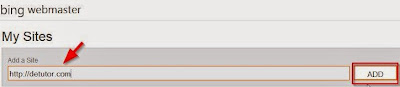
- Click on Add
- On the new page, include your sitemap URL
- Enter your sites URL in the space provided,
- Click on Generate
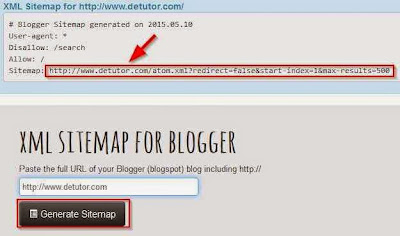
- Copy the generated URL for the sitemap and paste on the required field on Bing
- Click on Add.
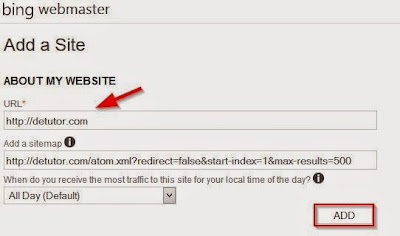
Next, youll verify youre the owner of the site youre submitting to Bing. To verify website on bing for blogger blogs, follow the steps below.
- Use the option 2 which is the meta tag method
- Copy the meta tag.
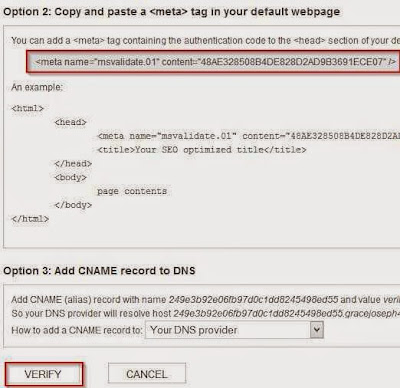
- Goto your Blogger template
- Click on Edit HTML
- Using CTRL+F keys, search for the tag <head>
- Paste the validation code you copied on Bing below <head>
- Save your template.
- Return to Bing
- Scroll down and click on Verify
Also Read: Optimize H1,H2 and H3 Heading Tags In Blogger
How to Make Blogger Template SEO Friendly
With the steps as listed above on how to submit your blog to Bing Webmaster Tools you site will start showing upin Bing search results, thereby improving your online visibility.
How to Make Blogger Template SEO Friendly
With the steps as listed above on how to submit your blog to Bing Webmaster Tools you site will start showing upin Bing search results, thereby improving your online visibility.
Go to link download
Monday, September 19, 2016
Allow Search Engines to Index Your Blog Fast
Allow Search Engines to Index Your Blog Fast
Search Engines Indexing
Steps on how to allow search engines to index your blog posts fast is given in this post. The process of crawling a website by search engine bots is to find new and updated content in order to bring about its indexing. Indexing involves the addition of the sites content to the search engines index. The time taken to index an updated content or new content varies from site to site. For some websites, their posts are indexed within a matter of minutes after the content was published, and for others it might take hours or some days. Until a website or post from the site is indexed by search engines,it cannot be found by users on searching for it on the net.Also Read: How to Submit Blog to Bing Webmaster Tools
Remove Old or Deleted Information From Google Index
Optimize H1,H2 and H3 Heading Tags In Blogger
Benefits Of Indexing a Blog Post Fast
Waiting for Google bots to crawl and index new posts on your blog can take hours, days or even weeks. The reason for this diversity in indexing speed/time is unknown and for many bloggers, this can have many disadvantages. One of them is the fact that when someone copies from your blog to theirs and Google indexes their posts first before yours, it can have a negative impact on your blog. For one, theyll be seen as the original creator of the content since theirs was indexed before yours and since Google dislikes duplicate content, your site could get penalized.Also a blog post that is indexed fast and on time will start showing up in Google search result pages. If it is well optimized, Itll start getting pageviews and thereby influence the amount of traffic to the site positively. Below are some of the ways you can ensure your new blog post gets indexed fast by Google and other search engines, follow them to improve the time at which posts and pages on your website are indexed.
How to Index a New Blog Post Fast On Search Engines
Link Building:
Building backlinks from reputable sites that gets crawled regularly can help in indexing your site and its content fast. By sharing the URL of the post to these sites, you can help search engines find, crawl and index your content on time. These backlinks can be acquired from sites with high Page rank. They can be social bookmarking sites, commentluv blogs, and forums. Other than getting your blog posts indexed fast, these backlinks can improve your rank in search engine result pages.Pinging Of Post
Another effective way of alerting search engines that you have recently updated your website or made changes to its pages is to ping the URL of the post to several search engines.This will help in indexing the post fast. There are several sites that offer pinging services and some of these are pingdom and pingomatic. Also, you can create an RSS feed URL and submit it to RSS aggregators. To generate an RSS feed URL,- Visit RSS feed Creator
- Enter your keywords, post URLs and description. Then create the feed.
On this site, you also can submit the RSS feed you created to different directories. To do this,
- Click on the tab RSS submit Online
- Enter the Feed name, its description, and URL of the feed you created in step one above
- Finally, submit the URL
Fetch as Google Tool
In Google Webmaster tools, you can use the fetch as google tool that can enable Google index your blog posts faster. To use this tool,
- Goto Google Webmaster tools,
- If you have more than one site, select the one youll like to use for this process
- Click on Crawl
- Select Fetch as Google

- You can enter individual URLs or your homepages URL in the space provided.
Sitemap
An HTML sitemap in your blog does not only enable users navigate easily through your blog but it can also help search engines crawl pages on your website. Add an HTML sitemap to your blog by following this link.Also Read: 7 Best On Page SEO Techniques 2016 For Blog Traffic
How to Use Google Webmaster Tools For SEO
With the methods outlined above, Google bots and other search engine bots can easily to crawl and fetch your sites content for indexing at a faster pace.
Go to link download
Saturday, September 3, 2016
How to Create a Logo for Your Blog
How to Create a Logo for Your Blog
Looking for online logo makers for your website or to have one just like popular brands like Apple, Blackberry and Facebook? Then in this post, youll find a list of sites where you can create a logo that is fit for your website. A logo is like a symbol, signature or an identity that represents your brand/website. On most blogs you visit, youll notice that theres a logo on it, which is usually unique for all websites. The same logo can be used across multiple accounts like, Facebook groups and pages, Twitter profile, Pinterest and the rest.

Also Read: Where to Find Free Images Online For Blog
Tumblr Cursors
Free Blog Backgrounds
Benefits of Having A Logo
One of the advantages of creating a logo is that even without the name of your blog, the logo can still stand out and be pointed to as your website. In a way, this helps in promoting your brand or website. Also, when the URL of your site or Blogs name looks similar to several other sites, a unique logo can help visitors identify which site is actually yours and in turn helps in reducing the effect it couldve brought in terms of losing your loyal readers or potential customers.Also Read: Where to Find Free Images Online For Blog
Tumblr Cursors
Free Blog Backgrounds
Guidelines For Choosing a Logo For Your Blog
While its actually advisable to add a logo on your blog, there are certain things you should consider while choosing one for your blog. These include:- Keep the logo simple. The design should be easy for people to recall.
- In an attempt to keep it simple, dont make it unattractive it the process.
- Your logo should be unique and not resemble the logo of any other site or brand.
List Of Sites to Create Logo For Your Blog
Logo Maker
With Logo Maker, you can easily create a free logo for your blog. There are several logo icons, fonts and colours you can choose from and within some minutes, the process of creating a logo is complete. On this site, youre allowed to create and download six logos for free and for subsequent ones, they will have to be paid for.Withoomph
You can also create a Logo on this site. Even though its not free, its ability to create logos with quality design makes it an excellent service to use in creating your blogs logo. Your blogs name or companys name to identify the logo and keywords which will be used as the logos description are usually required on Withoomp. Thereafter, It automatically generates several logos with different designs using the name you entered.Free Logo Services
Offers a free logo creation service that allows you to choose from different collection of logo symbols, the text, font size. You can also design your business cards and promotional products here.OnlineLogoMaker
This is another free logo online maker site. Here, you can choose from 1,000 symbols that have been provided to create a logo for your blog. Also, you can resize your logo as you deem fit. Registration is required on this site in order to create and download your logo.LogoEase
The free logo offers free and paid services for logo design. With the custom logo design, you get to have professionals design your logo and with the free version, you have full control of creating your own logo but with limited features.Logo Yes
Logo Yes gives you access to over 20,000 professional design elements which you can use in personalizing the look of your logo. They have an extensive library that is periodically updated,so youre sure of getting a logo design that is in trend.
LogoSnap
Logo Design Engine
Go to link download
Wednesday, August 31, 2016
Get Easily Rooting Method Your Samsung Galaxy S6 S6 edge Guide Easily Method Free Download
Get Easily Rooting Method Your Samsung Galaxy S6 S6 edge Guide Easily Method Free Download
G925SKSU1A5D6,G925FXXU1AODC,G920IDVU1AOD5,G920PVPU0AOBC,G925W8VLU1AOE1,
G925AUCU1AOC9,G920VVRU1AOC4,G920FXXU1AODC,G920TUVU1AOC9,G920W8VLU1AOE1
Due to my limited bandwidth and slow connection to oversea download sites, it takes too long to get new ROM scanned and supported. I need volunteers with knowledge of Odin tarballs and ROM zip packages to help me extracting "useful" part out of the ROM and upload them to speed up the process. Thank you for making this tool better

How to get involved:
1. You need to know how to extract boot.img and system partition files from Odin tarball and recovery flash-able ZIP packages.
2. Pick one of the ROM from the pending list. Please search in thread first to see if anyone is already working on it (and not yet failed). Ill also maintain the list regularly.
3. Search for this ROM on SamMobile or other sources. If you can find it, please reply in this thread in form of "WIP ROM version" so others will know.
4. Download the ROM, extract following pieces:
- boot.img
- /system/build.prop
5. Create a zip file named ROM_version.zip, containing boot.img and build.prop (inside system folder please), and upload it to a mediafire/mega share:
***remove the account, seems it never works***
6. Once done, please update the reply with "DONE ROM version". For any reason it failed or you cant continue, just replace it with "deleted".
ROMs Pending Download:
G925SKSU1A5D6
G925FXXU1AODC
G920IDVU1AOD5
G920PVPU0AOBC
G925AUCU1AOC9
G920VVRU1AOC4
G920FXXU1AODC
G920TUVU1AOC9
G920W8VLU1AOE1
G925W8VLU1AOE1
G925FXXU1AOCV
G925SKSU1AOD5
G920R4TYU1AOCB
G925W8VLU1AOCG
G925TUVU1AOCG
SimG2imG
SimG2imG
Go to link download
Tuesday, August 30, 2016
How to Make Your Blog Post SEO Friendly
How to Make Your Blog Post SEO Friendly
Search Engine Optimization
Given below are tips on how to make your blog post SEO Friendly. Search engine optimization is a technique used by webmasters to improve their sites rank and visibility on search engines like Google and Bing, thereby increasing traffic to their site. These SEO techniques are either on page or off page SEO. For on page SEO, it involves optimizing images, content etc on the site and for off page SEO, it basically involves the act of link building.For your blog posts to perform well in search engine results by ranking high, it has to be well optimized using both on page and off page SEO techniques Although there are several sources of traffic like social networks and forums, they all require constant sharing of your blog posts to them. Receiving traffic from search engines is better and requires less effort after sometime. This is because the amount of traffic is higher and youre not required to continually share your post like in the case of social networks and forums. A well optimized post can drive free traffic to your site for months or even years. In this post, ways on on how optimize your blog post for search engines have been given.
Also Read: Google SEO Ranking Factors
How to Use Google Webmaster Tools For SEO
Optimize H1,H2 and H3 Heading Tags In Blogger
How to Optimize Your Blog Post For Search Engines
Keywords:
- Title Of Post:
Including keywords in the title of the post can rank your post higher in search engine result pages. Although most tutorials on net will advice you to use catchy titles, this is good but in the process of attracting your readers to read your post, you should also ensure search engines can find the post by ensuring keywords are in the title especially at the beginning. Youll notice that exact matches to the string entered on Google search usually rank higher than the ones that arent exactly the same to the entered string. But this is not true in all cases.
- URL:
Also, you can edit the URL of a post before publishing it or after it has been published by including keywords in the URL. Remove any irrelevant word or stop words like to from the URL but do it in a way that it still makes sense when read out loud. Even though theyre just search engine bots, theyre smarter than you can imagine
- Within Post:
Including keywords at the beginning and at the end of the post. Repeating your keywords several times within the body of the post can also help in ranking your blog higher in search engines. While doing so, you should ensure you dont go beyond the limit to avoid keyword stuffing. Most SEO experts advice on having keywords thrice in the entire post or keywords after 100 every words in your post.
Length of Post:
A longer post when compared with a shorter post can perform better in search engine results. To increase the chances that your blog posts will come up in search engines for different related terms, you need to increase the length of the post you publish. Increasing the length doesnt mean you should just add unnecessary content to the your post thereby making it hard for your readers to read and understand. Carry out research on the topic youll like to write on, so that you dont run out of ideas on what to include in your post.
Search description:
For blogger blogs, youre allowed to include a search description in individual post on your blog. Include a search description for all the posts. The description is a way of telling search engines what the post is all about and help can rank your post higher. This description should contain your keywords and not exceed 155 characters.
Labels:
Another way of optimizing your posts for search engines is by adding relevant labels that are related to the post. For the labels, you can use keywords that actually describe the post and not generic keywords. In this post for example, the labels used are SEO optimization, SEO friendly, Blogging tips, On page optimization techniques instead of Blogging, Blogger, Blogging Tips.Backlinks:
After publishing the post, another effective method and ill say the most effective SEO techique to use in improving its visibility is building backlinks to the post. You can share the post to forums, social bookmarking sites, comment on other blogs or even guest post. Another advantage of doing this is that it will help in indexing the post faster and give your site a better alexa rank.
Image Optimization:
Optimizing the images used in your blog posts by adding alt tags. These alt tags describe the image and since images are usually included in search results, you can also use this method to drive traffic to your blog.
Also Read: How to Make Blogger Template SEO Friendly
SEO Tools - Firefox Addons for Search Engine Optimization
With the above tips, you can optimize your site for search engines and drive traffic to your site .
Go to link download
Tuesday, August 23, 2016
How to Access the Recovery Mode for your PSP 1000 2000 or 3000
How to Access the Recovery Mode for your PSP 1000 2000 or 3000
NOTE : You must have Custom Firmware to do this !
This is created by PSPn00bz. I own this video and I dont steal credits !
Go to link download
Subscribe to:
Posts (Atom)