 Free Download Samsung Galaxy Ace NXT SM-G313HZ BNG Unknow 4.4.2 KitKat G313HZDDU0ANG3
Showing posts with label galaxy. Show all posts
Showing posts with label galaxy. Show all posts
Wednesday, November 16, 2016
How to Install Android 4 4 KitKat Based ROM on Galaxy S3 GT I9300 GT I9305 AT T Sprint T Mobile Verizon
How to Install Android 4 4 KitKat Based ROM on Galaxy S3 GT I9300 GT I9305 AT T Sprint T Mobile Verizon

Owning a Google Nexus device is a kind of guarantee that you would be one of the first to receive the latest version of Android, but if you got a phone/tablet from manufacturers like Samsung, LG, HTC, Sony, etc., you might have no choice but to wait perpetually. Even if you get a new (?) update, it’s got to be an old thing by the time it reaches you. Samsung’s treatment with its popular phones like the Galaxy S3 and Note 2 is a very relevant example of how manufacturers shirk from sending software updates to their users.
Yesterday we published an article on installing Android 4.4 KitKat based custom ROMs on the Galaxy Note 2 and many of its variants. Extending our KitKat treat, we have now come with a collection of Android 4.4 custom ROMs for the Samsung Galaxy S3. If you own any of the following variants of the device, you can update your phone with the newest sensation of Android:
- Samsung Galaxy S3 GT-I9300
- Samsung Galaxy S3 LTE GT-I9305
- AT&T Galaxy S3 SGH-I337 (the ROMs for this model can also be installed on the Canadian variants e.g, Rogers, Bell, Telus, etc.)
- Sprint Galaxy S3 SPH-L710
- T-Mobile Galaxy S3 SGH-T999
- Verizon Galaxy S3 SCH-I535
Warning:
The procedure described below is not meant for perfect noobs as it is considered risky. Follow all instructions carefully if you do not wish to caught into a compromising situation. We would always be at our end to help you in case of a mishap but we take no responsibility. Proceed only if you agree to these terms.Prerequisites:
- A rooted Samsung Galaxy S3. If you have not rooted your phone yet, please take some time and root it using our easy rooting tutorial.
- The KitKat ROMs we are going to talk about are custom ROMs and therefore they require the presence of a custom recovery like ClockworkMod or TWRP on your device. Not only this, you must have the latest version of the recovery you use. You can download ROM Manager (CWM) or Goo Manager (TWRP) to install the latest version.


ROM Manager
Developer: ClockworkMod
Price: Free


GooManager
Developer: Snipanet Apps
Price: Free
Note:
Since Goo Manager is working properly these days, we recommend that you install CWM version 6.0.4.3 on your device. If you know how to install recovery image file using ADB command, download the latest CWM recovery .img file from here and install it. 6.0.4.3About the ROMs:
Please note that most of the ROMs that we have mentioned below are based on CM 11 and therefore have all the bugs of their parent. Being in early stage of development, it is obvious that you might encounter a few bugs in performance. Please install the appropriate ROM on your phone, test them and if you find them stable enough for you,use them. We hope that with new updates, all these ROMs will become more mature and stable.
Downloads:
Download the Android 4.4 ROM:
Now here are the CyanogenMod 11 based KitKat ROMs for Samsung Galaxy S3. In case you find more that one ROM listed for your S3 model, download any of the two.- Samsung Galaxy S3:
- CM 11 Unofficial ROM: cm-11-2013-UNOFFICIAL-i9300-V5.zip
- Samsung Galaxy S3 LTE:
- CM 11 Unofficial ROM: cm-11-2013-UNOFFICIAL-i9305.zip
- AT&T & Canadian Galaxy S3 (SGH-1747 and 1747M):
- CM 11 Unofficial ROM: cm-11-2013-UNOFFICIAL-d2att.zip
- Quantum ROM: Quantum-v3-Beta.zip
- BeansTalk ROM: BeanStalk-4.4001-20131120-d2att.zip
- Sprint Galaxy S3:
- CM 11 Unofficial ROM: cm-11-2013-UNOFFICIAL-d2spr.zip
- T-Mobile and Canadian Galaxy S3 (SGH-T999 and T999V):
- CM 11 Unofficial ROM: cm-11-2013-UNOFFICIAL-d2tmo.zip
- Verizon Galaxy S3:
- CM 11 Unofficial ROM: cm-11-2013-UNOFFICIAL-d2vzw.zip
Download Google Apps:
Google apps are not included in the ROM package. Therefore, you need to download and install them separately. Always choose the latest version of Gapps.pa_gapps-full-4.4-20131118-signed.zip
Mediafire Mirror
Download Latest SuperUser:
UPDATE-SuperSU-v1.69.zipHow to Install:
- Important: Do not forget to backup your phone’s EFS/IMEI before. Read this article for detailed tutorial.
- Charge your phone.
- Copy the downloaded Android 4.4 ROM file and the latest Gapps package from above and copy them to your phone.
- Also copy the SuperSU zip file to the device.
- Boot your Galaxy in recovery mode. Here is how to do it: hold down the Volume Up+Home+Power buttons together for 4-6 seconds till the screen turns up and you see the recovery screen. Alternatively,you can enter recovery mode using these apps.
- If you are using CWM, use the volume keys to scroll up/down and the power button to select files and options. TWRP users can simply touch the corresponding buttons to get a job done.
- Important: Before doing anything, do not forget to backup your current ROM using “backup and restore”option (in CWM) or “Backup” option (in TWRP) and check all items to backup.
- CWM Users: Go back to main menu in recovery and select “wipe data / factory reset> yes”. Then go to“mounts and storage” and wipe data and system.
- TWRP Users: Just tap on “Wipe” button and select Data, System and Cache.
- Now go back again and choose “install zip from sdcard> choose zip from sd card” option, select the ROM file in zip and choose “yes” when asked. If you have TWRP, use “Install” button, select the ROM and swipe the slider to confirm installation.
- When the ROM is installed, install the Gapps zip package just like you flashed the ROM in Step 11.
- Then install the ”UPDATE-SuperSU-v1.69.zip” file the same way.
- Finally, select the reboot system option.
Go to link download

Monday, November 14, 2016
Samsung Galaxy Ace IIx GT S7560M CHE Firmwares For Chile
Samsung Galaxy Ace IIx GT S7560M CHE Firmwares For Chile
Samsung Galaxy Ace IIx GT-S7560M CHE Chile (entel pcs) 4.0.4 Ice Cream Sandwich S7560MUBAMI1
Free Download Samsung Galaxy Ace IIx GT-S7560M CHE Chile (entel pcs) 4.0.4 Ice Cream Sandwich S7560MUBAMI1

Device Model : GT-S7560M
Date Update : 2013-09-02
Region Code : CHE
Region Country : Chile (entel pcs)
Firmware Version : S7560MUBAMI1
OS Name : Ice Cream Sandwich
OS Version : 4.0.4
Download Here
Go to link download
Sunday, November 13, 2016
Samsung Galaxy 551 GT I5510 Latest Firmwares Free Download
Samsung Galaxy 551 GT I5510 Latest Firmwares Free Download
 Free Download Samsung Galaxy 551 GT-I5510 PAN Hungary (telenor) 2.3.6 Gignerbread I5510XWKPJ
Samsung Galaxy 551 GT-I5510 Latest Firmwares Free Download
Device Name : Samsung Galaxy 551 GT-I5510
Device Model : GT-I5510
Date Update : 2012-03-17
Region Code : PAN
Region Country : Hungary (telenor)
Firmware Version : I5510XWKPJ
OS Name : Gignerbread
OS Version : 2.3.6
Change List : 1040501
Hits : 457
Download Here
Go to link download
Samsung Galaxy Ace NXT SM G313HZ BNG Firmwares 4 4 2 KitKat
Samsung Galaxy Ace NXT SM G313HZ BNG Firmwares 4 4 2 KitKat
Samsung Galaxy Ace NXT SM-G313HZ BNG 4.4.2 KitKat G313HZDDU0ANG3
Free Download Samsung Galaxy Ace NXT SM-G313HZ BNG Unknow 4.4.2 KitKat G313HZDDU0ANG3Device Model : SM-G313HZ
Date Update : 2014-07-30
Region Code : BNG
Region Country : Unknow
Firmware Version : G313HZDDU0ANG3
OS Name : KitKat
OS Version : 4.4.2
Download Here
Go to link download
Samsung Galaxy J5 Specs and Price
Samsung Galaxy J5 Specs and Price
The Samsung Galaxy J5(SM-J500F) is a mid range smartphone. One wouldve expected the Galaxy J5 to have a metallic or glass body as seen in Galaxy S6 and Galaxy S6 edge, but the Galaxy J5 only uses plastic. This build is similar to that of the Galaxy J1 , which also has a plastic body with a removable back panel.
Where to Buy Samsung Galaxy J5
KONGAFROM ?36,000 BUY NOW
JUMIA FROM ?36,000 BUY NOW
 |
| Samsung Galaxy J5 |
Also Read: Samsung Galaxy A3 Specs and Price
Samsung Galaxy A5 Specs and Price
Samsung Galaxy Tab A 9.7 Specs and Price
Samsung Galaxy Tab A 9.7 Specs and Price
Overview Features
Display and Build
The Samsung Galaxy J5 is a dual-SIM smartphone that features a 5-inch Super AMOLED screen with 1,280 pixels by 720 pixels resolution making it a 720p HD screen. It is made from plastic, is 2.00 mm high, 73.00 mm wide, and has a depth of 8.50 mm.larger than an average display. The smartphone measures 152.2x79.1x7.9mm and weighs 168 gramsProcessor and OS
It is powered by a 1.2GHz quad-cored 64-bit Qualcomm Snapdragon 410 processor, providing faster web browsing, gaming, and HD video viewing, 1.5GB RAM capable of boosting the phones peformance and 8GB internal storage expandable to 128 GB using a microSD card. It runs Android 5.1 Lollipop, allowing multitasking and switching between several apps .Camera
For the camera specs of the Samsung Galaxy J5, theres a 13MP rear camera with f/1.9 aperture allowing in more light as well as taking shallower depth of field photos. This rear camera can capture 1080p high definition video and produce high quality images. Also, it features a 5MP front-facing camera with LED flash for video chat and taking clear selfies.
Battery and Connection
There battery capacity is 2600mAh, supporting upto 342 hours standby time. It also features an ultra power saving mode allowing users to shut down unnecessary functions on the device.
For connectivity, this smartphone supports 4G LTE connectivity, mobile hotspot tethering, Bluetooth, NFC, 3G, GPS, glonass and microUSB. Though absent in some smartphones, one will find an FM radio in the Galaxy J5.
For connectivity, this smartphone supports 4G LTE connectivity, mobile hotspot tethering, Bluetooth, NFC, 3G, GPS, glonass and microUSB. Though absent in some smartphones, one will find an FM radio in the Galaxy J5.
General
| Release date | June 2015 |
| Form factor | Touchscreen |
| Dimensions | 142.00 x 73.00 x 8.50mm |
| Weight | 149.00g |
| Battery capacity | 2600mah |
| Removable battery | Yes |
| Colours | Black, White, Gold |
| SAR value | NA |
Display
| Screen size | 5.00inch |
| Touchscreen | Yes |
| Resolution | 720x1280 pixels |
Hardware
| Processor | 1.2GHz quad-core |
| Processor make | Qualcomm Snapdragon 410 |
| RAM | 1.5GB |
| Internal storage | 8GB |
| Expandable storage | Yes |
| Expandable storage type | microSD |
| Expandable storage up to | 128GB |
Camera
| Rear camera | 13MP |
| Flash | Yes |
| Front camera | 5MP |
Software
| Operating System | Android 5.1 |
| Skin | TouchWiz UI |
Connectivity
| Wi-Fi | Yes |
| Wi-Fi standards supported | 802.11 b/ g/ n |
| GPS | Yes |
| Bluetooth | Yes, v 4.10 |
| NFC | No |
| Infrared | No |
| Wi-Fi Direct | No |
| MHL Out | No |
| HDMI | No |
| Headphones | 3.5mm |
| FM | Yes |
| Number of SIMs | 2 |
| SIM 1 | |
| SIM Type | Regular |
| GSM/ CDMA | GSM |
| 3G | Yes |
| 4G/ LTE | Yes |
| Supports 4G in India (Band 40) | Yes |
| SIM 2 | |
| SIM Type | Regular |
| GSM/ CDMA | GSM |
| 3G | Yes |
| 4G/ LTE | No |
Sensors
| Compass/ Magnetometer | Yes |
| Proximity sensor | Yes |
| Accelerometer | No |
| Ambient light sensor | Yes |
| Gyroscope | No |
| Barometer | No |
| Temperature sensor | No |
Also Read: Samsung Galaxy Note 4 Specs and Price
Samsung Galaxy Star 2 Plus Specs and Price
Pricing and Availability
The Samsung Galaxy J5 is currently available in Nigeria and other countries. The price of Samsung Galaxy J5 in Nigeria ranges from ?36,000 to ? 40,000
Where to Buy Samsung Galaxy J5
KONGAFROM ?36,000 BUY NOW
JUMIA FROM ?36,000 BUY NOW
Go to link download
Saturday, November 12, 2016
Samsung Galaxy Core Prime Duos SM G360H Simlock or country Lock unlock 1000 ok
Samsung Galaxy Core Prime Duos SM G360H Simlock or country Lock unlock 1000 ok
Samsung-Galaxy-Core-Prime Duos SM-G360H Sim Unlock
 Dimensions: 68.4 x 131.3 x 8.8 mm
Weight: 130 g
SoC: Spreadtrum SC8830
CPU: ARM Cortex-A7, 1200 MHz, Cores: 4
GPU: ARM Mali-400 MP2, Cores: 2
RAM: 1 GB
Storage: 8 GB
Memory cards: microSD, microSDHC, microSDXC
Display: 4.5 in, TFT, 480 x 800 pixels, 24 bit
Battery: 2000 mAh, Li-Ion
OS: Android 4.4.2 KitKat
Camera: 2576 x 1932 pixels, 1280 x 720 pixels, 30 fps
SIM card: Micro-SIM
Wi-Fi: b, g, n, Wi-Fi Hotspot
USB: 2.0, Micro USB
Bluetooth: 4.0
Positioning: GPS, A-GPS
To connect SM-G360H phone you have to perform the following steps:
1. Disconnect USB cable from phone.
2. Go to Menu->Settings->More->About Device.
3. Tap on "Build number" 7 times to enable developer options.
4. Go to Menu->Settings->More->Developer options.
5. Turn on "USB Debugging" option.
6. Then Click ok

Open Octopus/Octoplus Box Software
1. Click Phone Model
2. Click Read info
3. When show Information see the dialog box
4. Click unlock button for Direct unlock
5. Or read Code For Manual unlock Place Code.
100% Unlock Done
Go to link download
Samsung Galaxy Ace S5830 All Firmware Free DOWNLOAD
Samsung Galaxy Ace S5830 All Firmware Free DOWNLOAD
S5830 Firmware:
Android 2.2.1:
- S5830BGKD1 / XEC Spain (Moviestar)
- S5830BOKA3
- S5830BOKB1
- S5830BUKA7
- S5830BUKC2 / VODKC1 United Kingdom (Vodafone)
- S5830BVKC4 / FTMKD1 France (Orange)
- S5830BVKE3 / IDEKD2 Polan (Orange)
- S5830JPKC2 Arabic
- S5830XEKB1 Russia
- S5830XWKA9 Russia
- S5830XWKAA
- S5830XWKAB
- S5830XWKB7
- S5830XWKC3
- S5830XXKA7
- S5830XXKA7 / KB2
- S5830XXKB1
- S5830XXKC1 / SERKB3 Russia
- S5830BOKA3
- S5830BOKB1
- S5830BUKA7
- S5830BUKC2 / VODKC1 United Kingdom (Vodafone)
- S5830BVKC4 / FTMKD1 France (Orange)
- S5830BVKE3 / IDEKD2 Polan (Orange)
- S5830JPKC2 Arabic
- S5830XEKB1 Russia
- S5830XWKA9 Russia
- S5830XWKAA
- S5830XWKAB
- S5830XWKB7
- S5830XWKC3
- S5830XXKA7
- S5830XXKA7 / KB2
- S5830XXKB1
- S5830XXKC1 / SERKB3 Russia
Android 2.3.3:
- S5830BOKP5
- S5830JPKP9 Arabic
- S5830JVKP2 Turkey
- S5830POKP4 / BOGKP2 France
- S5830WGKP4 / DORKP2 Dominica
- S5830XWKPF / XWKP5 TPL Poland (T-mobile)
- S5830XWKPK / TMHKP1 Hungary (T-mobile)
- S5830XWKPL / OXFKP3
- S5830XWKPN / OXXKP7
- S5830XWKPO / XENKP2 Netherlands
- S5830XWKPO / LUXKP1 Luxembourg
- S5830XWKPU / TPLKP2 Poland (T-mobile)
- S5830XWKPW / OXXKPC
- S5830XWKPY / OXFKP5 BHT Bosnia
- S5830XWKPY / VGFKP3 France
- S5830XWKPY / OJCKP2 XFA South Africa
- S5830XWKPY / NRJKP3 France
- S5830XWKPY / WINKP2 Italy Wind
- S5830XWKS9 / KPNKP2 Netherlands KPN
- S5830XXKP8
- S5830XXKP9
- S5830XXKPB
- S5830XXKPE
Android 2.3.4:
- S5830BVKQ7 / BVKQ6 IDE Poland (Orange)
- S5830BVKQ9 / IDEKQ4 Poland (Orange)
- S5830BVKQ9 / AMNKQ4 Spain Orange
- S5830BVKQ9 / FTMKQ6 France (Orange)
- S5830DXKPB / OLB
- S5830XWKPT / XEOKP2 Poland
- S5830XWKPT / PLSKP2 Poland
- S5830XXKPH
- S5830XWKPY / OXXKPA PAN Hungary Telenor
Android 2.3.5:
- S5830BGKS5 / XECKS1 Spain Moviestar
- S5830BOKS3 / DTMKS1 Germany T-Mobile
- S5830BUKS2 / SFRKS2 SFR France
- S5830BUKS2 / VODKS1 United Kingdom (Vodafone)
- S5830BUKS2 / VGRKS3 Greece (Vodafone)
- S5830BUKS2 / VDFKS1 Netherlands Vodafone
- S5830JPKS2 Arabic
- S5830XWKR2 / OXEKP4 SEB Baltic
- S5830XWKR2 / OXFKS3 ORO Romania (Orange)
- S5830XWKR2 / PROKP2 Belgium / Luxemburg
- S5830XWKS2 / XENKS1 Netherlands
- S5830XWKS3 / VIRKP1 United Kingdom
- S5830XWKS9 / XEOKP2 Poland
- S5830XWKS9 / XENKS1 Netherlands
- S5830XWKS9 / OXXKS2 ATO Austria
- S5830XWKS9 / VGFKS1 France
- S5830XWKS9 / XEFKS1 France
- S5830XWKS9 / VNZKP5 NEW ZEALAND
- S5830XWKS9 / XSAKS4 Australia
- S5830XWKSD / METKP6 Ireland (Meteor)
- S5830XXKPO / SER Russia
Android 2.3.6:
- S5830ANKT1 / EPLKT3 Germany E-Plus
- S5830BGKT4 / XECKT4 Spain Moviestar
- S5830BOLH1 / CROLG1 Croatia T-Mobile
- S5830BOLH1 / MAXLG1 Austria T-Mobile
- S5830BOLH1 / TMZLG1 Czech T-Mobile
- S5830BOLH1 / TRGLG1 Austria Telering
- S5830BUKT2 / ATLKT1 Spain Vodafone
- S5830BUKT2 / VD2KT1 Germany Vodafone
- S5830BUKT2 / SFRKT1 France SFR
- S5830BUKT2 / VODKT1 UK Vodafone
- S5830BVKT3 / AMNKT1 Spain (Orange)
- S5830BVKT3 / FTMKT1 France (Orange)
- S5830BVKT4 / ORAKT1 UK Orange
- S5830BVKT5 / AMNKT2 Spain Orange
- S5830BVKT5 / IDEKT1 Poland Orange
- S5830BVKT5 / ORGKT1 Switzerland
- S5830BVKT6 / FTMKT3 France Orange
- S5830DDKQ8 / ODDKQ7 India
- S5830DXKT5 / OLBKT3
- S5830DXKT6 / OLBKT3 THL Thailand
- S5830DXKT7 / OLBKT3 XXV Vietnam
- S5830FOKP1 / HEFKP2 XEF France
- S5830HRKT2 / OROKT2 Romania Orange
- S5830XWKPY / SEKKP6 Ukraine Complete
- S5830XWKT5 / HTSKT2 Sweden
- S5830XWKT6 / OXXKT3 TPH Portugal
- S5830XWKT7 / OXFKT1 NEE Nordic countries
- S5830XWKT7 / TMHKP1 Hungary T-Mobile
- S5830XWKT7 / OPPKS6 Australia
- S5830XWKT7/ PLSKT1 Poland
- S5830XWKT7 / ITVKT1 Italy
- S5830XWKT7 / DBTKT1 Germany
- S5830XWKT8 / FREKS5 France
- S5830XWKTE / EPLKP3 Germany (E-Plus)
- S5830XWKTM / OXXKT3 FOP Spain
- S5830XWKTQ / PRTKT3 Poland Play
- S5830XWKTQ / FRELT2 France Free Mobile
- S5830XWKTQ / EIRKT1 Ireland eMobile
- S5830XWKTQ / METKT1 Ireland Meteor
- S5830XWKTQ / O2CKT1 Czech O2
- S5830XWKTQ / O2IKT1 Ireland O2
- S5830XWKTQ / VIAKT3 Germany O2
- S5830XWKTQ / ORSLP1 Slovakia
- S5830XWKTQ / XEZKP1 Czech
- S5830XWKTR / XSKLI1 Slovakia
- S5830XWKTR / DBTKT4 Germany
- S5830XWKTS / ITVKT2 Italy
- S5830XWKTS / WINKT1 Italy WIND
- S5830XXKPP / SERKPP Russia
- S5830XXKPT / SERKPT Russia
- S5830WGLP2 / DORLP1 Dominican
----------------------------------------------
S5830B Firmwares:
Android 2.3.3:
- S5830BVJKPA / ZTAKP4 Brazil
Android 2.3.4:
- S5830BVJKPE / ZTAKP5 Brazil
- S5830BVJKPE / ANCKP2 Argentina
- S5830BVJKP4 / ZW Brazil
- S5830BVJLP4 / ZTMLP1 Brazil TIM
- S5830BVJKP7 / ZTMKP5 Brazil TIM
Android 2.3.6:
- S5830BVJLP3 / ZTOLP3 Brazil
- S5830BVJLP4 / ZTOLP4 Brazil
- S5830BVJLP4 / UVILP2 ZVV Brazil VIVO
- S5830BVJLP4 / ZTALP1 Brazil Claro
-----------------------------------------
S5830C Firmwares:
Android 2.3.6:
- S5830CVJKL4 / ZTOKL4 Brazil
- S5830CVJLB3 / ZTALB2 Brazil Claro
- S5830CVJLB3 / ZTMLB2 Brazil TIM
- S5830CVJLF3 / ZTOLF1 Brazil
- S5830CVJLF2 / ZTRLF2 Brazil
- S5830CVJLH1 / ZTMLH1 Brazil TIM
- S5830CVJLH1 / ZTALH1 Brazil Claro
- S5830CVJLJ1 / ZTOLJ1 Brazil
- S5830CVJLK4 / ZTMLK1 Brazil TIM
- S5830CVJLK4 / ZTALK1 Brazil Claro
- S5830CVJLK4 / ANCLK3 Argentina
- S5830CVJLK4 / ZTRLK1
- S5830CVJMA1 / ZTMMB1 Brazil TIM
- S5830CVJMA1 / ZTRMA1 Brazil
- S5830CVSLA1 / TFGLA1 EBE Ecuador
- S5830CVSLL1 / TFGLL1 EBE Ecuador
-----------------------------------------------------------
S5830D Firmwares:
Android 2.3.4:
- S5830DTLKI4 / TLSKI4 Canada
------------------------------------------------
Samsung S5830G Firmwares:
Android 2.3.6:
- S5830GXXMD1 / SERMD1 Russia
------------------------------------------------
S5830i Firmwares:
S5830i PIT File
Android 2.3.6:
- S5830IBGLB3 / XECLB1 Spain
- S5830IBGLH4 / XECLH2 Spain Moviestar
- S5830IBGME4 / XECME1 Spain Movistar
- S5830IDXLB1 / OLBLB1 XSP Singapore
- S5830IDXLD2 / OLBLD1 XME Malaysia
- S5830IDXLD2 / OLBLD1 XSE Indonesia
- S5830IDXLD2 / OLBLD1 XSP Singapore
- S5830IDXLF1 / OLBLD1 MM1 Singapore
- S5830IDXLF1 / OLBLD1 SIN Singapore SingTel
- S5830IDXLF1 / OLBLD1 STH Singapore StarHub
- S5830IDXLF1 / OLBLD1 XME Malaysia
- S5830IDXLF1 / OLBLD1 XSE Indonesia
- S5830IDXLF1 / OLBLD1 XSP Singapore
- S5830IDXLF1 / OLBLD1 XTC Philippines Sun
- S5830IDXLF1 / OLBLD1 XXV Vietnam
- S5830IDXLK1 / OLBLD1 XME Malaysia
- S5830IDXLK1 / OLBLD1 XSE Indonesia
- S5830IDXLK1 / OLBLD1 XTC Philippines Sun
- S5830IDXLK1 / OLBLD1 MM1 Singapore
- S5830IDXLK1 / OLBLD1 SIN Singapore SingTel
- S5830IDXLK1 / OLBLD1 STH Singapore StarHub
- S5830IDXLK1 / OLBLD1 THL Thailand
- S5830IDXLK1 / OLBLD1 XSP Singapore
- S5830IDXLK1 / OLBLD1 XXV Vietnam
Go to link download
Read more »
Thursday, November 10, 2016
Samsung Galaxy Ace GT S5830 2 3 3 XEU Firmwares For Europe
Samsung Galaxy Ace GT S5830 2 3 3 XEU Firmwares For Europe
Samsung Galaxy Ace GT-S5830 XEU Europe 2.3.3 Gignerbread S5830XWKPY
Free Download Samsung Galaxy Ace GT-S5830 XEU Europe 2.3.3 Gignerbread S5830XWKPY
Device Name : Samsung Galaxy Ace GT-S5830 Device Model : GT-S5830
Date Update : 2011-09-07
Region Code : XEU
Region Country : Europe
Firmware Version : S5830XWKPY
OS Name : Gignerbread
OS Version : 2.3.3
Download Here
Go to link download
Wednesday, November 9, 2016
Samsung Galaxy Ace 3 GT S7275B LTE For South America PET
Samsung Galaxy Ace 3 GT S7275B LTE For South America PET
Samsung Galaxy Ace 3 LTE South America GT-S7275B PET Peru 4.2.2 Jelly Bean S7275BUBUAML1
Free Download Samsung Galaxy Ace 3 LTE South America GT-S7275B PET Peru 4.2.2 Jelly Bean S7275BUBUAML1
 Device Name : Samsung Galaxy Ace 3 LTE South America GT-S7275B
Device Model : GT-S7275B
Date Update : 2013-12-23
Region Code : PET
Region Country : Peru
Firmware Version : S7275BUBUAML1
OS Name : Jelly Bean
OS Version : 4.2.2
Change List : 2348011
Download Here
Go to link download
Tuesday, November 8, 2016
Samsung Galaxy Ace IIx GT S7560M PCM 4 0 4 Latest Firmwares
Samsung Galaxy Ace IIx GT S7560M PCM 4 0 4 Latest Firmwares
Samsung Galaxy Ace IIx GT-S7560M PCM 4.0.4 Ice Cream Sandwich S7560MVLBNA5
Free Download Samsung Galaxy Ace IIx GT-S7560M PCM Unknow 4.0.4 Ice Cream Sandwich S7560MVLBNA5
 Device Name : Samsung Galaxy Ace IIx GT-S7560M
Device Model : GT-S7560M
Date Update : 2014-01-29
Region Code : PCM
Region Country : Unknow
Firmware Version : S7560MVLBNA5
OS Name : Ice Cream Sandwich
OS Version : 4.0.4
Download Here
Go to link download
Monday, November 7, 2016
Samsung Galaxy Ace 3 GT S7273T Stock Rom Free Download
Samsung Galaxy Ace 3 GT S7273T Stock Rom Free Download
Samsung Galaxy Ace 3 Brazil GT-S7273T ZTM Brazil (tim) 4.2.2 Jelly Bean S7273TUIUANG1
Free Download Samsung Galaxy Ace 3 Brazil GT-S7273T ZTM Brazil (tim) 4.2.2 Jelly Bean S7273TUIUANG1
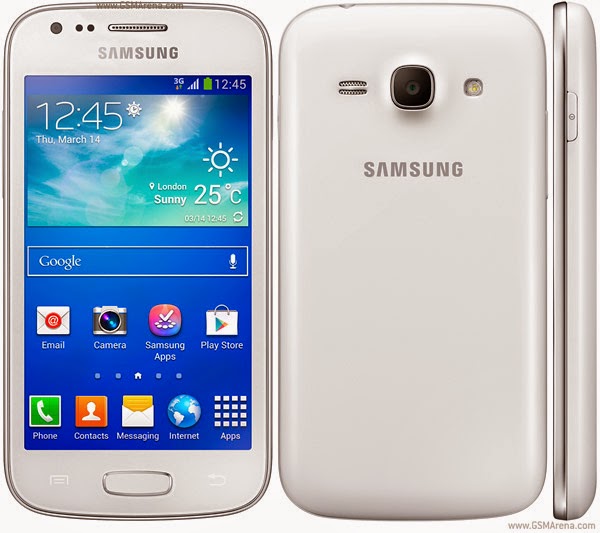
Device Name : Samsung Galaxy Ace 3 Brazil GT-S7273T
Device Model : GT-S7273T
Date Update : 2014-07-18
Region Code : ZTM
Region Country : Brazil (tim)
Firmware Version : S7273TUIUANG1
OS Name : Jelly Bean
OS Version : 4.2.2
Change List : 2718615
Hits : 279
Download Here
Go to link download
Samsung Galaxy Ace Advance GT S6800 All Upgrade Firmwares Free
Samsung Galaxy Ace Advance GT S6800 All Upgrade Firmwares Free
Android Firmwares Samsung Galaxy Ace Advance GT-S6800, Stock Rom Samsung Galaxy Ace Advance GT-S6800
Samsung Galaxy Ace Advance GT-S6800 XFA South africa 2.3.6 Gignerbread S6800XXMK1
 Device Name : Samsung Galaxy Ace Advance GT-S6800
Device Model : GT-S6800
Date Update : 2013-11-07
Region Code : XFA
Region Country : South africa
Firmware Version : S6800XXMK1
OS Name : Gignerbread
OS Version : 2.3.6
Download Here
Samsung Galaxy Ace Advance GT-S6800 XFV South africa (vodafone) 2.3.6 Gignerbread S6800XXMJ2
Device Name : Samsung Galaxy Ace Advance GT-S6800Device Model : GT-S6800
Date Update : 2013-10-21
Region Code : XFV
Region Country : South africa (vodafone)
Firmware Version : S6800XXMJ2
OS Name : Gignerbread
OS Version : 2.3.6
Download Here
Samsung Galaxy Ace Advance GT-S6800 XFA South africa 2.3.6 Gignerbread S6800XXLH1
Device Name : Samsung Galaxy Ace Advance GT-S6800Device Model : GT-S6800
Date Update : 2012-08-07
Region Code : XFA
Region Country : South africa
Firmware Version : S6800XXLH1
OS Name : Gignerbread
OS Version : 2.3.6
Download Here
Samsung Galaxy Ace Advance GT-S6800 XFE South africa 2.3.6 Gignerbread S6800XXLH1
Device Name : Samsung Galaxy Ace Advance GT-S6800Device Model : GT-S6800
Date Update : 2012-08-07
Region Code : XFE
Region Country : South africa
Firmware Version : S6800XXLH1
OS Name : Gignerbread
OS Version : 2.3.6
Download Here
Go to link download
Sunday, November 6, 2016
Samsung Galaxy Ace Duos GT S6802 Upgrade Firmwares For COA Romania
Samsung Galaxy Ace Duos GT S6802 Upgrade Firmwares For COA Romania
Samsung Galaxy Ace Duos GT-S6802 COA Romania (cosmote) 2.3.6 Gignerbread S6802XXMJ1
Free Download Samsung Galaxy Ace Duos GT-S6802 COA Romania (cosmote) 2.3.6 Gignerbread S6802XXMJ1
 Device Name : Samsung Galaxy Ace Duos GT-S6802
Device Model : GT-S6802
Date Update : 2013-10-28
Region Code : COA
Region Country : Romania (cosmote)
Firmware Version : S6802XXMJ1
OS Name : Gignerbread
OS Version : 2.3.6
Download Here
Go to link download
Saturday, November 5, 2016
Samsung Galaxy Ace 3 GT S7275B LTE Upgrade Firmwares For South America COL Colombia
Samsung Galaxy Ace 3 GT S7275B LTE Upgrade Firmwares For South America COL Colombia
Samsung Galaxy Ace 3 LTE South America GT-S7275B COL Colombia 4.2.2 Jelly Bean S7275BUBUAMJ2
Free Download Samsung Galaxy Ace 3 LTE South America GT-S7275B COL Colombia 4.2.2 Jelly Bean S7275BUBUAMJ2
Device Name : Samsung Galaxy Ace 3 LTE South America GT-S7275BDevice Model : GT-S7275BDate Update : 2013-10-19
Region Code : COL
Region Country : Colombia
Firmware Version : S7275BUBUAMJ2
OS Name : Jelly Bean
OS Version : 4.2.2
Change List : 1909437
Download Here
Go to link download
Friday, November 4, 2016
Samsung Galaxy Ace 3 Latin GT S7270L Firmwares Free Download
Samsung Galaxy Ace 3 Latin GT S7270L Firmwares Free Download
Samsung Galaxy Ace 3 Latin GT-S7270L TPA Panama 4.2.2 Jelly Bean S7270LUBUANG1
Free Download Samsung Galaxy Ace 3 Latin GT-S7270L TPA Panama 4.2.2 Jelly Bean S7270LUBUANG1
 Device Name : Samsung Galaxy Ace 3 Latin GT-S7270L
Device Model : GT-S7270L
Date Update : 2014-07-28
Region Code : TPA
Region Country : Panama
Firmware Version : S7270LUBUANG1
OS Name : Jelly Bean
OS Version : 4.2.2
Change List : 2723718
Hits : 93
Download Here
Go to link download
Thursday, November 3, 2016
Samsung Galaxy Ace IIx GT S7560 TCL Firmwares For Portugal
Samsung Galaxy Ace IIx GT S7560 TCL Firmwares For Portugal
Samsung Galaxy Ace IIx GT-S7560 TCL Portugal (vodafone) 4.0.4 Ice Cream Sandwich S7560XXBNJ1
Free Download Samsung Galaxy Ace IIx GT-S7560 TCL Portugal (vodafone) 4.0.4 Ice Cream Sandwich S7560XXBNJ1
 Device Name : Samsung Galaxy Ace IIx GT-S7560
Device Model : GT-S7560
Date Update : 2014-10-02
Region Code : TCL
Region Country : Portugal (vodafone)
Firmware Version : S7560XXBNJ1
OS Name : Ice Cream Sandwich
OS Version : 4.0.4
Change List : 1264835
Download Here
Go to link download
Samsung Galaxy S5 Specs and Price
Samsung Galaxy S5 Specs and Price
Samsung Galaxy S5 Specs and Price
The Samsung Galaxy S5 a successor to the Galaxy S4 is Samsung’s 2014 flagship smartphone. Although it still retains the recognisable build and design of previous generations of Samsung smartphones, the Galaxy S5 has a dust and water resistant feature and a more modern user interface.
With a powerful S Health app and a dedicated heart rate monitor, Its fitness tracking abilities are enhanced over the Galaxy S4. The battery capacity is larger, the screen is bigger, the processor quicker and provides an excellent camera experience. But from the front, one can barely tell the Galaxy S4 and Galaxy S5 apart.
With a powerful S Health app and a dedicated heart rate monitor, Its fitness tracking abilities are enhanced over the Galaxy S4. The battery capacity is larger, the screen is bigger, the processor quicker and provides an excellent camera experience. But from the front, one can barely tell the Galaxy S4 and Galaxy S5 apart.
Where to Buy Samsung Galaxy S5
KONGAFROM ?87,000.00 BUY NOW
JUMIA FROM ?85,000.00 BUY NOW
 |
| Samsung Galaxy S5 |
Also Read: Samsung Galaxy S6 Edge Specs and Price
Samsung Galaxy A5 Specs and Price
Samsung Galaxy Star 2 Plus Specs and Price
Overview Features
The Samsung Galaxy S5 features an oversized screen and rich color 5.1 FHD super AMOLED display with resolution of 1920 x 1080, 1.9 GHz qualcomm snapdragon processor which provides fast performance, great speed and graphics and also supports multi-tasking. It runs on Android 4.4 (KitKat) OS but with the recent update, the Galaxy S5 is upgradable to Android 5.0 (Lollipop). For connectivity, Its 4G LTE compatible, supports Wi-Fi, Bluetooth 4.0 and microUSB.
The Samsung Galaxy S5 offers a durable and water-resistant design Rated IP67, which protects it against dust, sweat, rain, sand, dust and the effect of immersion between 15cm and 1m. With its fingerprint feature, you can unlock the phone and purchase content with Samsung services. Other features include heart rate sensor, smart stay, smart scroll, air view, air gestures, IR remote, etc.
The Samsung Galaxy S5 has dual cameras, these are a 16MP rear camera packed with features like LED flash, HD video recording, face detection, smile detection, voice activation, auto focus, digital zoom, Contact pictures and a front-facing 2 MP camera for video chat and taking selfies.
The internal storage is up to 16 GB, RAM size of 2GB and theres a micro SD slot for a memory card up to 128 GB. The battery capacity is 2800 mAh, supporting up to 29 hours talk time. The Galaxy S5 also features an Ultra power-saving mode which turns off most connections, limits colors, apps, and activities to prolong the phones run time.
The internal storage is up to 16 GB, RAM size of 2GB and theres a micro SD slot for a memory card up to 128 GB. The battery capacity is 2800 mAh, supporting up to 29 hours talk time. The Galaxy S5 also features an Ultra power-saving mode which turns off most connections, limits colors, apps, and activities to prolong the phones run time.
Other Samsung Galaxy S5 Specs are given below:
General
| Alternate names | SM-G900H |
| Release date | April 2014 |
| Form factor | Touchscreen |
| Dimensions (mm) | 142.00 x 72.50 x 8.10 |
| Weight (g) | 145.00 |
| Battery capacity (mAh) | 2800 |
| Removable battery | Yes |
| Colours | White, Black, Gold, Blue |
| SAR value | NA |
Display
| Screen size (inches) | 5.10 |
| Touchscreen | Yes |
| Resolution | 1080x1920 pixels |
| Pixels per inch (PPI) | 432 |
Hardware
| Processor | 1.9GHz octa-core |
| Processor make | Exynos Octa 5420 |
| RAM | 2GB |
| Internal storage | 16GB |
| Expandable storage | Yes |
| Expandable storage type | microSD |
| Expandable storage up to (GB) | 128 |
Camera
| Rear camera | 16-megapixel |
| Flash | Yes |
| Front camera | 2.1-megapixel |
Software
| Operating System | Android OS, v4.4.2 (KitKat), upgradable to v5.0 (Lollipop) |
| Skin | TouchWiz |
Connectivity
| Wi-Fi | Yes |
| Wi-Fi standards supported | 802.11 a/ b/ g/ n/ ac |
| GPS | Yes |
| Bluetooth | Yes, v 4.00 |
| NFC | Yes |
| Infrared | Yes |
| Wi-Fi Direct | Yes |
| MHL Out | Yes |
| HDMI | No |
| Headphones | 3.5mm |
| FM | No |
| SIM Type | Micro-SIM |
| GSM/ CDMA | GSM |
| 3G | Yes |
| 4G/ LTE | Yes |
| Supports 4G | Yes |
Sensors
| Compass/ Magnetometer | Yes |
| Proximity sensor | Yes |
| Accelerometer | Yes |
| Ambient light sensor | Yes |
| Gyroscope | Yes |
| Barometer | Yes |
| Temperature sensor | No |
Also Read: Samsung Galaxy Tab A 9.7 Specs and Price
Samsung Galaxy V Plus Specs and Price
Pricing and Availability
Galaxy S5 is available on all four major US wireless carriers - US Cellular, Virgin Mobile, MetroPCS and Boost Mobile. It comes if four different colours - black, white, blue, and copper gold. Its price is about $129.99. The price of Samsung Galaxy S5 In Nigeria ranges from N85,000 to N96,000.
Where to Buy Samsung Galaxy S5
KONGAFROM ?85,000.00 BUY NOW
JUMIA FROM ?85,000.00 BUY NOW
Go to link download
Tuesday, November 1, 2016
Samsung Galaxy W I8150 Firmware Flash File How To Install Using Odin Firmware Guide
Samsung Galaxy W I8150 Firmware Flash File How To Install Using Odin Firmware Guide
For the record, flashing causes a violation of the garantuee policy of Samsung. Furthermore there is a possibility of demaging the Android-system(bricking). It has been reported that flashing has caused in a several(ca. 10) cases a brick. So please be aware THIS IS A RISK. Until now we couldnt find out what caused the bricking, it has been reported with the asian firmware. But also once with the german firmware.
So whoever takes the risk, takes the responsibility
How to Flash a firmware with ODIN
Note: Please scroll down and read the Notification if you have not already done so !!!
1.a) Download Firmware :
So whoever takes the risk, takes the responsibility
How to Flash a firmware with ODIN
Note: Please scroll down and read the Notification if you have not already done so !!!
1.a) Download Firmware :
All the firmwares contain the Odin Multi Downloader v4.43.exe and the Ancora.OPS-file.
- I8150XXLA2 Android 2.3.6 (GER) (SALES CODES: DBT(Germany))
- I8150XXKK1 Android 2.3.6 (EUR) (SALES CODES: XSK, XEZ, XEU, XEO, XEH,XEF, TPH, TOP, SMO, SEB, PAN, MSR, GBL, CYO, CPW, COA, BGL)
- I8150XXKI8 Android 2.3.5 (ITL-EUR) (SALES CODES: ???)
- I8150ZSKI3 Android 2.3.6 (ASIA) (SALES CODES: ???)
- OPS – Ancora.ops.
Boot – APBOOT_I8150ZSKI3_CL613004_REV00_user_low_ship_EMM C.tar.md5
Phone – SMD_MODEM_I8150ZSKI3_CL613004_REV00_user_low_ship_ EMMC.smd.md5
PDA – SMD_PDA_I8150ZSKI3_CL613004_REV00_user_low_ship_EM MC.smd.md5
CSC – SMD_CSC_GT-I8150-MULTI-CSC-OZSKI3_EMMC.smd.md5
1.b) If you already have a firmware, you can download the Ancora.OPS and the Odin Multi Downloader v4.43.exe
2. While switched off, keep the following buttons pressed. Release the power-button once the Samsung Galaxy W(I8150) is switched on.

As soon as the screen with the exclamation mark appears hit the Volume up-button. Now you should be in the download mode.
Connect your device to the Computer.
Note: In order that your Samsung Galaxy W to be detected by ODIN, you will have to install the drivers manually or install Kies (Kies can be uninstalled right after, if prefered, because the drivers will remain in the system). Make sure Kies is not running in the task-manager, while using ODIN.

INFO: The download-mode is being used to flash firmwares, without using the official method of Samsung Kies. This should be reachable even if you have a corrupted firmware installed.
3. Open Odin Multi Downloader v4.43.exe . INFO: Use ODIN Multi Download v.4.43, I reported some issues with lower versions
4. click on the OPS-Button and select the Ancora.ops file.
5. Set up the settings as followed:
mark the option: One Package, Protect OPS, Auto Rebootunmark the option: Reset Time (Sec)
6.Click on the One Package-Button and select the downloaded MD5-file.
7. Click on the Start-Button. Flashing takes around 10-15 minutes. and the first start up takes up to 5 min., so please dont panic and dont press anything until the home screen appears!
Notification
Maybe it is more secure to make a full wipe using ClockWorkMod.
The reason why these complicated steps might be necessary: Because your system most likely be a mess, if you were flashing all different kinds of firmwares. To make sure your device is not an overwritten old firmware these steps are necessary.
Flashing firmwares via ODIN does not delete all old data !!!
Use this course of action:
1. Backup everything manually what you can!
2. If you have not already installed ClockWorkMod, use the flash instruction from above and download the ClockWorkMod from the section Other.
3. Once ClockWorkMod is flashed, go to the Recovery Mode(which is the ClockWordMod):
a) backup and restore -> backup to external sdcard
b) backup and restore -> restore from external sdcardThis is to make sure the files arent corrupted, if this is successful you can be sure everything is backupped. If you get a MD5 mismatch something went wrong. Try again!
c) wipe data/factory reset -> confirm
d) wipe cache partition -> confirm
e) mounts and storage -> format system -> confirm
f) mounts and storage -> format cache -> confirm
g) mounts and storage -> format data -> confirm
4. You restart your phone in Download Mode and flash a firmware using this, which is provided in the thread under Firmwares.
5. Now you will have to flash again the ClockWorkMod recovery to restore your data.
Note: But this is only possible if the previous firmware is compatible with the current one. Most custom ROMs arent compatible with the stock ROMs or other custom ROMs!
Than open ClockWorkMod Recovery and:
backup and restore-> advanced restore from external sdcard -> select the backup -> Restore data -> confirm.
Now if you want the stock recovery back(needed for OTA updates) instood of ClockWorkMod, than go to Other and select the stock recovery, and flash it on your device.
6. Now you should have a fresh device like you have never flashed before!!!
2. While switched off, keep the following buttons pressed. Release the power-button once the Samsung Galaxy W(I8150) is switched on.
As soon as the screen with the exclamation mark appears hit the Volume up-button. Now you should be in the download mode.
Connect your device to the Computer.
Note: In order that your Samsung Galaxy W to be detected by ODIN, you will have to install the drivers manually or install Kies (Kies can be uninstalled right after, if prefered, because the drivers will remain in the system). Make sure Kies is not running in the task-manager, while using ODIN.
INFO: The download-mode is being used to flash firmwares, without using the official method of Samsung Kies. This should be reachable even if you have a corrupted firmware installed.
3. Open Odin Multi Downloader v4.43.exe . INFO: Use ODIN Multi Download v.4.43, I reported some issues with lower versions
4. click on the OPS-Button and select the Ancora.ops file.
5. Set up the settings as followed:
mark the option: One Package, Protect OPS, Auto Rebootunmark the option: Reset Time (Sec)
6.Click on the One Package-Button and select the downloaded MD5-file.
7. Click on the Start-Button. Flashing takes around 10-15 minutes. and the first start up takes up to 5 min., so please dont panic and dont press anything until the home screen appears!
Notification
Maybe it is more secure to make a full wipe using ClockWorkMod.
The reason why these complicated steps might be necessary: Because your system most likely be a mess, if you were flashing all different kinds of firmwares. To make sure your device is not an overwritten old firmware these steps are necessary.
Flashing firmwares via ODIN does not delete all old data !!!
Use this course of action:
1. Backup everything manually what you can!
2. If you have not already installed ClockWorkMod, use the flash instruction from above and download the ClockWorkMod from the section Other.
3. Once ClockWorkMod is flashed, go to the Recovery Mode(which is the ClockWordMod):
a) backup and restore -> backup to external sdcard
b) backup and restore -> restore from external sdcardThis is to make sure the files arent corrupted, if this is successful you can be sure everything is backupped. If you get a MD5 mismatch something went wrong. Try again!
c) wipe data/factory reset -> confirm
d) wipe cache partition -> confirm
e) mounts and storage -> format system -> confirm
f) mounts and storage -> format cache -> confirm
g) mounts and storage -> format data -> confirm
4. You restart your phone in Download Mode and flash a firmware using this, which is provided in the thread under Firmwares.
5. Now you will have to flash again the ClockWorkMod recovery to restore your data.
Note: But this is only possible if the previous firmware is compatible with the current one. Most custom ROMs arent compatible with the stock ROMs or other custom ROMs!
Than open ClockWorkMod Recovery and:
backup and restore-> advanced restore from external sdcard -> select the backup -> Restore data -> confirm.
Now if you want the stock recovery back(needed for OTA updates) instood of ClockWorkMod, than go to Other and select the stock recovery, and flash it on your device.
6. Now you should have a fresh device like you have never flashed before!!!
Go to link download
Download Recovery clockwork 5 0 2 6 galaxy ace fix tersybachwa com zip
Download Recovery clockwork 5 0 2 6 galaxy ace fix tersybachwa com zip
Download clockwork


download file here: https://mega.co.nz/#!5xJg1A7S!Hzv-6rREzHQIDd5W4QEcYVZTD9UQpwtnOm_lFv0hPXo

x
Go to link download
Samsung Galaxy S3 L710 Sprint Firmware Version 4 4 2 cdma meid repair and change Without Root Guide 100 Worked
Samsung Galaxy S3 L710 Sprint Firmware Version 4 4 2 cdma meid repair and change Without Root Guide 100 Worked
Samsung 4.4.2 L710 meid repair change 100% Worked

As we all know samsung new security all new os you can not write meid older way..
NO ROOT.
NO PATCH.
JUST C3303K CABLE + ANY FTDI BOX.
gcprokey is only tool in market can repair most samsung cdma meid 4.3,4.4.x most versions.
here is sample of L710 MEID change.
Using Version...1.0.0.0005
Selected Port VCP0 = COM3
Selected Model Samsung GSM
Selected Task SAM MEID
SAMSUNG MEID REPAIR STARTED...
Searching Phone Please wait...
Phone Found Wait...
TEST MODE OK..
Model := SPH-L710
UNIQID := CMAF74A19C462AF
Phone MEID := 990003342XXXXX
MSL found can continue..
Autho Pass..
SEED Passed..
Update MEID Ok..
Repairing finish.
All Finish..
!!! Success !!!!
Total Time Take...00:00:30
Selected Port VCP0 = COM3
Selected Model Samsung GSM
Selected Task SAM MEID
SAMSUNG MEID REPAIR STARTED...
Searching Phone Please wait...
Phone Found Wait...
TEST MODE OK..
Model := SPH-L710
UNIQID := CMAF74A19C462AF
Phone MEID := 990003342XXXXX
MSL found can continue..
Autho Pass..
SEED Passed..
Update MEID Ok..
Repairing finish.
All Finish..
!!! Success !!!!
Total Time Take...00:00:30
Just to show meid is really changed i did repair again..
Using Version...1.0.0.0005
Selected Port VCP0 = COM3
Selected Model Samsung CDMA
Selected Task SAM MEID
SAMSUNG MEID REPAIR STARTED...
Searching Phone Please wait...
Phone Found Wait...
TEST MODE OK..
Model := SPH-L710
UNIQID := CMAF74A19C462AF
Phone MEID := A10001XXXXXXX
MSL found can continue..
Autho Pass..
SEED Passed..
Update MEID Ok..
Repairing finish.
All Finish..
!!! Success !!!!
Total Time Take...00:00:32
Selected Port VCP0 = COM3
Selected Model Samsung CDMA
Selected Task SAM MEID
SAMSUNG MEID REPAIR STARTED...
Searching Phone Please wait...
Phone Found Wait...
TEST MODE OK..
Model := SPH-L710
UNIQID := CMAF74A19C462AF
Phone MEID := A10001XXXXXXX
MSL found can continue..
Autho Pass..
SEED Passed..
Update MEID Ok..
Repairing finish.
All Finish..
!!! Success !!!!
Total Time Take...00:00:32
Go to link download
Subscribe to:
Posts (Atom)