Free Download Samsung Galaxy Ace 3 Brazil GT-S7273T ZTM Brazil (tim) 4.2.2 Jelly Bean S7273TUIUANG1
Showing posts with label rom. Show all posts
Showing posts with label rom. Show all posts
Wednesday, November 16, 2016
How to Install Android 4 4 KitKat Based ROM on Galaxy S3 GT I9300 GT I9305 AT T Sprint T Mobile Verizon
How to Install Android 4 4 KitKat Based ROM on Galaxy S3 GT I9300 GT I9305 AT T Sprint T Mobile Verizon

Owning a Google Nexus device is a kind of guarantee that you would be one of the first to receive the latest version of Android, but if you got a phone/tablet from manufacturers like Samsung, LG, HTC, Sony, etc., you might have no choice but to wait perpetually. Even if you get a new (?) update, it’s got to be an old thing by the time it reaches you. Samsung’s treatment with its popular phones like the Galaxy S3 and Note 2 is a very relevant example of how manufacturers shirk from sending software updates to their users.
Yesterday we published an article on installing Android 4.4 KitKat based custom ROMs on the Galaxy Note 2 and many of its variants. Extending our KitKat treat, we have now come with a collection of Android 4.4 custom ROMs for the Samsung Galaxy S3. If you own any of the following variants of the device, you can update your phone with the newest sensation of Android:
- Samsung Galaxy S3 GT-I9300
- Samsung Galaxy S3 LTE GT-I9305
- AT&T Galaxy S3 SGH-I337 (the ROMs for this model can also be installed on the Canadian variants e.g, Rogers, Bell, Telus, etc.)
- Sprint Galaxy S3 SPH-L710
- T-Mobile Galaxy S3 SGH-T999
- Verizon Galaxy S3 SCH-I535
Warning:
The procedure described below is not meant for perfect noobs as it is considered risky. Follow all instructions carefully if you do not wish to caught into a compromising situation. We would always be at our end to help you in case of a mishap but we take no responsibility. Proceed only if you agree to these terms.Prerequisites:
- A rooted Samsung Galaxy S3. If you have not rooted your phone yet, please take some time and root it using our easy rooting tutorial.
- The KitKat ROMs we are going to talk about are custom ROMs and therefore they require the presence of a custom recovery like ClockworkMod or TWRP on your device. Not only this, you must have the latest version of the recovery you use. You can download ROM Manager (CWM) or Goo Manager (TWRP) to install the latest version.


ROM Manager
Developer: ClockworkMod
Price: Free


GooManager
Developer: Snipanet Apps
Price: Free
Note:
Since Goo Manager is working properly these days, we recommend that you install CWM version 6.0.4.3 on your device. If you know how to install recovery image file using ADB command, download the latest CWM recovery .img file from here and install it. 6.0.4.3About the ROMs:
Please note that most of the ROMs that we have mentioned below are based on CM 11 and therefore have all the bugs of their parent. Being in early stage of development, it is obvious that you might encounter a few bugs in performance. Please install the appropriate ROM on your phone, test them and if you find them stable enough for you,use them. We hope that with new updates, all these ROMs will become more mature and stable.
Downloads:
Download the Android 4.4 ROM:
Now here are the CyanogenMod 11 based KitKat ROMs for Samsung Galaxy S3. In case you find more that one ROM listed for your S3 model, download any of the two.- Samsung Galaxy S3:
- CM 11 Unofficial ROM: cm-11-2013-UNOFFICIAL-i9300-V5.zip
- Samsung Galaxy S3 LTE:
- CM 11 Unofficial ROM: cm-11-2013-UNOFFICIAL-i9305.zip
- AT&T & Canadian Galaxy S3 (SGH-1747 and 1747M):
- CM 11 Unofficial ROM: cm-11-2013-UNOFFICIAL-d2att.zip
- Quantum ROM: Quantum-v3-Beta.zip
- BeansTalk ROM: BeanStalk-4.4001-20131120-d2att.zip
- Sprint Galaxy S3:
- CM 11 Unofficial ROM: cm-11-2013-UNOFFICIAL-d2spr.zip
- T-Mobile and Canadian Galaxy S3 (SGH-T999 and T999V):
- CM 11 Unofficial ROM: cm-11-2013-UNOFFICIAL-d2tmo.zip
- Verizon Galaxy S3:
- CM 11 Unofficial ROM: cm-11-2013-UNOFFICIAL-d2vzw.zip
Download Google Apps:
Google apps are not included in the ROM package. Therefore, you need to download and install them separately. Always choose the latest version of Gapps.pa_gapps-full-4.4-20131118-signed.zip
Mediafire Mirror
Download Latest SuperUser:
UPDATE-SuperSU-v1.69.zipHow to Install:
- Important: Do not forget to backup your phone’s EFS/IMEI before. Read this article for detailed tutorial.
- Charge your phone.
- Copy the downloaded Android 4.4 ROM file and the latest Gapps package from above and copy them to your phone.
- Also copy the SuperSU zip file to the device.
- Boot your Galaxy in recovery mode. Here is how to do it: hold down the Volume Up+Home+Power buttons together for 4-6 seconds till the screen turns up and you see the recovery screen. Alternatively,you can enter recovery mode using these apps.
- If you are using CWM, use the volume keys to scroll up/down and the power button to select files and options. TWRP users can simply touch the corresponding buttons to get a job done.
- Important: Before doing anything, do not forget to backup your current ROM using “backup and restore”option (in CWM) or “Backup” option (in TWRP) and check all items to backup.
- CWM Users: Go back to main menu in recovery and select “wipe data / factory reset> yes”. Then go to“mounts and storage” and wipe data and system.
- TWRP Users: Just tap on “Wipe” button and select Data, System and Cache.
- Now go back again and choose “install zip from sdcard> choose zip from sd card” option, select the ROM file in zip and choose “yes” when asked. If you have TWRP, use “Install” button, select the ROM and swipe the slider to confirm installation.
- When the ROM is installed, install the Gapps zip package just like you flashed the ROM in Step 11.
- Then install the ”UPDATE-SuperSU-v1.69.zip” file the same way.
- Finally, select the reboot system option.
Go to link download

Tuesday, November 15, 2016
How to flash Xiaomi Mi 4i Stock ROM
How to flash Xiaomi Mi 4i Stock ROM
How to flash Xiaomi Mi 4i Stock ROM without using any flash tool.
Step 1: Download Xiaomi Stock ROM on your phone from below link.
Step 2: Open Tools Folder from the Launcher and Select Updater like below image.
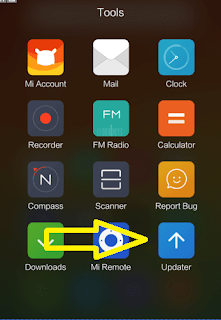
Step 3: Now, click on Menu Key on your Device and Select installation file.
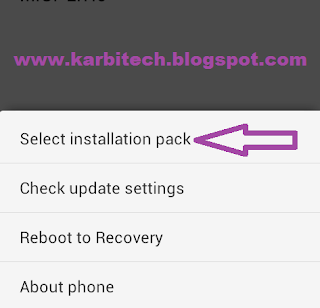
Step 4: Locate the zip file that you have downloaded.
Step 5: Now, click on the update button to begin the update process.

Step 6: Now you will see the update process.

Step 7: Once update process is completed, select reboot to finish.
DOWNLOAD:
Xiaomi Mi 1s Android 5.0 stock ROM
Step 1: Download Xiaomi Stock ROM on your phone from below link.
Step 2: Open Tools Folder from the Launcher and Select Updater like below image.
Step 3: Now, click on Menu Key on your Device and Select installation file.
Step 4: Locate the zip file that you have downloaded.
Step 5: Now, click on the update button to begin the update process.
Step 6: Now you will see the update process.
Step 7: Once update process is completed, select reboot to finish.
DOWNLOAD:
Xiaomi Mi 1s Android 5.0 stock ROM
Go to link download
How to flash Lenovo A536S stock ROM
How to flash Lenovo A536S stock ROM
How to flash Lenovo A536S stock ROM with SP flash tool
Step 1: Download the Stock Rom and extract it on your Computer.
Step 2: Download Smart Phone Flash Tool on Your computer and extract it.
Step 3: Open Flash_tool.exe .
Step 4: Click on the Scatter-Loading Button from the Right.
Step 5: Now, Locate the Scatter File, you will find this file in stock ROM folder.
Step 6: Now, Click on the Download Button to begin the Flashing Process.
Step 7: Connect your Smartphone to the Computer using USB Cable. After connecting the device to the computer Press Volume Down or Volume Up key, so that your computer easily detect your phone.
Step 8: Now flashing process will start in the bottom in yellow color.
Step 9: Once Flashing is completed, a Green Ring will appear.
Step 10: Unplug USB cable from your smartphone, and swith ON your phone.
Flashing Successful
Downloads:
Step 1: Download the Stock Rom and extract it on your Computer.
Step 2: Download Smart Phone Flash Tool on Your computer and extract it.
Step 3: Open Flash_tool.exe .
Step 4: Click on the Scatter-Loading Button from the Right.
Step 5: Now, Locate the Scatter File, you will find this file in stock ROM folder.
Step 6: Now, Click on the Download Button to begin the Flashing Process.
Step 7: Connect your Smartphone to the Computer using USB Cable. After connecting the device to the computer Press Volume Down or Volume Up key, so that your computer easily detect your phone.
Step 8: Now flashing process will start in the bottom in yellow color.
Step 9: Once Flashing is completed, a Green Ring will appear.
Step 10: Unplug USB cable from your smartphone, and swith ON your phone.
Flashing Successful
Downloads:
SP Flash Tool
Go to link download
Sunday, November 13, 2016
How to flash Xiaomi Mi 2A Stock ROM
How to flash Xiaomi Mi 2A Stock ROM
How to flash Xiaomi Mi 2A Stock ROM without using any flash tool.
Step 1: Download Xiaomi Stock ROM on your phone from below link.
Step 2: Open Tools Folder from the Launcher and Select Updater like below image.
Step 3: Now, click on Menu Key on your Device and Select installation file.
Step 4: Locate the zip file that you have downloaded.
Step 5: Now, click on the update button to begin the update process.
Step 6: Now you will see the update process.
Step 7: Once update process is completed, select reboot to finish.
DOWNLOAD:
Xiaomi Mi 2A Android 4.1 stock ROM
Step 1: Download Xiaomi Stock ROM on your phone from below link.
Step 2: Open Tools Folder from the Launcher and Select Updater like below image.
Step 3: Now, click on Menu Key on your Device and Select installation file.
Step 4: Locate the zip file that you have downloaded.
Step 5: Now, click on the update button to begin the update process.
Step 6: Now you will see the update process.
Step 7: Once update process is completed, select reboot to finish.
DOWNLOAD:
Xiaomi Mi 2A Android 4.1 stock ROM
Go to link download
Saturday, November 12, 2016
How to flash Lenovo A590 stock ROM
How to flash Lenovo A590 stock ROM
How to flash Lenovo A590 stock ROM with SP flash tool
Step 1: Download the Stock Rom and extract it on your Computer.
Step 2: Download Smart Phone Flash Tool on Your computer and extract it.
Step 3: Open Flash_tool.exe .
Step 4: Click on the Scatter-Loading Button from the Right.
Step 5: Now, Locate the Scatter File, you will find this file in stock ROM folder.
Step 6: Now, Click on the Download Button to begin the Flashing Process.
Step 7: Connect your Smartphone to the Computer using USB Cable. After connecting the device to the computer Press Volume Down or Volume Up key, so that your computer easily detect your phone.
Step 8: Now flashing process will start in the bottom in yellow color.
Step 9: Once Flashing is completed, a Green Ring will appear.
Step 10: Unplug USB cable from your smartphone, and swith ON your phone.
Flashing Successful
Downloads:
Step 1: Download the Stock Rom and extract it on your Computer.
Step 2: Download Smart Phone Flash Tool on Your computer and extract it.
Step 3: Open Flash_tool.exe .
Step 4: Click on the Scatter-Loading Button from the Right.
Step 5: Now, Locate the Scatter File, you will find this file in stock ROM folder.
Step 6: Now, Click on the Download Button to begin the Flashing Process.
Step 7: Connect your Smartphone to the Computer using USB Cable. After connecting the device to the computer Press Volume Down or Volume Up key, so that your computer easily detect your phone.
Step 8: Now flashing process will start in the bottom in yellow color.
Step 9: Once Flashing is completed, a Green Ring will appear.
Step 10: Unplug USB cable from your smartphone, and swith ON your phone.
Flashing Successful
Downloads:
SP Flash Tool
Go to link download
Thursday, November 10, 2016
How to flash Micromax A110 stock ROM
How to flash Micromax A110 stock ROM
How to flash Micromax A110 stock ROM with SP flash tool
Step 1: Download the Stock Rom and extract it on your Computer.
Step 2: Download Smart Phone Flash Tool on Your computer and extract it.
Step 3: Open Flash_tool.exe .
Step 4: Click on the Scatter-Loading Button from the Right.
Step 5: Now, Locate the Scatter File, you will find this file in stock ROM folder.
Step 6: Now, Click on the Download Button to begin the Flashing Process.
Step 7: Connect your Smartphone to the Computer using USB Cable. After connecting the device to the computer Press Volume Down or Volume Up key, so that your computer easily detect your phone.
Step 8: Now flashing process will start in the bottom in yellow color.
Step 9: Once Flashing is completed, a Green Ring will appear.
Step 10: Unplug USB cable from your smartphone, and swith ON your phone.
Flashing Successful
Downloads:
Step 1: Download the Stock Rom and extract it on your Computer.
Step 2: Download Smart Phone Flash Tool on Your computer and extract it.
Step 3: Open Flash_tool.exe .
Step 4: Click on the Scatter-Loading Button from the Right.
Step 5: Now, Locate the Scatter File, you will find this file in stock ROM folder.
Step 6: Now, Click on the Download Button to begin the Flashing Process.
Step 7: Connect your Smartphone to the Computer using USB Cable. After connecting the device to the computer Press Volume Down or Volume Up key, so that your computer easily detect your phone.
Step 8: Now flashing process will start in the bottom in yellow color.
Step 9: Once Flashing is completed, a Green Ring will appear.
Step 10: Unplug USB cable from your smartphone, and swith ON your phone.
Flashing Successful
Downloads:
SP Flash Tool
Micromax A110 Stock ROM
Micromax A110 USB driver
Go to link download
O 8 52 Stock ROM
O 8 52 Stock ROM
 |
| credits to gadgetpilipinas.net for the image |
DOWNLOAD O+ 8.52 Stock ROM
credits to sonet_06
PM sonet_06 for the password
Go to link download
Wednesday, November 9, 2016
How to flash Xiaomi Mi2 2s Stock ROM
How to flash Xiaomi Mi2 2s Stock ROM
How to flash Xiaomi Mi2 2s Stock ROM without using any flash tool.
Step 1: Download Xiaomi Stock ROM on your phone from below link.
Step 2: Open Tools Folder from the Launcher and Select Updater like below image.
Step 3: Now, click on Menu Key on your Device and Select installation file.
Step 4: Locate the zip file that you have downloaded.
Step 5: Now, click on the update button to begin the update process.
Step 6: Now you will see the update process.
Step 7: Once update process is completed, select reboot to finish.
DOWNLOAD:
Xiaomi Mi2 2s Android 4.1 stock ROM
Step 1: Download Xiaomi Stock ROM on your phone from below link.
Step 2: Open Tools Folder from the Launcher and Select Updater like below image.
Step 3: Now, click on Menu Key on your Device and Select installation file.
Step 4: Locate the zip file that you have downloaded.
Step 5: Now, click on the update button to begin the update process.
Step 6: Now you will see the update process.
Step 7: Once update process is completed, select reboot to finish.
DOWNLOAD:
Xiaomi Mi2 2s Android 4.1 stock ROM
Go to link download
Tuesday, November 8, 2016
How To Flash Lenovo A269i stock ROM
How To Flash Lenovo A269i stock ROM
How to flash Lenovo A269i stock ROM with SP flash tool
Step 1: Download the Stock Rom and extract it on your Computer.
Step 2: Download Smart Phone Flash Tool on Your computer and extract it.
Step 3: Open Flash_tool.exe .
Step 4: Click on the Scatter-Loading Button from the Right.
Step 5: Now, Locate the Scatter File, you will find this file in stock ROM folder.
Step 6: Now, Click on the Download Button to begin the Flashing Process.
Step 7: Connect your Smartphone to the Computer using USB Cable. After connecting the device to the computer Press Volume Down or Volume Up key, so that your computer easily detect your phone.
Step 8: Now flashing process will start in the bottom in yellow color.
Step 9: Once Flashing is completed, a Green Ring will appear.
Step 10: Unplug USB cable from your smartphone, and swith ON your phone.
Flashing Successful
Downloads:
SP Flash Tool
Stock ROM (link)
Go to link download
Lenovo Tab 2 A10 70L Stock Rom firmware Download
Lenovo Tab 2 A10 70L Stock Rom firmware Download
Do you know How To download flash/update Lenovo Tab 2 A10-70L Stock Rom firmware?
Please following button area & get your flash file using our passwords –without Password Thanks for choosing US & All the best.

Step 1: Download and install Android USB Drivers on your computer. In case Android USB Drivers are already installed on your Computer then skip this step.Step 2: Power Off your Android Smartphone and remove the Battery (if it is removable).
Step 3: Download the Stock Rom or Custom Rom that you want to Flash on your Android Smartphone and extract it on your Computer.
Step 4: Download and Extract Smart Phone Flash Tool on Your Computer. After Extracting you will be able to see the following files:
Step 5: Now Open Flash_tool.exe.
Step 6: Once Smart Phone Flash Tool is launched, Click on the Download Tab.
Step 7: In the Download Tab, now click on the scatter-loading button.
Step 9: Now, Click on the Download Button to begin the Flashing Process.
Step 10: Now, Connect your Smartphone to the Computer using USB Cable (without battery- if it is removable). After connecting the device to the computer Press Volume Down or Volume Up key, so that your computer easily detect your smartphone.
Step 11: Once Flashing is completed, a Green Ring will appear.
Step 12: Close the Smart Phone Flash Tool on your computer and disconnect your Android Smartphone from the computer.
Congratulations, Now your Lenovo A10-70L is successfully running the Stock Rom you have Downloaded.
So, this was a simple tutorial on How to flash stock rom for Lenovo A10-70L.
Important Notes:Stay tuned for more updates!
[*] Take a Backup of your personal data before flashing or installing the firmware on your smartphone. As this helps you to recover the personal data whenever any thing wrong happens.
Brand- Lenovo
Model- A10-70L
Chip- MT6752
Androide-4.4.4
Country- ALL country supported firmware
DOWNLOAD FIRMWARE
Lenovo Tab 2 A10-70L Official factory firmware Download.Lenovo Tab 2 A10-70L 100% tested Official flash file Download.
Lenovo Tab 2 A10-70L Official factory firmware,flash Tool,Driver Download now.
Lenovo Tab 2 A10-70L flashing Complete manual Download.
Lenovo Tab 2 A10-70L Latest & update version Official Stock Rom Download.
Lenovo Tab 2 A10-70L Deadphone Recovery firmware Download.Lenovo Tab 2 A10-70L Hang on Logo Done after falsh this firmware.
Lenovo Tab 2 A10-70L MT6752 Official scatter firmware.Lenovo Tab 2 A10-70L Lates 4.4.4 kitkat firmware.
Lenovo Tab 2 A10-70L official Stock Rom Download free & without Password.
Go to link download
Monday, November 7, 2016
Samsung Galaxy Ace 3 GT S7273T Stock Rom Free Download
Samsung Galaxy Ace 3 GT S7273T Stock Rom Free Download
Samsung Galaxy Ace 3 Brazil GT-S7273T ZTM Brazil (tim) 4.2.2 Jelly Bean S7273TUIUANG1

Device Name : Samsung Galaxy Ace 3 Brazil GT-S7273T
Device Model : GT-S7273T
Date Update : 2014-07-18
Region Code : ZTM
Region Country : Brazil (tim)
Firmware Version : S7273TUIUANG1
OS Name : Jelly Bean
OS Version : 4.2.2
Change List : 2718615
Hits : 279
Download Here
Go to link download
How to flash Micromax phone stock ROM
How to flash Micromax phone stock ROM
How to flash Micromax phone stock ROM with SP flash tool
Step 1: Download the Stock Rom and extract it on your Computer.
Step 2: Download Smart Phone Flash Tool on Your computer and extract it.
Step 3: Open Flash_tool.exe .
Step 4: Click on the Scatter-Loading Button from the Right.
Step 5: Now, Locate the Scatter File, you will find this file in stock ROM folder.
Step 6: Now, Click on the Download Button to begin the Flashing Process.
Step 7: Connect your Smartphone to the Computer using USB Cable. After connecting the device to the computer Press Volume Down or Volume Up key, so that your computer easily detect your phone.
Step 8: Now flashing process will start in the bottom in yellow color.
Step 9: Once Flashing is completed, a Green Ring will appear.
Step 10: Unplug USB cable from your smartphone, and swith ON your phone.
Step 1: Download the Stock Rom and extract it on your Computer.
Step 2: Download Smart Phone Flash Tool on Your computer and extract it.
Step 3: Open Flash_tool.exe .
Step 4: Click on the Scatter-Loading Button from the Right.
Step 5: Now, Locate the Scatter File, you will find this file in stock ROM folder.
Step 6: Now, Click on the Download Button to begin the Flashing Process.
Step 7: Connect your Smartphone to the Computer using USB Cable. After connecting the device to the computer Press Volume Down or Volume Up key, so that your computer easily detect your phone.
Step 8: Now flashing process will start in the bottom in yellow color.
Step 9: Once Flashing is completed, a Green Ring will appear.
Step 10: Unplug USB cable from your smartphone, and swith ON your phone.
Go to link download
How to flash Lenovo A320t stock ROM
How to flash Lenovo A320t stock ROM
How to flash Lenovo A320t stock ROM with SP flash tool
Step 1: Download the Stock Rom and extract it on your Computer.
Step 2: Download Smart Phone Flash Tool on Your computer and extract it.
Step 3: Open Flash_tool.exe .
Step 4: Click on the Scatter-Loading Button from the Right.
Step 5: Now, Locate the Scatter File, you will find this file in stock ROM folder.
Step 6: Now, Click on the Download Button to begin the Flashing Process.
Step 7: Connect your Smartphone to the Computer using USB Cable. After connecting the device to the computer Press Volume Down or Volume Up key, so that your computer easily detect your phone.
Step 8: Now flashing process will start in the bottom in yellow color.
Step 9: Once Flashing is completed, a Green Ring will appear.
Step 10: Unplug USB cable from your smartphone, and swith ON your phone.
Flashing Successful
Downloads:
Step 1: Download the Stock Rom and extract it on your Computer.
Step 2: Download Smart Phone Flash Tool on Your computer and extract it.
Step 3: Open Flash_tool.exe .
Step 4: Click on the Scatter-Loading Button from the Right.
Step 5: Now, Locate the Scatter File, you will find this file in stock ROM folder.
Step 6: Now, Click on the Download Button to begin the Flashing Process.
Step 7: Connect your Smartphone to the Computer using USB Cable. After connecting the device to the computer Press Volume Down or Volume Up key, so that your computer easily detect your phone.
Step 8: Now flashing process will start in the bottom in yellow color.
Step 9: Once Flashing is completed, a Green Ring will appear.
Step 10: Unplug USB cable from your smartphone, and swith ON your phone.
Flashing Successful
Downloads:
SP Flash Tool
Go to link download
Sunday, November 6, 2016
Sony Xperia U ST25i Latest Stok Rom
Sony Xperia U ST25i Latest Stok Rom
Sony Xperia U (ST25i) Latest Firmwares
Xperia U (ST25i)6.1.1.B.1.100 Download from here
Android version: 4.0.4
Go to link download
Thursday, November 3, 2016
Hera100 P4350 Xda Terra Wing Hard SPL and English Rom Worked 100 Tested
Hera100 P4350 Xda Terra Wing Hard SPL and English Rom Worked 100 Tested
HTC Herald - Hera100,P4350,Xda Terra,Wing Hard SPL and English Rom 100% Tested and Exclusive Solution With Working File Link.
For 100% Success Read Carefully Instruction and of-course with self risk for Any Damage. ( Any Question Please PM )
Model Supported:
Hera100
HTC P4350
XDA Terra
WING
Need Must IPL 4.xxx and higher!!! (that is IMPORTANT)

Download Require Files from Here
and then follow this:
Step By Step....
(with ActiveSync File explorer inside the phone)
1. install canonyang.cab
2. install aserpolicy.cab
3- install disablesecurity.cab
4. SOFTRESET by pressing reset Switch with stylus.
5. run RUU from Hard-SPLWM6 folder verison 4.70.yang
6. screen will become white - WAIT until it reboots itselfe.
7. done! + English Firmware also Done.
8. Enjoy and Thanks Button.
check if SPL now is 4.70.yang by Pressing Camera button and Reset switch.
For 100% Success Read Carefully Instruction and of-course with self risk for Any Damage. ( Any Question Please PM )
Model Supported:
Hera100
HTC P4350
XDA Terra
WING
Need Must IPL 4.xxx and higher!!! (that is IMPORTANT)
Download Require Files from Here
and then follow this:
Step By Step....
(with ActiveSync File explorer inside the phone)
1. install canonyang.cab
2. install aserpolicy.cab
3- install disablesecurity.cab
4. SOFTRESET by pressing reset Switch with stylus.
5. run RUU from Hard-SPLWM6 folder verison 4.70.yang
6. screen will become white - WAIT until it reboots itselfe.
7. done! + English Firmware also Done.
8. Enjoy and Thanks Button.
check if SPL now is 4.70.yang by Pressing Camera button and Reset switch.
Go to link download
Wednesday, November 2, 2016
Xperia V LT25i Latest Stock Rom
Xperia V LT25i Latest Stock Rom
Xperia V (LT25i)
Xperia V (LT25i) Latest Stock Rom
9.1.A.1.142 Customized TW
9.1.A.1.145 Customized RU
9.1.A.1.145 Customized SG
Go to link download
How to flash Lenovo A606 stock ROM
How to flash Lenovo A606 stock ROM
How to flash Lenovo A606 stock ROM with SP flash tool
Step 1: Download the Stock Rom and extract it on your Computer.
Step 2: Download Smart Phone Flash Tool on Your computer and extract it.
Step 3: Open Flash_tool.exe .
Step 4: Click on the Scatter-Loading Button from the Right.
Step 5: Now, Locate the Scatter File, you will find this file in stock ROM folder.
Step 6: Now, Click on the Download Button to begin the Flashing Process.
Step 7: Connect your Smartphone to the Computer using USB Cable. After connecting the device to the computer Press Volume Down or Volume Up key, so that your computer easily detect your phone.
Step 8: Now flashing process will start in the bottom in yellow color.
Step 9: Once Flashing is completed, a Green Ring will appear.
Step 10: Unplug USB cable from your smartphone, and swith ON your phone.
Flashing Successful
Downloads:
Step 1: Download the Stock Rom and extract it on your Computer.
Step 2: Download Smart Phone Flash Tool on Your computer and extract it.
Step 3: Open Flash_tool.exe .
Step 4: Click on the Scatter-Loading Button from the Right.
Step 5: Now, Locate the Scatter File, you will find this file in stock ROM folder.
Step 6: Now, Click on the Download Button to begin the Flashing Process.
Step 7: Connect your Smartphone to the Computer using USB Cable. After connecting the device to the computer Press Volume Down or Volume Up key, so that your computer easily detect your phone.
Step 8: Now flashing process will start in the bottom in yellow color.
Step 9: Once Flashing is completed, a Green Ring will appear.
Step 10: Unplug USB cable from your smartphone, and swith ON your phone.
Flashing Successful
Downloads:
SP Flash Tool
Go to link download
Tuesday, November 1, 2016
Download Firmware Stock ROM Nokia XL V 1 1 1 0 6 RM 1030
Download Firmware Stock ROM Nokia XL V 1 1 1 0 6 RM 1030
As we know Nokia XL is Android Base AOSP. The Stock ROM is named Firmware Nokia X Platform V 1.1.0.6. for the latest firmware you can download it with Nokia Software Recovery tools or Update O.T.A by Device.

Firmware Stock ROM Nokia XL V 1.1.1.0.6 RM-1030
Select Version:
RM-1030 NDT IMEA BD (059V935)
PWBASSY RM-1030 LIGHT SWAP ENGINE GLOBAL (059V8V2)
RM-1030 GLOBAL SWAP (059V8V0)
RM-1030 NDT IMEA AE (059V6S5)
RM-1030 NDT IMEA KW (059V6S4)
RM-1030 NDT IMEA QA (059V6S3)
RM-1030 NDT IMEA OM (059V6S2)
RM-1030 NDT IMEA SA(059V6S0)
RM-1030 NDT IMEA NG (059V6R1)
RM-1030 NDT IMEA KE (059V6R0)
RM-1030 NDT IMEA EG (059V6Q9)
RM-1030 NDT IMEA PK (059V6Q7)
RM-1030 NDT EURO KZ (059V6Q4)
RM-1030 NDT EURO UA (059V6Q3)
RM-1030 NDT EURO PL (059V6Q2)
RM-1030 NDT EURO TR (059V6Q1)
RM-1030 NDT EURO RU (059V6Q0)
RM-1030 NDT APAC ID TRI (059V6P9)
RM-1030 NDT APAC ID PAR (059V6P8)
RM-1030 NDT APAC ID ERA (059V6P7)
RM-1030 NDT APAC MY (059V6P6)
RM-1030 NDT APAC KH (059V6P5)
RM-1030 NDT APAC PH (059V6P4)
RM-1030 NDT APAC TH (059V6P1)
RM-1030 NDT APAC VN (059V6G3)
Go to link download
Sunday, October 30, 2016
Xperia T LT30p Latest Stock Rom
Xperia T LT30p Latest Stock Rom
Xperia T (LT30p) Latest Stock Rom
Xperia T (LT30p)
Download Link Below
9.1.A.1.142 Customized TW
Go to link download
Iphone S5 MTK 6575 Stock Rom Firmware Download
Iphone S5 MTK 6575 Stock Rom Firmware Download
Hello Friends, Welcome to GSMFirmware.in Here you will get the Iphone S5 MTK 6575 Stock Rom Firmware Download of Latest file version 2016. We are ready here to provide your desire Android files free Download.

Iphone S5 MTK 6575 Stock Rom Firmware Download
China iPhone 5 MT6575 Read Flash done With Volcano
Iphone S5 MTK 6575 Stock Rom Firmware Download
China iPhone 5 MT6575 Read Flash done With Volcano
China iPhone 5 MT6575 Firmware
If you want to require knowing more about Iphone S5 MTK 6575 Stock Rom Firmware Download file Resource or updates. Please ask to us via our contact us form or comment box. Please make sure that, you don’t send Personal information via the Comment box. Thank you for being with us.
Go to link download
Subscribe to:
Posts (Atom)