Showing posts with label phone. Show all posts
Showing posts with label phone. Show all posts
Saturday, November 12, 2016
G phone D16 Eye SPD 6820 Official Firmware 100 Tested
G phone D16 Eye SPD 6820 Official Firmware 100 Tested
G-PHONE D16 EYE SPD 6820 OFFICIAL FIRMWARE

password:
helpful-man121
Download Firmware
Go to link download

Monday, November 7, 2016
How to flash Micromax phone stock ROM
How to flash Micromax phone stock ROM
How to flash Micromax phone stock ROM with SP flash tool
Step 1: Download the Stock Rom and extract it on your Computer.
Step 2: Download Smart Phone Flash Tool on Your computer and extract it.
Step 3: Open Flash_tool.exe .
Step 4: Click on the Scatter-Loading Button from the Right.
Step 5: Now, Locate the Scatter File, you will find this file in stock ROM folder.
Step 6: Now, Click on the Download Button to begin the Flashing Process.
Step 7: Connect your Smartphone to the Computer using USB Cable. After connecting the device to the computer Press Volume Down or Volume Up key, so that your computer easily detect your phone.
Step 8: Now flashing process will start in the bottom in yellow color.
Step 9: Once Flashing is completed, a Green Ring will appear.
Step 10: Unplug USB cable from your smartphone, and swith ON your phone.
Step 1: Download the Stock Rom and extract it on your Computer.
Step 2: Download Smart Phone Flash Tool on Your computer and extract it.
Step 3: Open Flash_tool.exe .
Step 4: Click on the Scatter-Loading Button from the Right.
Step 5: Now, Locate the Scatter File, you will find this file in stock ROM folder.
Step 6: Now, Click on the Download Button to begin the Flashing Process.
Step 7: Connect your Smartphone to the Computer using USB Cable. After connecting the device to the computer Press Volume Down or Volume Up key, so that your computer easily detect your phone.
Step 8: Now flashing process will start in the bottom in yellow color.
Step 9: Once Flashing is completed, a Green Ring will appear.
Step 10: Unplug USB cable from your smartphone, and swith ON your phone.
Go to link download
Wednesday, October 19, 2016
Donwload Android ONE Toolkit v1 2 1 Free Unlock Any Android phone
Donwload Android ONE Toolkit v1 2 1 Free Unlock Any Android phone
Unlock by Android ONE Toolkit latest version free download
Android ONE Toolkit One Click Root/Recovery, Unlock/ Relock Bootloader Android ONE Toolkit setup very easy and free download now-
Android ONE Toolkit 1.2.1

Supported Devices:
Micromax Canvas A1
Karbonn Sparkle V
Spice Dream UNO
Nexian Journey One
Symphony Roar A50
Evercoss One X Mito Impact
MyPhone Uno
Cherry Mobile One
Features:
One click Unlock or Relock Bootloader.
One click Root Locked or Unlocked Bootloader.
One click Flash recovery and 3 custom recoveries.
Install Single apk or Bulk apks.
SUPPORT ALL ANDROID ONE DEVICES
Requirement: .
Net 4.0 (Click here to Download)
How To Use:
?Turn ON USB Debugging Mode under Setting>>Developer options
?Open Android ONE Toolkit
?Click on Install Drivers Button(Skip if already installed)
?Click List Devices button, your device will be listed
?Unlock/Relock/Root your device else install apps
Unlocking Bootloader:
**Unlocking bootloader will Wipe/format Userdata**
?Click on List device just to make sure your device is properly connected to adb
?Click on Unlock Button, wait for device to boot in fastboot mode
?Press Vol+ key on your on phone to confirm Unlocking Phone will be reboot and may take some time to Boot. DONE Now you can Install Custom recovery
Flashing Recovery:
Make Sure your device Bootloader is Unlocked
?Click on List device and see your device is listed
?Select any recovery from the Recovery List
?Click on Flash Recovery Button Wait for few seconds device will boot in normal mode DONE
You can Boot to your recovery by clicking on "Recovery" button
Now can Root your Unlocked Bootloader device.
Rooting with Unlocked Bootloader:
Unlock Bootloader Flash any custom recovery Click on List device and see your device is listed
? ?Click on ROOT Button
?Wait for recovery to load
?and follow the instructions Now your device is Rooted Device will reboot Now your device is Rooted
Rooting with locked Bootloader:
Click on List device and see your device is listed
?Click on ROOT Button
?Wait for recovery to load
?and follow the instructions Now your device is Rooted
Relocked Bootloader:
?Click on List device and see your device is listed
?Click on Relock Button, wait for device to boot in fastboot mode
?Press Vol+ key on your on phone to confirm Unlocking Phone will be reboot and may take some time to Boot. DONE
Download Link
Android One ToolKit 1.2[UPDATED 25.2.15]- Click here to download
Android One Toolkit 1.2.1 Patch install on 1.2[7mb] - Click here to download
Go to link download
Monday, October 17, 2016
Nokia Q9 MT6253 Dead Phone repair With AVATAR BOX DONE
Nokia Q9 MT6253 Dead Phone repair With AVATAR BOX DONE
Nokia Q9 (copy) MT6253 Dead Phone Successfully repair with AVATAR BOX - DONE

*Read Info:
Code:
-------------------Created: 12.11.2013 13:47:44-------------------

Chip=MTK
Action=ReadInfo
FlashType=NOR
boot=Ver5.1232
Expert Mode=Disable
Range[start]=0x0
Range[size]=0x0
Interface=COM
FlashFile=
Comport=COM4
Baudrate=921600

CPU_Type=MT6253
CPU_ID=0000000F
NOR_ID=00EC240400000000
NOR_Size=16MB
NOR_Name=[SAMSUNG] K5N2833ATB
NOR_DieCnt=
NAND_ID=0000000000000000
NAND_Size=0MB
NAND_Name=Nand:N/A

 Initializing...
 DA_LIB_VER_5.6.1.1
 It is sensing the pinout fast,please hold on the phone Power key
 RXD=1 TXD=3
 Connecting...Please hold on the POWER key until the red gauge is going...
 Any errors please select another boot and try again.
 BB:6253, HardwareVer:8A00, SoftwareVer:8A04
 Loading boot...
 INT_SYSRAM_BOOT test completed.
 Loading boot...
 Boot2 test completed.
 Nor Flash ID: 00EC240400000000
 Nand Flash ID: 0000000000000000
 Read Hardware Information is done.
 Config EMI(Nor Flash only)...
 H/W detection ok.
 Get Project ID from phone...
 Project ID: MAUI.09A.W09.52.MP.V3.F1

+++++++++++++++++++End at: 12.11.2013 13:48:17+++++++++++++++++++
*Format FS:
Code:
-------------------Created: 12.11.2013 13:48:34-------------------

Chip=MTK
Action=Format
FlashType=NOR
boot=Ver5.1232
Expert Mode=Disable
Range[start]=0x0
Range[size]=0x0
Interface=COM
FlashFile=
Comport=COM4
Baudrate=921600

CPU_Type=MT6253
CPU_ID=0000000F
NOR_ID=00EC240400000000
NOR_Size=16MB
NOR_Name=[SAMSUNG] K5N2833ATB
NOR_DieCnt=
NAND_ID=0000000000000000
NAND_Size=0MB
NAND_Name=Nand:N/A

 Initializing...
 DA_LIB_VER_5.6.1.1
 Connecting...Please hold on the POWER key until the red gauge is going...
 Any errors please select another boot and try again.
 BB:6253, HardwareVer:8A00, SoftwareVer:8A04
 Loading boot...
 INT_SYSRAM_BOOT test completed.
 Loading boot...
 Boot2 test completed.
 Nor Flash ID: 00EC240400000000
 Nand Flash ID: 0000000000000000
 Read Hardware Information is done.
 Config EMI(Nor Flash only)...
 H/W detection ok.
 Get Project ID from phone...
 Project ID: MAUI.09A.W09.52.MP.V3.F1
 Changing baudrate to 921600...
 Done.
 Formatting Flash...
 All Done

+++++++++++++++++++End at: 12.11.2013 13:49:20+++++++++++++++++++
*Repair IMEI
Code:
-------------------Created: 12.11.2013 13:58:45-------------------

Chip=MTK
Action=IMEI
FlashType=NOR
boot=Ver5.1232
Expert Mode=Disable
Range[start]=0x0
Range[size]=0x0
Interface=COM
FlashFile=
Comport=COM4
Baudrate=921600

 Initializing...
 DA_LIB_VER_5.6.1.1
 Tip: The phone must be able to power-on normally
 It is sensing the pinout fast,please hold on the phone Power key
 RXD=1 TXD=3
 Connecting...Please hold on the POWER key until the red gauge is going...
 Any errors please select another boot and try again.
 BB:6253, HardwareVer:8A00, SoftwareVer:8A04
 Read info...ok, Waitting enter meta...
 Connected...can release Power button now, tracking...
 Unable to locate LID, Force write...
 Lid=0x2_0x0056, Val=FFFFFFFFFFFFFF0F0000
 Lid=0x1_0x0056, Val=FFFFFFFFFFFFFF0F0000
 Lid=0x2_0x0095, Val=00000000000000000000
 Lid=0x1_0x0095, Val=00000000000000000000
 All done.

+++++++++++++++++++End at: 12.11.2013 13:59:06+++++++++++++++++++
*All done!
Go to link download
Monday, October 3, 2016
How to read pac file from spd android phone With Miracle Box
How to read pac file from spd android phone With Miracle Box
(1) ROOT YOUR PHONE WITH MIRACLE /EAGLE EYE

(2) BACKUP MOBILE (ADB)

(3) OPEN YOUR READED FILE FOLDER AND SEE

STILL YOU NEED OTHER FANCY TOOL?
(2) BACKUP MOBILE (ADB)
(3) OPEN YOUR READED FILE FOLDER AND SEE
STILL YOU NEED OTHER FANCY TOOL?
Go to link download
Wednesday, September 21, 2016
Intex cloud x1 dead phone is vibrate only recovery Done
Intex cloud x1 dead phone is vibrate only recovery Done
INTEX CLOUD X1

SPD8810/6820 CPU
PHONE IN DEAD CONDITION(VIBRATE ONLY)
SUCESSFULLY ALIVE IN FLASHING WITH OG PAC FILE

USING MIRACLE EAGLE-EYE
REALY TRULY FOR CHINA
Go to link download
Saturday, September 10, 2016
Icloud remove Phone iPad iPod All
Icloud remove Phone iPad iPod All
Hello Friends, Welcome to GSMFirmware.in Here you will get the Icloud remove Phone /iPad/iPod All Download of Latest file version 2016. We are ready here to provide your desire Android files free Download.
Icloud remove Phone /iPad/iPod All
Desbloquear Cuenta iCloud de Cualquer Dispositivos iPhone /iPad/iPod All Dispositivos Cualquer iOS7/8
Todo Bypass

DOWNLOAD

DOWNLOAD

DOWNLOAD

DOWNLOAD

DOWNLOAD

DOWNLOAD

DOWNLOAD
If you want to require knowing more about Icloud remove Phone /iPad/iPod All file Resource or updates. Please ask to us via our contact us form or comment box. Please make sure that, you don’t send Personal information via the Comment box. Thank you for being with us.
Go to link download
Thursday, September 8, 2016
MTK Feature Phone Flash Tool
MTK Feature Phone Flash Tool
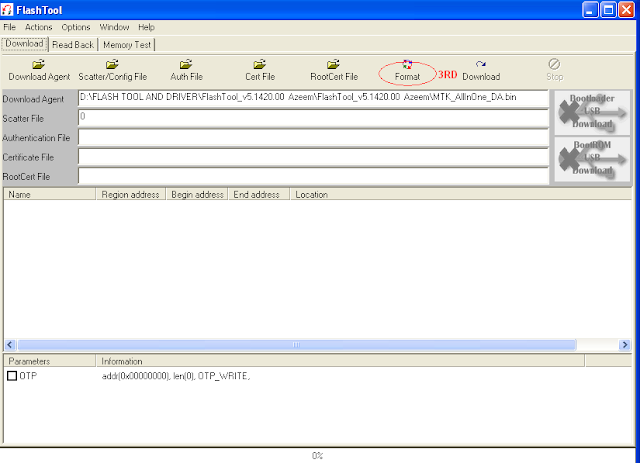
MTK Feature Phone Flash Tool
How To Flash:
- Its a Scatter file you can flash it with Sp Flash Tool or any Flasher Box
- Select “scatter-Loading” and Slect XXXX_cfg File in folder
- Wait file to be added into Flash Tool Or Any Flashing box
- Turn off your phone
- Press “Download” Button to Start in Flash Tool
- And connect your phone with PC via USB data cable.
- The process will start and a red progress bar will appear after color purple, yellow.
- And green circles display
- Finish !
- You can now safely disconnect your phone and turn it on.
- its Done..!
Join Us!


Go to link download
Path Application Has Left the Windows Phone OS
Path Application Has Left the Windows Phone OS
After almost 2 years, application Path perched in Windows Store. now the Path App has been closed on a platform made Microsoft. This information is broadcast by the Path via e-mail to all users.

Through email, Path mention if it will stop the update for Windows Phone app Path began December 31, 2015. This decision was taken Path with a reason to be more focus on developing the application Path in other popular platforms, namely Android and iOS.
very unfortunate indeed, perhaps this was done because users WindowsPhone that compete with its competitors,
The following snippet of the email sent by path

Go to link download
Saturday, September 3, 2016
Upcoming Samsung Flexible Phone
Upcoming Samsung Flexible Phone
The exclusive foldable display device is now moving towards reality. The screen would be 8-9 Inches. The most interesting part is the foldable display. The tablet’s display would be on plastic and there is only one touch layer on the top. Researchers have already built the bending. The quality of image doesn’t decrease at the crevice. No matter how many times you fold, it could be thousand times. Samsung claims that the tablet can be folded two times till the display part becomes much smaller. The two sides could be folded at 180 degrees which make the device very smaller.

Samsung had thoroughly undergone the development inspite of having issues with the panels of flexible tablet. The device would be launched by 2015.The possible applications were seen in handbags carried by women. The folded phone would take only little space. When there is need of larger display then it can be easily unfolded. Coming to the specifications the tablet has excellent specifications: –
Network
The phone has 2G, 3G and the latest 4G network coverage. 4G network would work on LTE 850 and 1800 LTE-A bands
Body
The body weights only 154 grams which is 151.1×79.6×7.9mm (5.95×3.13×0.31in)
Display
The device comes up with SuperFlexible AMOLED Capacitive touchscreen with 16 Million Colors. Pixel size is 1080×1920 pixels
Memory
Can support upto 64 GB micro SD card and has already in built 32GB with 3GB RAM
Data
GPRS, EDGE are already included in every phone today. 3G speed is HSPA+ and 4G has LTE-A. WLAN channel is 802.11a/b/g/n/ac, double band with WiFi Direct, DLNA support and Wifi Hotspot
Wireless and USB
The most latest version of Bluetooth 4.0 is included with AD2DP, EDR, NFC, Infrared and USB v3.0
Camera
The primary camera comes with 13 Megapixel (4128×3096) including autofocus and LED Flash. Dual shot, Geotagging, Simultaneous Image and video recording, Smile and Face detection, Panaroma, HDR and image stabilization are some other features. The video recording is Very high definition that is 2160p@30 Frames per second and the secondary camera comes with 2 Megapixel (1080p @ 30 frames per second). These are some of the exciting new features. The device comes with latest Operating system Android Kitkat 4.4.2. battery backup is excellent as its coming with 2800-MAH Li-On battery. The tablet has a standby time upto 370 Hrs (2G) and upto 330 Hrs (3G). It has talktime upto 16 Hrs and music play upto 74 Hrs.
The design gives a premium look as compared to other Samsung devices. The rear cover is made up of plastic leather. As a result of its unique design users can enjoy round integration experience. The roll effect from which can check date, time, weather, missed call and battery information. The gravity effect is awesome in this phablet. The phone comes up with superb processor the superfast snapdragon latest version.The future of gadgets is really changing. With continuous innovation humans are in need of using these types of latest technologies
Go to link download
Friday, September 2, 2016
MT6575 6577 MT6572 MT6582 6589 MTK Android Based Phone IMEI Write Tool 100 Worked
MT6575 6577 MT6572 MT6582 6589 MTK Android Based Phone IMEI Write Tool 100 Worked
IMEI&SN Writer
100000% Working & Tested With MT6572 & MT6582

Click here to watch video guide - [Click to open]
Click here to download video guide(4shared) - [Click to open]
Click here to download tool - [Click to open]
Download DB File for MT6572, MT6575, MT657 & MT6589
Download from here 4shared folder - DB file
MT6582 DB File Is Here
Warning
Only For Repair Original IMEI
Go to link download
Subscribe to:
Posts (Atom)