Showing posts with label easy. Show all posts
Showing posts with label easy. Show all posts
Saturday, November 12, 2016
How to Root Easy way Samsung SM J110F successfully Root and Unlock 100 Done
How to Root Easy way Samsung SM J110F successfully Root and Unlock 100 Done
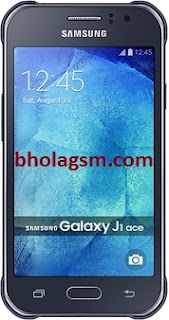
Samsung Galaxy J1 SM-J110F Root file
Successfully Root Samsung SM-J110F for unlock and IMEI repair.Samsung SM-J110F Root File 100% Tested ok
Samsung SM-J110F auto Root File. Successfully Rooted this file when flash by Odin flash tools and selected PDA or AP Button then click start button.
Pre-rooted File
J110FXXU0AOJ3_Pre_Rooted_v4.4.4.zip
- UNLOCK INSTRUCTIONS:
- Phone must be rooted!
- If the software cant root the phone automatically,
- then you must root your device manually.
- 1. Power on the phone.
- 2. Tap 7 times on Build number in Settings-About phone to enable Developer options,
- go to Settings-Developer options and enable USB debugging.
- 3. Connect the phone to PC with USB cable, install drivers if needed.
- 4. Press Unlock button for direct unlock or Read codes to read security codes.
Download
.
Go to link download

Friday, October 28, 2016
How to Root Easy Samsung SM J110G successfully Root and Unlock 100 Done
How to Root Easy Samsung SM J110G successfully Root and Unlock 100 Done
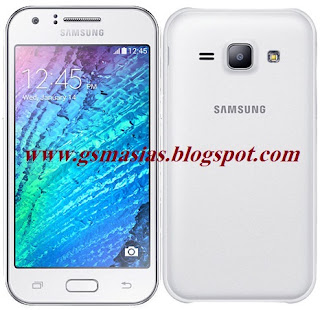
Samsung Galaxy J1 SM-J110G Root file
Successfully Root Samsung SM-J110G for unlock and IMEI repair.Samsung SM-J110G Root File 100% Tested ok
Samsung SM-J110G auto Root File. Successfully Rooted this file when flash by Odin flash tools and selected PDA or AP Button then click start button.
Pre-rooted File
J110GDXU0AOH2_Pre_Rooted_v4.4.4_v4.zip
- UNLOCK INSTRUCTIONS:
- Phone must be rooted!
- If the software cant root the phone automatically,
- then you must root your device manually.
- 1. Power on the phone.
- 2. Tap 7 times on Build number in Settings-About phone to enable Developer options,
- go to Settings-Developer options and enable USB debugging.
- 3. Connect the phone to PC with USB cable, install drivers if needed.
- 4. Press Unlock button for direct unlock or Read codes to read security codes.
Download
.
Go to link download
Tuesday, October 25, 2016
Easy Repair boot samsung s4 i9500 via sd card
Easy Repair boot samsung s4 i9500 via sd card
Hello Friends, Welcome to GSMFirmware.in Here you will get the Easy Repair boot samsung s4 i9500 via sd card Download of Latest file version 2016. We are ready here to provide your desire Android files free Download.

Hot!! Hot!! Easy Repair boot samsung s4 i9500 via sd card!!!
EASY REPAIR BOOT FREE SAMSUNG S4 I9500 VIA SD CARD, 100% TESTED!!
EASY REPAIR BOOT FREE SAMSUNG S4 I9500 VIA SD CARD, 100% TESTED!!
DISABLE SAMSUNG VIA JTAG WORK ON THESE DEVICES WITH A STRONG
PROTECTION AND THAT BY THE TIME IS NEEDED TO BREAK THE SAME TIME.
NEEDED:
1.- Samsung Galaxy S4 GT-i9500 BRICKED O DEAD
2.- MICRO SD CARD 2GB (NOT HC)
3.- JIG O CABLE JIG NEEDED:
1.- Samsung Galaxy S4 GT-i9500 BRICKED O DEAD
2.- MICRO SD CARD 2GB (NOT HC)
4.- USB CABLE
5.- ODIN3 v3.07
6.- FILE REPAIR BOOT S4 I9500 gt-i9500_boot_recovery - Download - 4shared
Boot Recovery process for GT-I9500:
1.- Copying bootloader file to external SD Card, using normal GT-I9500.
2.- Inserting the SD card to ‘No Power’ phone, and copy the bootloader file to the defective PBA.
3.- After downloading bootloader file to the defective phone, enter the download mode with the phone, and download Full S/W.(PIT, PDA, CSC, PHONE files)
4.- Repair Code for Boot Recovery MUST be entered as ‘C3’ on Warranty System (For Europe)
START:
1.- Insert External SD Card to normal phone to copy Bootloader to SD card.
2.- Run Odin3 v3.07.exe
3.- Click ‘Bootloader’ button and load Bootloader file
4.- Enter download mode with the normal phone (SD Card inserted).
? Download Mode : Volume Down key + Home key + Power Key and press Volume Up key
5.- Connect the phone to PC, using USB cable
6.- Click Start button to copy bootloader to the phone
7.- Disconnect the phone from PC
8.- Close the Odin3 v3.07.exe and Run it again
9.- Click ‘Bootloader’ button and load Bootloader file, and check ‘T Flash’ option in the Odin, to copy bootloader to SD Card. After connecting the phone to PC, click Start button to download bootloader to SD card
10.- After downloading, turn off the phone and remove the SD Card
? This SD card will be used to recover boot of the phone.
11.- Disassemble the ‘No Power’ phone. Then insert SD card to the PBA
12.- Connect the PBA with Anyway JIG and power supply, with the POWER OFF.
? Use 11pin cable to supply power to the PBA
13.- Short the ‘TP_NAND_CMD’ to R5103
(HQ uses tweezers to short the resistance)
14.- Turn on the PBA and STOP THE SHORT (remove tweezers) after 3 to 6 seconds from turning on the PBA.
15.- After approximately 5 seconds, you can see message on the LCD boot recovery was succeeded.
16.- Press Volume Down Key to make the phone enter download mode
17.- Download Full S/W including PIT, PDA, CSC and PHONE
If you want to require knowing more about Easy Repair boot samsung s4 i9500 via sd card file Resource or updates. Please ask to us via our contact us form or comment box. Please make sure that, you don’t send Personal information via the Comment box. Thank you for being with us.
Go to link download
Saturday, September 3, 2016
How To HTC Bootloader unlock All Model Easy way 100 Tested ok
How To HTC Bootloader unlock All Model Easy way 100 Tested ok
HTC Boot-loader unlock Easy way
If you have a HTC phone then any cause of need boot-loader unlock. Because without boot-loader unlock you cant amazing support. If need Root or Firmware upgrade of course need Boot-loader unlock. Then easy to use you HTC smart phone.
How To Boot-Loader unlock
Required Resources
Please make sure all items are installed and up to date.
Please make sure all items are installed and up to date.
Google Android SDK zip: http://developer.android.com/sdk/index.html
Java Runtime Environment: http://java.com
HTC Sync (Windows Only): http://www.htc.com/www/help/
Unlocking Bootloader Instructions
Take the following steps to Unlock your Devices Bootloader.
1. Go http://www.htcdev.com/bootloader
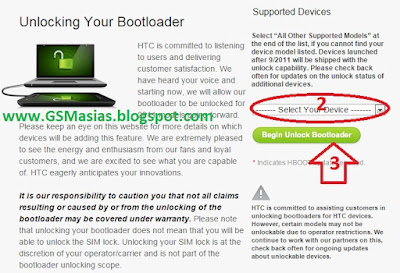
2. Select Your Device / Model and Down scroll and select All Other Supported Models
3. Click Being Unlock and Bootloader
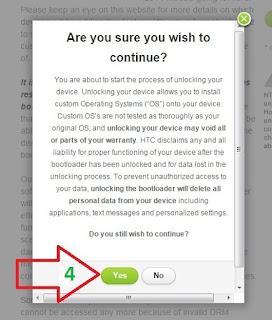
4. Show this Dialogue Box Click YES
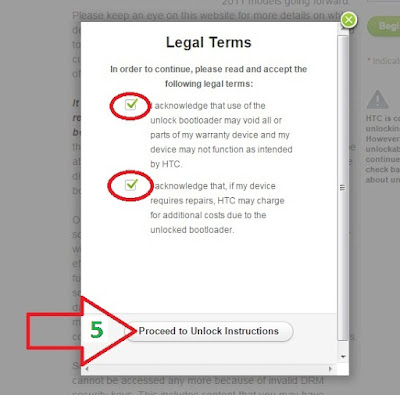
5. Show this Dialogue Box and Tick Red round area and Click Proceed to Unlock Instruction
6. Show this page Follow instruction : Download
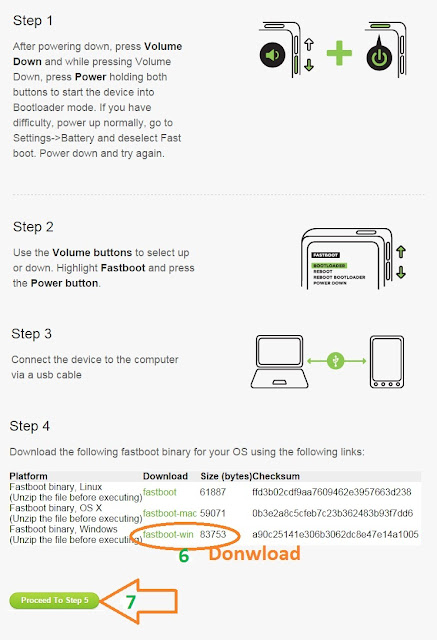
Download
| Platform | Download | Size (bytes) | Checksum |
| Fastboot binary, Linux (Unzip the file before executing) | fastboot | 61887 | ffd3b02cdf9aa7609462e3957663d238 |
| Fastboot binary, OS X (Unzip the file before executing) | fastboot-mac | 59071 | 0b3e2a8c5cfeb7c23b362483b93f7dd6 |
| Fastboot binary, Windows (Unzip the file before executing) | fastboot-win | 83753 | a90c25141e306b3062dc8e47e14a1005 |
Youve been sent an email with your unlock key as a file attachment. Please review this email for further instructions and a link to complete the Bootloader process.
Go to link download
Thursday, September 1, 2016
VERY EASY FLASH TOOL ANDROID ECT MOBILE DOWNLOAD CONTACT ME 01719567848
VERY EASY FLASH TOOL ANDROID ECT MOBILE DOWNLOAD CONTACT ME 01719567848
DOWNLOAD HERE
Go to link download
Subscribe to:
Posts (Atom)