Showing posts with label z10. Show all posts
Showing posts with label z10. Show all posts
Thursday, November 3, 2016
How To Hard Reset BlackBerry Z10
How To Hard Reset BlackBerry Z10
HOW TO HARD RESET BLACKBERRY Z10.
Method to Hard Reset:
Step 1: Remove the battery, and then reinsert it.
Step 2: Press and hold the Power key for 10 seconds.
Step 3: Press and hold the Volume up key and Volume down key at the same time for 10 seconds.
Thats it.
Method 2:
Step 1: Press and hold the Alt key + right Shift key + Backspace/Delete key together.
Now your phone will turn off, and it will start to hard reset.
Go to link download

Saturday, October 22, 2016
Blackberry z10 Hang Block 10 Left Password Red Light ETC Solution
Blackberry z10 Hang Block 10 Left Password Red Light ETC Solution
Hello Friends, Welcome to GSMFirmware.in Here you will get the Blackberry z10 Hang Block 10 Left Password Red Light ETC Solution Download of Latest file version 2016. We are ready here to provide your desire Android files free Download.

Blackberry Z10 Hang Solution
Blackberry Z10 Block Solution
Blackberry Z10 10Left Password Dolution
FAQ}-Blackberry z10 {Hang / Block / 10 Left Password / Red Light } ETC
HI Guys,
I seen in forum always user posting to BB Section about z10 hang on logo , Red light , blocked password Etc problem . So lets me explain here about these problem and solution . Kindly next time before post fellow my solution
Update With BB Link/Autoloader :
You can update your phone with Autoloader Remember you must use your same STL OS (EXAMPLE - STL100-1 ETC). STL version have in your phone back side . So you can download correct OS for your Phone . Also you can update your phone with BB Link Its Online updater , 1st time take long time for Os downloading 2nd time no need long time , Cases you have download already ! Remember Some time unable to detect on BB Link , This case Simple wipe your Phone With CFP ( I already share in below ) Then connect to BB Link !
Hang On Logo / Red light :
1st try to update Autoloader Or BB Link . Remember if you try with Autoloader you must you same STL Version
If after update Still hang on logo , your problem is not solve So just wipe your phone with CFP For Blackberry Z10 By AzimBahar Then Update your phone
Password Block/10 Left :
1st you need use CFP For Blackberry Z10 By AzimBahar . This case connecting is impotent . You may connect too way . 1st run WIPE from CFT tools then connect phone and entry password 10 time. If same, Once again Run WIPE and connect phone without battery and entry password 10 time.
After wipe update your phone thats it
Impotent note :
If after wipe phone not connect to PC , Then connect battery to phone wait few min
These way tested By me 50 more time
If you want to require knowing more about Blackberry z10 Hang Block 10 Left Password Red Light ETC Solution file Resource or updates. Please ask to us via our contact us form or comment box. Please make sure that, you don’t send Personal information via the Comment box. Thank you for being with us.
Go to link download
Wednesday, October 5, 2016
How to Find Bluetooth Received Files on Z10
How to Find Bluetooth Received Files on Z10
Find Bluetooth Received Files on Z10
Due to bluetooth file transfer bug in some Blackberry Z10 devices, after receiving files through bluetooth, these files might not be accessible by merely checking the file manager or downloads folder. Even if you try searching for the file, video or image which youve just received using its name, it wont be included in the search results. Although a notification message is given after each successful file transfer and the files can be viewed immediately using the notification bar, on exiting the file viewer, the location of the file is hidden. Many BB10 users have encountered this problem which is yet to be rectified by the periodical blackberry software updates. But before then, an alternative means of accessing all your received bluetooth files on bb10 is available. Heres how to locate files, images, videos you receive on your BB10 device.Also Read: Resolve 2go Internet Connection Problem On BB10
Browse On PC/Computer From BB10 Using Glo BIS
How to Take A Screenshot With BB10
How to Find Hidden Files on Blackberry10
- From your BB10 device,
- Open Blackberry World
- Search and download Ghost Commander
- After Installation, open the app
- Click on the Folder External SD
- Select the sub folder /downloads
Here, you should see all your received files which you can share, copy, move and perform other operations. On trying to send, move, or copy the files directly in Ghost commander app to blackberry file manager, it might not be possible. To do this,
- Click and hold the file which you want to copy or move.
- In the options displayed, select the operation you want (Here ill use move)
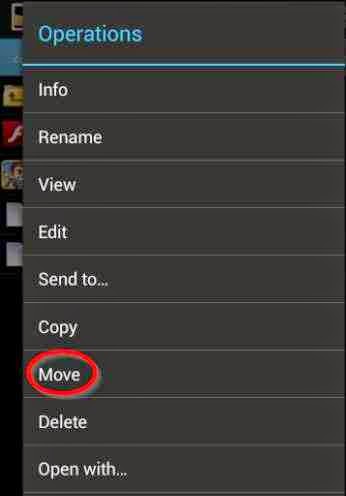
- A space is provided to specify the location where youll like to move the file to.
- Type in /mnt/sdcard/folder
- Then click on OK.
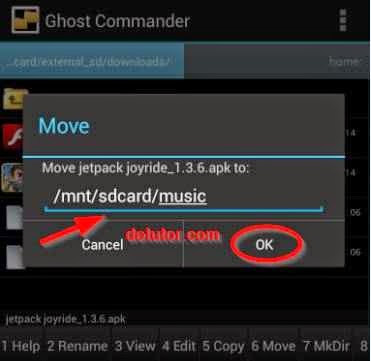
For example, i have a folder in file manager called music, ill type /mnt/sdcard/music. After moving the file to the file manager, you can now share/send it.
Go to link download
Friday, September 16, 2016
Blackberry z10 10 Attempt Left Solution Password block 10 Attempt Solution
Blackberry z10 10 Attempt Left Solution Password block 10 Attempt Solution
Hello Friends, Welcome to GSMFirmware.in Here you will get the Blackberry z10 10 Attempt Left Solution Password block 10 Attempt Solution Download of Latest file version 2016. We are ready here to provide your desire Android files free Download.

Blackberry z10 10 Attempt Left Solution / Password block 10 Attempt :
Read Details - FAQ}-Blackberry z10 {Hang / Block / 10 Left Password / Red Light } ETC Look on the screenshot Its always in 10 Left with Autoloarder , Here show 6 LEFT cases 1st i did try with cfp tools 4 time.
If you want to require knowing more about Blackberry z10 10 Attempt Left Solution Password block 10 Attempt Solution file Resource or updates. Please ask to us via our contact us form or comment box. Please make sure that, you don’t send Personal information via the Comment box. Thank you for being with us.
Go to link download
Subscribe to:
Posts (Atom)