Showing posts with label pad. Show all posts
Showing posts with label pad. Show all posts
Thursday, October 27, 2016
Samsung corby s3653 Touch pad ways Jumper Done Tested 100
Samsung corby s3653 Touch pad ways Jumper Done Tested 100

Samsung corby s3653 Touch ways damage 100% Working
Samsung corby s3653 Touch not working Solution
Samsung corby s3653 Touch ways jumper Solution
Samsung corby s3653 Touch ways print damage Solution 100% Tested
Go to link download

Tuesday, September 20, 2016
How To Unlock Pattern On Xiaomi Mi Pad
How To Unlock Pattern On Xiaomi Mi Pad
How To Unlock Pattern On Xiaomi Mi Pad without any tools.
If you have forgotten you phone password or Pattern or you are unable to turn ON your phone than follow this few steps.
Step 1: Turn off your phone.
Step 2: Make sure that battery fully charge.
Step 3: Press and Hold together Volume down button + Power Button for several seconds.
Step 4: Now, you will see "No command" Press power key to see recovery menu like below image.
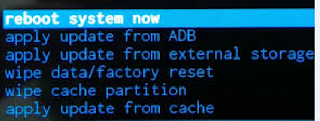
Step 5: Now, Select wipe data/ factory reset using Volume down key and volume up key to confirm.
Step 6: Now, Select Yes Delete All User Data using Volume down key and volume up key to confirm. (warning: your all phone data will be deleted)
Step 7: Now, wait few seconds to complete the process.
Step 8: Select Reboot System Now.
If you have forgotten you phone password or Pattern or you are unable to turn ON your phone than follow this few steps.
Step 1: Turn off your phone.
Step 2: Make sure that battery fully charge.
Step 3: Press and Hold together Volume down button + Power Button for several seconds.
Step 4: Now, you will see "No command" Press power key to see recovery menu like below image.
Step 5: Now, Select wipe data/ factory reset using Volume down key and volume up key to confirm.
Step 6: Now, Select Yes Delete All User Data using Volume down key and volume up key to confirm. (warning: your all phone data will be deleted)
Step 7: Now, wait few seconds to complete the process.
Step 8: Select Reboot System Now.
Go to link download
Saturday, September 17, 2016
How to flash Xiaomi Mi Pad Stock ROM
How to flash Xiaomi Mi Pad Stock ROM
How to flash Xiaomi Mi Pad Stock ROM without using any flash tool.
Step 1: Download Xiaomi Stock ROM on your phone from below link.
Step 2: Open Tools Folder from the Launcher and Select Updater like below image.
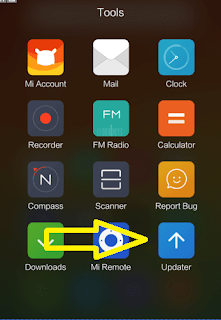
Step 3: Now, click on Menu Key on your Device and Select installation file.
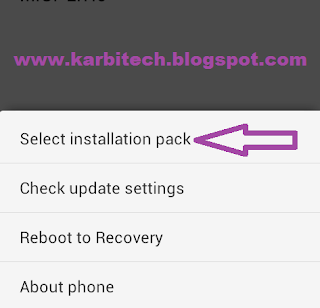
Step 4: Locate the zip file that you have downloaded.
Step 5: Now, click on the update button to begin the update process.

Step 6: Now you will see the update process.

Step 7: Once update process is completed, select reboot to finish.
DOWNLOAD:
Xiaomi Mi Pad Android 4.4 stock ROM
Step 1: Download Xiaomi Stock ROM on your phone from below link.
Step 2: Open Tools Folder from the Launcher and Select Updater like below image.
Step 3: Now, click on Menu Key on your Device and Select installation file.
Step 4: Locate the zip file that you have downloaded.
Step 5: Now, click on the update button to begin the update process.
Step 6: Now you will see the update process.
Step 7: Once update process is completed, select reboot to finish.
DOWNLOAD:
Xiaomi Mi Pad Android 4.4 stock ROM
Go to link download
Subscribe to:
Posts (Atom)