Tuesday, November 15, 2016
Huawei Acsend D1 U9500 1 Firmware Flash File Latest Version Download ok
Huawei Acsend D1 U9500 1 Firmware Flash File Latest Version Download ok
Huawei Ascend D1 U9500-1 V100R001C00B221 Normal Flash File download tested ok
Huawei Ascend D1 U9500-1 V100R001CHNC00B710 China Firmware File download tested ok
Huawei_Ascend_D1_U9500-1_V100R001RUSC10B106_Russia Factory Flash File download tested ok
Huawei_Acsend_D1_U9500-1_V100R001C00B221_Normal Flash Rom download tested ok

Why you Update :
The latest Huawei Acsend D1 U9500-1 flash files has been released free downloading Direst Links for Flash. In any case Huawei Acsend D1 U9500-1 mobile fault stage if slow working. Software break, File missing with the reason of its outdated Firmware or corrupted firmware. You can use latest flash files for flashing or firmware updating. This Mobile for Flashing you can use different tools, boxes or Different Method. If you always slove your mobile phone you will flash with its latest flash files for restore with original settings. So before flashing you will backup of your important data like messages, contacts and images. After Flash successfully completed then restore backup data. You can update your mobile always latest firmware in any time. For Updating or Flashing you can use any tools or box via USB data cable or OTA Flash File Method by SD Card. See Below the latest Firmware..
Huawei Ascend D1 U9500-1 V100R001C00B221 Normal
Download
Huawei Ascend D1 U9500-1 V100R001CHNC00B710 China
Download
Huawei Ascend D1 U9500-1 V100R001CHNC00B130 China
Download
Huawei_Ascend_D1_U9500-1_V100R001RUSC10B106 Russia
Download
How Flash Tools ROM Install :
** Unpack FlashTools, and Click on Flash tool.exe
** Select Scatter Loading then select MTXXXX_Android_scatter_emmc.txt in ROM
** Wait file to be added into Flash Tool Display
** Choose Option->USB Mode, Click USB Mode
= Choose Option->DA Download All->Speed->High Speed, click High Speed
** Turn off your phone, Remove the battery.
** "Press F9 (hit Download button)" OR " if upgrade ROM Firmware->Upgrade "
** and connect your phone into the computer via USB data cable.
** The process will start and a red progress bar will appear after color purple, yellow.
** And green circles display
** Finish !
How to OTA update :
1.Off course sure that Your Device Battery is Charged about 70-80%.
2.Format SD Card (Optional).
3.Backup Your Important All Data.
Installation:
1.Extract zip Content and place the Folder on the root directory of SD Card
2.Power off the Device
3.Insert the SD card and Power on the Device by pressing VOLUME UP AND VOLUME DOWN keys simultaneously.
4.Wait for Installation Process to Complete (Do not turn off the Device during the installation process).
You can now safely open your phone or turn it on
Go to link download

How To Unlock Pattern On Xiaomi mi 3
How To Unlock Pattern On Xiaomi mi 3
How To Unlock Pattern On Xiaomi mi 3 without any tools.
If you have forgotten you phone password or Pattern or you are unable to turn ON your phone than follow this few steps.
Step 1: Turn off your phone.
Step 2: Make sure that battery fully charge.
Step 3: Press and Hold together Volume up button + Power Button for several seconds to go to recovery mode.
Step 4: Now, Select ENGLISH using Volume down key and power key to confirm.
Step 5: Now, Select WIPE AND RESET.

Step 6: Now, Select WIPE ALL DATA. (warning: your all phone data will be deleted)
Step 7: Now, wait few seconds to complete the process.
Step 8: Select Reboot System Now.
If you have forgotten you phone password or Pattern or you are unable to turn ON your phone than follow this few steps.
Step 1: Turn off your phone.
Step 2: Make sure that battery fully charge.
Step 3: Press and Hold together Volume up button + Power Button for several seconds to go to recovery mode.
Step 4: Now, Select ENGLISH using Volume down key and power key to confirm.
Step 5: Now, Select WIPE AND RESET.
Step 6: Now, Select WIPE ALL DATA. (warning: your all phone data will be deleted)
Step 7: Now, wait few seconds to complete the process.
Step 8: Select Reboot System Now.
Go to link download
How to flash Nokia Asha 206 with hwk box repair tool By USB Cable
How to flash Nokia Asha 206 with hwk box repair tool By USB Cable
How to flash nokia 206 phone using usb cable.This is very easy ways to flash nokia 206. Just flash step by step following this solution.

How to do this: first connect usb cable following picture then open hwk nokia program then click bb5 tab and select model and set firmware.then click check.(note : when you click check then connect battery ) then you will be see checking info.then click flash (note : when you click flash then connect battery ) after that your phones will be start flash.
Go to link download
How to flash Xiaomi Mi 4i Stock ROM
How to flash Xiaomi Mi 4i Stock ROM
How to flash Xiaomi Mi 4i Stock ROM without using any flash tool.
Step 1: Download Xiaomi Stock ROM on your phone from below link.
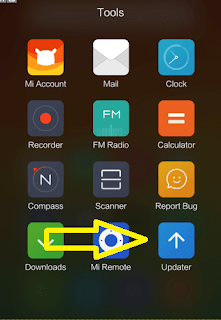
Step 2: Open Tools Folder from the Launcher and Select Updater like below image.
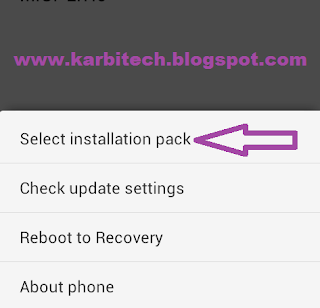
Step 3: Now, click on Menu Key on your Device and Select installation file.
Step 4: Locate the zip file that you have downloaded.
Step 5: Now, click on the update button to begin the update process.

Step 6: Now you will see the update process.

Step 7: Once update process is completed, select reboot to finish.
DOWNLOAD:
Xiaomi Mi 1s Android 5.0 stock ROM
Step 1: Download Xiaomi Stock ROM on your phone from below link.
Step 2: Open Tools Folder from the Launcher and Select Updater like below image.
Step 3: Now, click on Menu Key on your Device and Select installation file.
Step 4: Locate the zip file that you have downloaded.
Step 5: Now, click on the update button to begin the update process.
Step 6: Now you will see the update process.
Step 7: Once update process is completed, select reboot to finish.
DOWNLOAD:
Xiaomi Mi 1s Android 5.0 stock ROM
Go to link download
Subscribe to:
Posts (Atom)