Showing posts with label 45. Show all posts
Showing posts with label 45. Show all posts
Tuesday, November 8, 2016
Download Mobile Partner 23 002 08 03 45 Indian Version
Download Mobile Partner 23 002 08 03 45 Indian Version
Developed in 2012 by the company Huawei, Mobile Partner 23.002.08.03.45 is a connection software used to connect to the Internet with USB modems Huawei. This version also supports models Huawei E5 and HiLink called Mobile or Pocket WiFi Hotspot.

Mobile Partner 23.002.08.03.45 allows users to easily create a WiFi network provided you have a computer with an internal or external WiFi card you can change the appearance of the connection software.
After you download and install Mobile Partner 23.002.08.03.45 in your computer, you need to create a new APN profile. Without this configuration, it is impossible to use Mobile Partner to access the Internet.
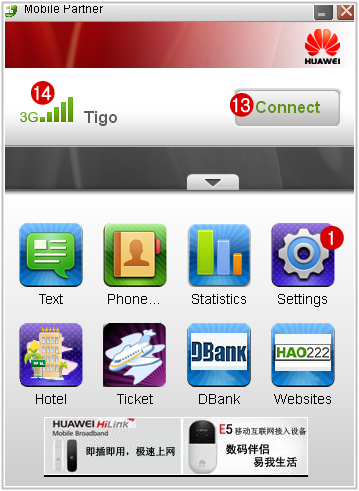
Run Mobile Partner 23.002.08.03.45 to access the interface of the connection software then click: « Settings » (1) ? « Options » (2).

Click « Profile Management » (3) ? « New » (4) ? enter the name of your operator in « Profile Name » (5).
APN (Access Point Name) is a protocol that allows communication between your modem and the network of your operator. Enter the name of the network access point in « APN » (6). The options for authentication vary for each operator, enter Access number (7): *99****1# or *99#.
« Username » (8) and « Password » (9) can be filled or not, click « Save » (10) ? « Default » (11) ? « OK » (12) to return to the interface of the Mobile Partner dashboard.

Click Connect (13) to establish the connection. The type of signal (14) varies depending on network coverage, you should check that « WCDMA Only » is selected in network settings to use the 3G service.
Go to link download

Sunday, September 18, 2016
Symphony FT 45 Official Firmware 100 ok
Symphony FT 45 Official Firmware 100 ok
Symphony FT-45 Official Firmware 100 %ok

VER - FT45_204_120830

skhasan2005@yahoo.com
Go to link download
Tuesday, August 16, 2016
Symphony FT 45 Call After Light Off Problem Solve By Gsm Sk Hasan
Symphony FT 45 Call After Light Off Problem Solve By Gsm Sk Hasan
Symphony FT 45 Call After Light Off Problem Solve
 Just Rmove Sensor Problem 100% slove
Go to link download
Subscribe to:
Posts (Atom)